iPhone vs Android QR Scanning: Why the Same QR Sometimes Works on One Phone but Not the Otherمسح QR على آيفون مقابل أندرويد: لماذا يعمل نفس الرمز على هاتف ولا يعمل على آخر
Every designer's nightmare: the QR scans cleanly on the designer's iPhone, the print run ships, and two weeks later the customer-support inbox fills up with 'I can't scan it' messages — almost all from Android users. The QR is not broken. The decoding pipeline is asymmetric. iPhone's ML decoder is permissive; Android's is stricter (and fragmented across vendors). For MENA businesses where Android is ~70% of the install base, designing for iPhone-only testing is leaving most of the market unscannable. This is the full technical explainer: where in the pipeline the asymmetry lives, why error-correction H and a 4-module quiet zone are non-negotiable, the mid-range Android test rule, and the eight design moves that make QRs work on every phone.كابوس كلّ مصمّم: الرمز يُمسح بسهولة على آيفون المصمّم، تخرج الطبعة إلى الميدان، وبعد أسبوعين يمتلئ صندوق دعم العملاء برسائل «لا أستطيع مسحه» — جميعها تقريباً من مستخدمي أندرويد. الرمز ليس معطوباً. مسار فكّ التشفير غير متناظر. فاكّ تشفير آيفون متساهل؛ فاكّ تشفير أندرويد أكثر صرامة (ومجزَّأ بين الشركات المصنّعة). لشركات الشرق الأوسط حيث يشكّل أندرويد نحو ٧٠٪ من قاعدة التركيب، التصميم على اختبار آيفون فقط يترك معظم السوق غير قادر على المسح. هذا هو الشرح التقني الكامل: أين يعيش عدم التناسق في المسار، لماذا يُعدّ تصحيح الأخطاء H والمنطقة الصامتة بعرض ٤ وحدات غير قابلَين للتفاوض، قاعدة اختبار أندرويد المتوسّط، والحركات الثماني للتصميم التي تجعل الرموز تعمل على كلّ هاتف.
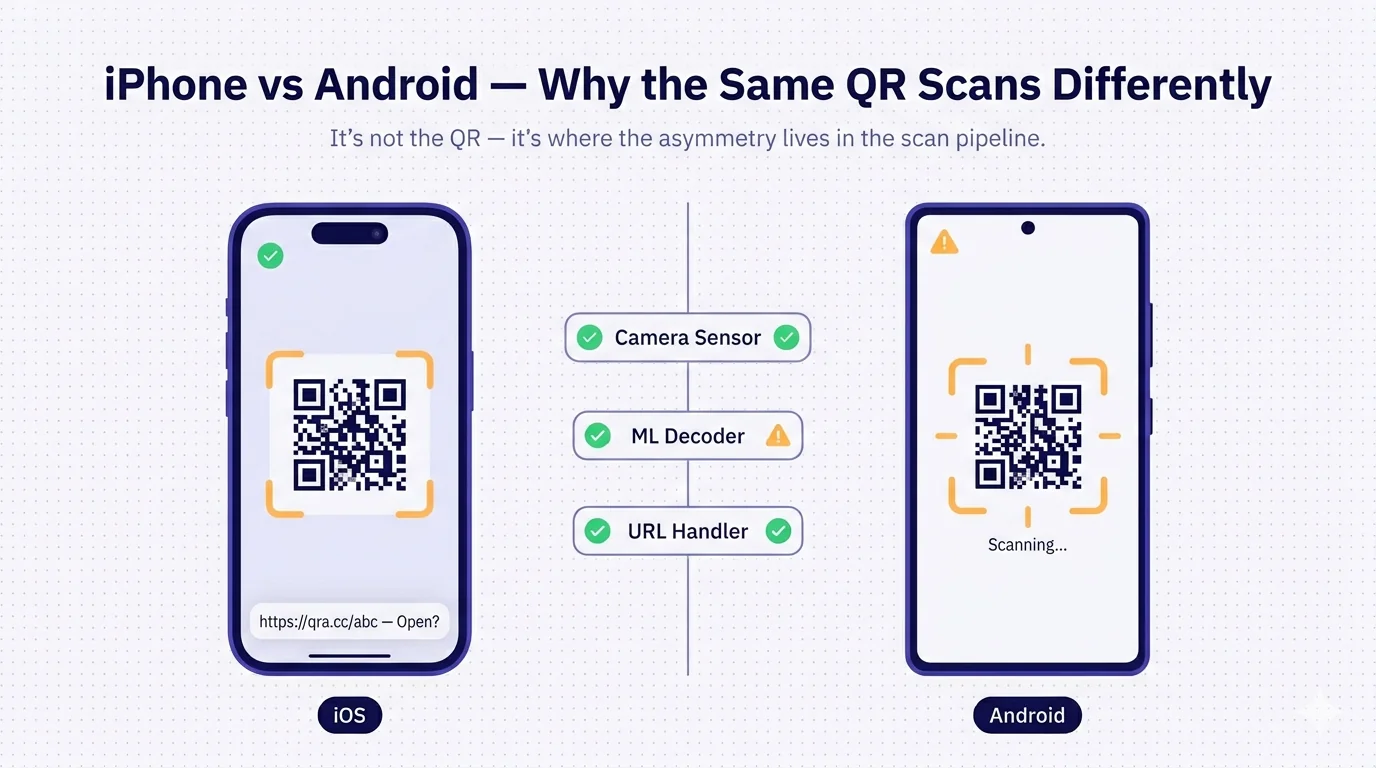
Every designer who has shipped QR code work has had this conversation. The QR was designed in Illustrator, exported to the print file, the designer scanned the printed proof with their iPhone, it worked perfectly, the print run shipped, and two weeks later the customer-support inbox is full of 'I can't scan it' complaints. The designer scans it again on their iPhone — works first try. They escalate to engineering, who scan it on their iPhones — works first try. Then someone grabs a mid-range Samsung from the office Android-test rack, points it at the QR, and the camera hesitates, the viewfinder brackets dance, sometimes it works after three seconds, sometimes it just gives up. The customer support inbox is correct. The QR is not broken. But it's not 'working' either. It's asymmetric — and almost everyone designing QRs in 2026 still doesn't fully understand why.
This piece is the technical explainer of why the same QR sometimes works on iPhone but not Android, where in the scanning pipeline the asymmetry actually lives, what design moves immunise QRs against the asymmetry, and — critically for MENA businesses where Android is the majority install base — why testing only on iPhone is one of the most expensive shortcuts in the trade. The framing matters: this is not 'Android is bad' or 'iPhone is the gold standard'. Both platforms decode QRs correctly when the QR follows spec. The asymmetry surfaces specifically when the QR pushes the limits of the spec — and most printed QRs in the wild are pushing some limit somewhere.
The scanning pipeline: four stages, two of them asymmetric
When you point a phone's camera at a QR code, the phone runs four distinct processing stages, in order. Understanding where iPhone and Android diverge requires breaking the process into its actual components.
- Stage 1 — Camera sensor. The hardware that captures the image. Modern iPhone and modern Android phones use comparable sensor technology; this stage is largely symmetric. Both platforms can capture a clear image of a QR under typical lighting.
- Stage 2 — QR detector. The image-processing step that locates QR codes within the captured frame — finding the three position-detection patterns (the corner squares), establishing the orientation, identifying the bounding box. Modern phones use ML models for this stage; iPhone uses Apple's VisionKit framework, Android uses Google's ML Kit or vendor-specific implementations (Samsung Bixby Vision, Xiaomi MIUI scanner, Huawei HiVision, Oppo's built-in scanner). This is where the FIRST asymmetry lives.
- Stage 3 — QR decoder. Once located, the dot pattern is decoded into the original bitstream — reading every module as black or white, applying Reed-Solomon error correction, recovering the encoded data. Reference decoders are largely symmetric, but the boundary tolerances (how much damage, how much partial coverage, how much off-axis distortion the decoder will accept before giving up) differ significantly. iPhone is permissive; Android is stricter, with substantial variance across vendor implementations. This is where the SECOND, larger asymmetry lives.
- Stage 4 — URL handler. Once decoded, the URL is shown to the user, who taps to open it. The browser opens. Both platforms behave similarly here — both show a preview, both prompt before opening, both handle the URL with browser-level safety. Largely symmetric.
Stage 1 and Stage 4 are symmetric. Stage 2 (detector) is mildly asymmetric. Stage 3 (decoder tolerance) is significantly asymmetric. The same QR that comfortably falls within iPhone's tolerance bands can be just outside Android's tolerance bands — and the user-facing result is 'iPhone works, Android doesn't'.
Why iPhone is more permissive
iOS's VisionKit, the framework underlying the Camera app's QR detection, is tuned aggressively toward 'guess correctly when uncertain'. Apple controls the entire hardware-software stack, including the Neural Engine ML processor on every modern iPhone, so they can deploy heavier ML models at the QR-detection stage than is feasible across the Android fleet. The practical consequences for QR scanning:
- Smaller quiet zones are tolerated. The QR spec calls for a 4-module quiet zone (4 modules of white space around the QR's outer edge). iPhone's decoder routinely succeeds with 2-module or even 1-module quiet zones.
- Lower-contrast QR colours work. A QR printed in dark indigo on a slightly-off-white background that an Android decoder might struggle with often scans cleanly on iPhone.
- Larger logo overlays survive. iPhone's decoder will recover the QR's data with logo coverage up to 30%+, beyond the spec-recommended limit. Android decoders typically fail above 22-25% coverage.
- Off-axis scans succeed. iPhone tolerates the QR being scanned at a 45-degree-or-greater angle to the camera; Android decoders are stricter, typically requiring the camera to be closer to perpendicular.
- Dim and bright lighting both work better. iPhone's image-processing pipeline normalises exposure and contrast aggressively before passing to the decoder; Android pipelines vary by vendor.
The net effect: a designer testing on iPhone is testing inside a permissive boundary that hides defects which would be caught on a stricter decoder. The QR that 'works on my iPhone' may be only marginally inside iOS's tolerance and well outside Android's.
Why Android is stricter (and fragmented)
Android's QR scanning is harder to describe as a single thing because Android isn't a single thing. There are three layers.
First, the default Camera app on stock Android (Pixel phones) uses Google's ML Kit for QR detection. ML Kit is good — comparable in many cases to iPhone — but its decoder tolerances are calibrated more conservatively. It prefers to fail rather than potentially decode the wrong URL.
Second, every major Android vendor has their OWN camera app, often replacing the default — Samsung's Camera app, Xiaomi's MIUI Camera, Huawei's Camera, Oppo's Camera, Vivo's Camera. Each vendor has its own QR-detection pipeline, with its own tolerances. Some are excellent (Samsung's recent Galaxy S-series cameras), some are mediocre (budget Xiaomi running 2-3-year-old vendor software), some are inconsistent (older Huawei devices running EMUI from before the Google Mobile Services split). The 'Android camera' that scans your QR varies enormously across the device fleet.
Third, third-party QR scanner apps are common on Android in a way they aren't on iPhone (because iOS's built-in scanner is good enough that most users don't install an alternative). On Android, many users have a third-party 'QR Code Scanner' app installed — often loaded with ads, sometimes with their own decoder that's worse than the OS default, sometimes with security concerns about what the scanner does with the URLs. The third-party scanner ecosystem on Android is a layer of decoder variance the QR designer has no control over.
The net effect: 'works on Android' is not a single statement. It depends on which Android phone, which version, which camera app, and whether the user is using a third-party scanner. Testing on 'an Android' isn't enough. Designers need to test on a representative spread of Android devices to know whether the QR works at population scale.
Why this matters more in MENA than in the West
Global smartphone market share, 2026: roughly 25% iOS, 75% Android. But the regional distribution varies sharply.
MENA Android share is among the highest in the world. Saudi Arabia: ~75% Android (Samsung, Huawei, Xiaomi, Oppo, Vivo combined dominate). UAE: ~65% Android. Egypt: ~85% Android. Morocco: ~85% Android. Kuwait and Qatar are more iOS-heavy at ~55% Android but still majority. Across the region as a whole, you can assume 70-80% of QR-scanning customers are on Android — the inverse of, say, the US (where iOS is ~58% of the market) or Japan (~70% iOS).
The practical consequence: a business designing a QR campaign for MENA that tests only on the designer's iPhone is testing against the minority of the target audience. The Android failures are the majority experience. The customer-support inbox volume of 'can't scan' messages will be 3-4x what a US-based brand running the same QR would see, because the user mix is inverted. This is not a small effect — it's the difference between a campaign that converts and one that quietly under-performs because most users couldn't get past the QR scan.
The mid-range Android test rule
If a designer wants to test ONE Android phone to catch most of the decoder-asymmetry failures, the rule is: test on a mid-range Android — not the latest flagship. A Samsung Galaxy A-series (A24, A34, A54) from the past two years, or a Xiaomi Redmi Note, or a Huawei Nova, or an Oppo Reno. These phones run software that's representative of what's actually in users' hands in MENA — not the flagship's superior ML decoder that's much closer to iPhone in tolerance.
The reason: flagship Android phones (Samsung Galaxy S25, Pixel 9 Pro, Xiaomi 14, Huawei Mate 60) have ML decoders that approach iPhone's permissiveness because they run on more capable processors with bigger ML models. They're not representative of the average user. The user with the Samsung Galaxy A24 in their hand at a parking meter, scanning your QR with the Samsung Camera app from a 2-year-old MIUI/OneUI version, is the customer you're losing if your QR is only inside iPhone's tolerance band.
For full test coverage: iPhone (latest), mid-range Samsung, mid-range Xiaomi/Huawei/Oppo. Three devices, ten minutes of testing. The QR that scans cleanly on all three is robust enough to ship; the QR that scans on iPhone alone is not yet ready for deployment.
Eight design moves that immunise QRs against the asymmetry
- Always use error-correction level H. The H level adds ~30% redundancy to the encoded bitstream, which means even when Android's stricter decoder treats some modules as 'damaged' (where iPhone would have just decoded them), there's enough redundant data elsewhere in the QR for full recovery. Cost: the QR is slightly larger. Benefit: massively wider scan reliability. The detail in our error-correction levels guide applies directly.
- Always include a full 4-module quiet zone. White space around the QR's outer edge, equal to 4 modules' width. iPhone tolerates less; Android often won't. Designing in 2 modules to save space is the most common silent failure mode for MENA-printed QRs.
- Maximise contrast. Black QR on pure-white background is the safest. Coloured QRs work but require the dark colour to be very dark (Y luminance under 0.3) and the light background to be very light (Y luminance over 0.85). Designer-tasteful dark-indigo on warm-off-white can fall just inside iPhone's contrast tolerance and outside Android's.
- Keep logo coverage under 20% of QR width. Spec-compliant maximum is ~25% with level H, but Android's stricter decoder needs more headroom. 20% is the safe threshold across all phones. The detail in our custom-logo QR guide expands this.
- Maintain a safe-zone cutout around the logo. The QR pattern should be removed (not just covered) under the logo, leaving clean white space behind it. Boundary modules half-covered by a logo are exactly where Android's decoder struggles.
- Print at the right size. Minimum 2.5 cm side for hand-held materials; 8 cm minimum for distance scanning. Smaller QRs at any contrast push Android decoders past their tolerance. The detail in our print-size guide applies.
- Use a vector format for the print file (SVG or EPS) — not a rasterised PNG. Vector geometry stays sharp at any print size; raster pixels at small sizes lose contrast at the module boundaries, which is exactly where Android decoders fail. The detail in our export-format guide applies.
- Test the printed final on three phones before committing to the run — iPhone, mid-range Samsung, mid-range Xiaomi/Huawei/Oppo. Not the digital preview, not a desk-side iPhone scan of the unprinted PDF — the actual ink-on-paper output at production print quality, on at least one phone from each decoder family.
The dual-test pre-print checklist
Concrete checklist to run before any QR is committed to a printed campaign:
- Generate the QR at error-correction level H (not the default M).
- Maintain 4-module quiet zone in the final composition (designer cannot shrink it).
- If a logo is embedded, verify ≤20% width coverage with safe-zone cutout in the file.
- Export as SVG or EPS for the print designer (not PNG).
- Print one proof at the exact final size on the exact final material.
- Test the printed proof from 25-30 cm distance under typical scanning lighting (indoor office light, not the designer's bright desk lamp).
- Scan with: latest iPhone, mid-range Samsung (Galaxy A-series within 2 years), mid-range Xiaomi or Huawei or Oppo.
- All three should detect the QR within 1-2 seconds and decode the URL correctly. If any one of the three struggles, fix the QR before the print run.
How QRA handles the asymmetry
QRA's QR generator enforces error-correction H as the default when a logo is present (not the optional choice that designers might miss), preserves a full 4-module quiet zone in every exported QR, exports vector SVG and EPS files by default for print workflows, and includes scan-reliability hints in the preview that flag size, contrast, or logo-coverage issues before the QR is committed to a campaign. The platform's scan analytics surface per-OS and per-device-family scan-success rates — so if a deployed QR is converting fine on iOS but seeing drop-offs on Android, the data is visible in the dashboard rather than buried in customer-support emails. For high-stakes campaigns, the platform's bulk-create + bulk-test workflow lets a designer generate a campaign of fifty QRs and verify all of them against a multi-decoder test suite before committing.
The short answer
The QR is not broken. iPhone and Android decode QRs through different ML pipelines with different tolerances — iPhone permissive, Android stricter and fragmented across vendors. The asymmetry surfaces at the limits of the spec: tight quiet zones, marginal contrast, oversized logos, very small QRs, off-axis scans. The fixes are not exotic — error-correction H, 4-module quiet zone, ≤20% logo coverage with safe-zone cutout, vector export, proper print size — they're spec-compliant defaults that most designers ignore because their iPhone test was indulgent. In MENA, where Android is 70-80% of the install base, designing to iPhone-only testing is leaving most of the market unscannable. Test on iPhone, a mid-range Samsung, and a mid-range Xiaomi or Huawei or Oppo. All three should pass cleanly. The technology is not the problem; the discipline of designing inside the stricter decoder's tolerance is.
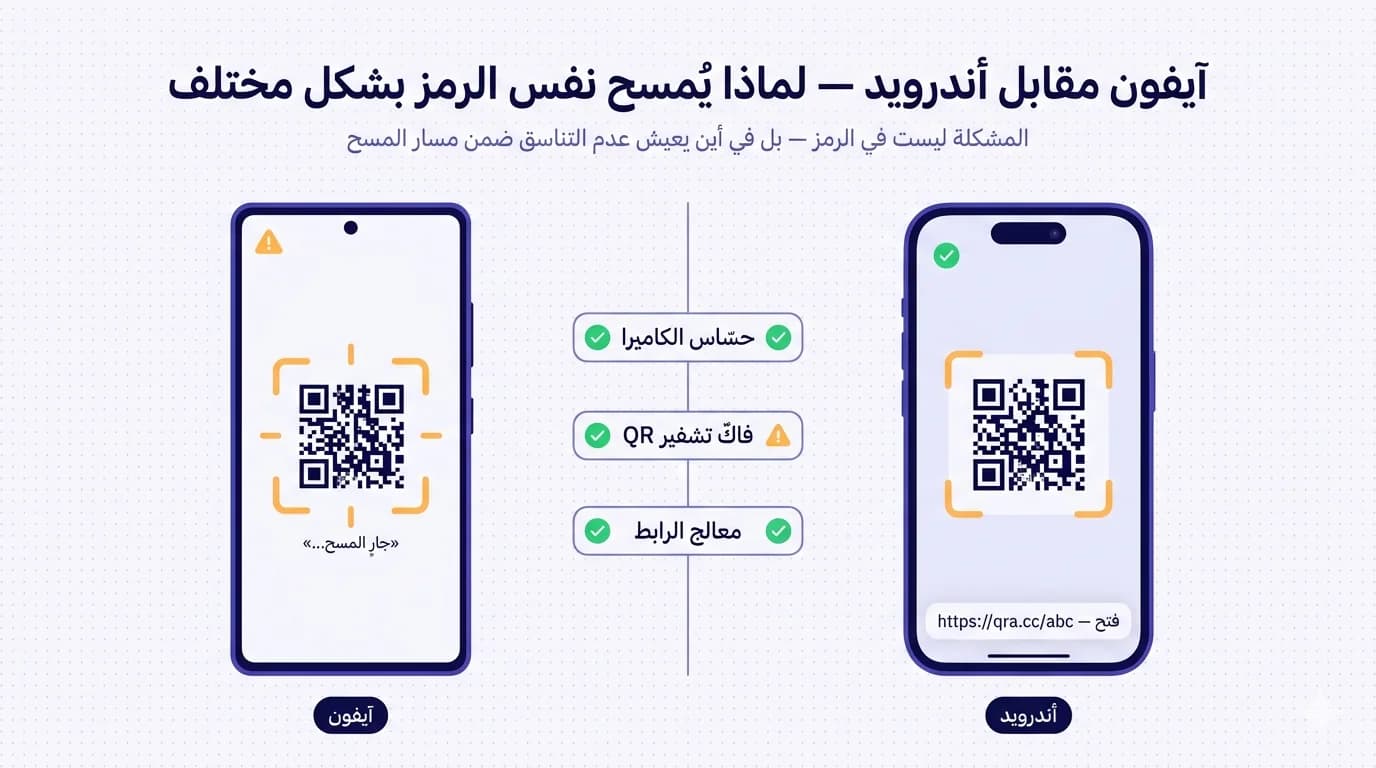
كلّ مصمّم شحن عملاً يتضمّن رموز QR مرّ بهذه المحادثة. الرمز صُمّم في إلستريتور، صُدّر إلى ملفّ الطباعة، المصمّم مسح النموذج المطبوع بآيفونه، عمل من المحاولة الأولى، الطبعة شُحنت، وبعد أسبوعين يمتلئ صندوق دعم العملاء بشكاوى «لا أستطيع مسحه». المصمّم يمسحه مجدّداً على آيفونه — يعمل من المحاولة الأولى. يصعّد للهندسة، يمسحونه على آيفوناتهم — يعمل من المحاولة الأولى. ثمّ يلتقط أحدهم سامسونغ متوسّط الفئة من رفّ اختبار أندرويد في المكتب، يوجّهه إلى الرمز، الكاميرا تتردّد، مستطيلات الماسح ترقص، أحياناً يعمل بعد ثلاث ثوان، أحياناً يستسلم تماماً. صندوق دعم العملاء صادق. الرمز ليس معطوباً. لكنّه أيضاً ليس «يعمل». إنّه غير متناظر — وحتّى عام ٢٠٢٦ ما زال معظم مصمّمي رموز QR لا يفهمون لماذا تماماً.
هذا المقال هو الشرح التقني لسبب عمل نفس الرمز أحياناً على آيفون لا على أندرويد، وأين يعيش عدم التناسق فعلاً ضمن مسار المسح، وما الحركات التصميميّة التي تحصّن الرمز ضدّ عدم التناسق، و — وهو حاسم لشركات الشرق الأوسط حيث أندرويد هو قاعدة التركيب الأغلبيّة — لماذا الاختبار على آيفون فقط هو أحد أغلى الاختصارات في المهنة. الإطار مهمّ: هذا ليس «أندرويد سيّئ» أو «آيفون المعيار الذهبي». كلتا المنصّتين تفكّان تشفير QR بشكل صحيح حين يتّبع الرمز المواصفات. عدم التناسق يظهر تحديداً حين يدفع الرمز إلى حدود المواصفات — ومعظم رموز QR المطبوعة في الميدان تدفع حدّاً ما في مكان ما.
مسار المسح: أربع مراحل، اثنتان منها غير متناظرتين
حين توجّه كاميرا الهاتف إلى رمز QR، يشغّل الهاتف أربع مراحل معالجة متمايزة، بالترتيب. فهم أين يتباعد آيفون وأندرويد يتطلّب تفكيك العمليّة إلى مكوّناتها الفعليّة.
- المرحلة ١ — حسّاس الكاميرا. العتاد الذي يلتقط الصورة. آيفون الحديث وهواتف أندرويد الحديثة تستخدم تقنيّة حسّاسات قابلة للمقارنة؛ هذه المرحلة متناظرة إلى حدّ كبير. كلتا المنصّتين تستطيعان التقاط صورة واضحة لرمز QR تحت الإضاءة الاعتياديّة.
- المرحلة ٢ — كاشف QR. خطوة معالجة الصورة التي تحدّد موقع رموز QR ضمن الإطار الملتقط — إيجاد أنماط الكشف الثلاثة (المربّعات الزاويّة)، تحديد الاتّجاه، تعيين مربّع الإحاطة. الهواتف الحديثة تستخدم نماذج ML لهذه المرحلة؛ آيفون يستخدم إطار عمل VisionKit من آبل، أندرويد يستخدم ML Kit من غوغل أو تطبيقات خاصّة بالشركة المصنّعة (Bixby Vision من سامسونغ، ماسح MIUI من شاومي، HiVision من هواوي، الماسح المدمج من Oppo). هنا يعيش عدم التناسق الأوّل.
- المرحلة ٣ — فاكّ تشفير QR. بعد تحديد الموقع، يُفكّ تشفير نمط النقاط إلى البتّات الأصليّة — قراءة كلّ وحدة كأسود أو أبيض، تطبيق تصحيح أخطاء Reed-Solomon، استرداد البيانات المُشفَّرة. فاكّو التشفير المرجعيّون متناظرون إلى حدّ كبير، لكنّ حدود التسامح (كم من التلف، كم من التغطية الجزئيّة، كم من الانحراف عن المحور، سيقبل فاكّ التشفير قبل أن يستسلم) تختلف بشكل ملحوظ. آيفون متساهل؛ أندرويد أصرم، مع تباين كبير بين تطبيقات الشركات المصنّعة. هنا يعيش عدم التناسق الثاني، وهو الأكبر.
- المرحلة ٤ — معالج الرابط. بعد فكّ التشفير، يُعرَض الرابط للمستخدم، الذي ينقر لفتحه. المتصفّح يفتح. كلتا المنصّتين تتصرّفان بشكل مماثل هنا — كلاهما يعرضان معاينة، كلاهما يطالبان قبل الفتح، كلاهما يتعاملان مع الرابط بأمان على مستوى المتصفّح. متناظرتان إلى حدّ كبير.
المرحلة ١ والمرحلة ٤ متناظرتان. المرحلة ٢ (الكاشف) غير متناظرة بشكل خفيف. المرحلة ٣ (تسامح فاكّ التشفير) غير متناظرة بشكل كبير. نفس الرمز الذي يقع بثبات داخل نطاقات تسامح آيفون يمكن أن يكون خارج نطاقات تسامح أندرويد بقليل — والنتيجة التي يراها المستخدم هي «آيفون يعمل، أندرويد لا يعمل».
لماذا آيفون أكثر تساهلاً
إطار عمل VisionKit في iOS، الكامن وراء كشف QR في تطبيق الكاميرا، مضبوط بقوّة نحو «خمّن بشكل صحيح عند عدم اليقين». آبل تسيطر على المكدّس الكامل للعتاد والبرمجيّات، بما في ذلك معالج ML المسمّى Neural Engine في كلّ آيفون حديث، لذا تستطيع نشر نماذج ML أثقل في مرحلة كشف QR ممّا هو مجدٍ عبر أسطول أندرويد. العواقب العمليّة لمسح QR:
- مناطق صامتة أصغر مقبولة. مواصفات QR تطلب منطقة صامتة بعرض ٤ وحدات (٤ وحدات من المساحة البيضاء حول الحافّة الخارجيّة للرمز). فاكّ تشفير آيفون ينجح روتينيّاً مع مناطق صامتة بعرض ٢ وحدتين أو حتّى ١ وحدة.
- ألوان QR منخفضة التباين تعمل. رمز مطبوع بالنيلي الغامق على خلفيّة بيضاء قليلاً خارج البياض قد يصارع فاكّ تشفير أندرويد، غالباً ما يُمسح بسلاسة على آيفون.
- أغطية الشعارات الأكبر تنجو. فاكّ تشفير آيفون يسترجع بيانات الرمز مع تغطية شعار تصل إلى ٣٠٪+، أبعد من الحدّ الموصى به في المواصفات. فاكّو تشفير أندرويد يفشلون عادةً فوق ٢٢-٢٥٪ تغطية.
- المسحات خارج المحور تنجح. آيفون يتسامح مع مسح الرمز بزاوية ٤٥ درجة أو أكثر مع الكاميرا؛ فاكّو تشفير أندرويد أصرم، يتطلّبون عادةً أن تكون الكاميرا أقرب إلى العمود.
- الإضاءة الخافتة والساطعة كلتاهما تعملان أفضل. مسار معالجة صور آيفون يطبّع التعرّض والتباين بقوّة قبل التمرير إلى فاكّ التشفير؛ مسارات أندرويد تتفاوت بحسب الشركة المصنّعة.
التأثير الصافي: مصمّم يختبر على آيفون يختبر داخل حدّ متساهل يخفي العيوب التي ستُلتقَط على فاكّ تشفير أصرم. الرمز الذي «يعمل على آيفوني» قد يكون فقط بالكاد داخل تسامح iOS وخارج تسامح أندرويد بشكل واضح.
لماذا أندرويد أصرم (ومجزَّأ)
مسح QR في أندرويد أصعب في وصفه كشيء واحد لأنّ أندرويد ليس شيئاً واحداً. هناك ثلاث طبقات.
أوّلاً، تطبيق الكاميرا الافتراضي على أندرويد الأصلي (هواتف Pixel) يستخدم ML Kit من غوغل لكشف QR. ML Kit جيّد — قابل للمقارنة في حالات كثيرة مع آيفون — لكنّ تسامحات فاكّ التشفير معايَرة بشكل أكثر تحفّظاً. يفضّل الفشل على فكّ تشفير الرابط الخطأ احتمالاً.
ثانياً، كلّ شركة أندرويد كبرى لديها تطبيق كاميرا خاصّ بها، غالباً يحلّ مكان الافتراضي — كاميرا سامسونغ، كاميرا MIUI من شاومي، كاميرا هواوي، كاميرا Oppo، كاميرا Vivo. كلّ شركة لها مسار كشف QR خاصّ بها، بتسامحاتها الخاصّة. بعضها ممتاز (كاميرات سلسلة Galaxy S الحديثة من سامسونغ)، بعضها متوسّط (شاومي اقتصادي يشغّل برمجيّات شركة عمرها ٢-٣ سنوات)، بعضها غير متّسق (هواوي القديم الذي يشغّل EMUI ما قبل انقسام خدمات غوغل للجوّال). «كاميرا أندرويد» التي تمسح رمزك تتفاوت بشكل هائل عبر أسطول الأجهزة.
ثالثاً، تطبيقات ماسح QR من جهات خارجيّة شائعة على أندرويد بطريقة لا تشيع على آيفون (لأنّ الماسح المدمج في iOS جيّد بما يكفي لئلّا يثبّت معظم المستخدمين بديلاً). على أندرويد، كثير من المستخدمين لديهم تطبيق «ماسح QR» من جهة خارجيّة مثبّت — غالباً محمّل بالإعلانات، أحياناً بفاكّ تشفير خاصّ به أسوأ من النظام الافتراضي، أحياناً بهواجس أمنيّة حول ما يفعله الماسح بالروابط. منظومة ماسحات الجهات الخارجيّة على أندرويد هي طبقة تباين في فاكّ التشفير لا يملك مصمّم QR السيطرة عليها.
التأثير الصافي: «يعمل على أندرويد» ليست عبارة واحدة. تعتمد على أيّ هاتف أندرويد، أيّ نسخة، أيّ تطبيق كاميرا، وهل المستخدم يستخدم ماسحاً من جهة خارجيّة. الاختبار على «هاتف أندرويد» غير كافٍ. المصمّمون يحتاجون اختبار طيف ممثّل من أجهزة أندرويد ليعرفوا هل الرمز يعمل على نطاق السكّان.
لماذا يهمّ هذا في الشرق الأوسط أكثر من الغرب
حصّة سوق الهواتف الذكيّة العالميّة، ٢٠٢٦: تقريباً ٢٥٪ iOS، ٧٥٪ أندرويد. لكنّ التوزيع الإقليمي يتفاوت بشدّة.
حصّة أندرويد في الشرق الأوسط من بين الأعلى في العالم. السعوديّة: ~٧٥٪ أندرويد (سامسونغ، هواوي، شاومي، Oppo، Vivo مجتمعةً تهيمن). الإمارات: ~٦٥٪ أندرويد. مصر: ~٨٥٪ أندرويد. المغرب: ~٨٥٪ أندرويد. الكويت وقطر أكثر ميلاً لـiOS بـ~٥٥٪ أندرويد لكنّها لا تزال أغلبيّة. عبر المنطقة كلّ، يمكنك افتراض ٧٠-٨٠٪ من عملاء مسح QR على أندرويد — العكس من الولايات المتّحدة (حيث iOS ~٥٨٪ من السوق) أو اليابان (~٧٠٪ iOS).
العاقبة العمليّة: شركة تصمّم حملة QR للشرق الأوسط وتختبر فقط على آيفون المصمّم تختبر مقابل أقلّيّة الجمهور المستهدف. حالات فشل أندرويد هي التجربة الأغلبيّة. حجم رسائل «لا أستطيع المسح» في صندوق دعم العملاء سيكون ٣-٤ أضعاف ما ستراه علامة أمريكيّة تشغّل نفس الرمز، لأنّ مزيج المستخدمين معكوس. هذا ليس تأثيراً صغيراً — إنّه الفرق بين حملة تحوّل وأخرى تؤدّي بشكل ضعيف بصمت لأنّ معظم المستخدمين لم يتمكّنوا من تجاوز مسح QR.
قاعدة اختبار أندرويد المتوسّط
إن أراد مصمّم اختبار هاتف أندرويد واحد ليلتقط معظم حالات فشل عدم التناسق في فاكّ التشفير، القاعدة: اختبر على أندرويد متوسّط الفئة — لا أحدث جهاز رائد. سامسونغ Galaxy A (A24، A34، A54) من السنتين الماضيتين، أو شاومي Redmi Note، أو هواوي Nova، أو Oppo Reno. هذه الهواتف تشغّل برمجيّات تمثّل ما هو فعلاً في أيدي المستخدمين في الشرق الأوسط — لا فاكّ تشفير الرائد الفائق الذي أقرب بكثير إلى تسامح آيفون.
السبب: هواتف أندرويد الرائدة (سامسونغ Galaxy S25، Pixel 9 Pro، شاومي 14، هواوي Mate 60) لها فاكّو تشفير ML يقتربون من تساهل آيفون لأنّهم يعملون على معالجات أقدر بنماذج ML أكبر. ليسوا ممثّلين للمستخدم العادي. المستخدم بسامسونغ Galaxy A24 في يده عند عدّاد وقوف، يمسح رمزك بتطبيق كاميرا سامسونغ من نسخة MIUI/OneUI عمرها سنتان، هو العميل الذي تخسره إن كان رمزك فقط داخل نطاق تسامح آيفون.
للتغطية الكاملة في الاختبار: آيفون (الأحدث)، سامسونغ متوسّط، شاومي/هواوي/Oppo متوسّط. ثلاثة أجهزة، عشر دقائق من الاختبار. الرمز الذي يُمسح بسلاسة على الثلاثة قويّ بما يكفي للشحن؛ الرمز الذي يُمسح على آيفون وحده ليس جاهزاً بعد للنشر.
ثماني حركات تصميميّة تحصّن الرمز ضدّ عدم التناسق
- استخدم دائماً تصحيح الأخطاء بمستوى H. مستوى H يضيف ~٣٠٪ تكراراً للبتّات المُشفَّرة، ما يعني أنّه حتّى حين يعامل فاكّ تشفير أندرويد الأصرم بعض الوحدات كـ«تالفة» (حيث كان آيفون سيفكّ تشفيرها فقط)، توجد بيانات تكراريّة كافية في أماكن أخرى من الرمز للاسترداد الكامل. الكلفة: الرمز أكبر قليلاً. الفائدة: موثوقيّة مسح أوسع بشكل هائل. التفاصيل في دليل مستويات تصحيح الأخطاء تنطبق مباشرةً.
- ضمّن دائماً منطقة صامتة كاملة بعرض ٤ وحدات. مساحة بيضاء حول الحافّة الخارجيّة للرمز، بعرض ٤ وحدات. آيفون يتسامح مع أقلّ؛ أندرويد غالباً لا يفعل. التصميم بـ٢ وحدتين لتوفير المساحة هو نمط الفشل الصامت الأكثر شيوعاً للرموز المطبوعة في الشرق الأوسط.
- ضاعف التباين. رمز أسود على خلفيّة بيضاء نقيّة هو الأأمن. الرموز الملوّنة تعمل لكنّها تتطلّب أن يكون اللون الغامق غامقاً جدّاً (لمعان Y تحت ٠٫٣) واللون الفاتح فاتحاً جدّاً (لمعان Y فوق ٠٫٨٥). نيلي غامق على خلفيّة بيضاء دافئة قد يقع بالكاد داخل تسامح تباين آيفون وخارج تسامح أندرويد.
- احفظ تغطية الشعار تحت ٢٠٪ من عرض الرمز. الحدّ الأقصى الممتثل للمواصفات هو ~٢٥٪ مع المستوى H، لكنّ فاكّ تشفير أندرويد الأصرم يحتاج هامشاً أكبر. ٢٠٪ هي العتبة الآمنة عبر كلّ الهواتف. التفاصيل في دليل QR مع الشعار تفصّل هذا.
- حافظ على قطع منطقة آمنة حول الشعار. يجب إزالة نمط QR (لا تغطيته فقط) تحت الشعار، تاركاً مساحة بيضاء نظيفة خلفه. الوحدات الحدوديّة المغطّاة نصفيّاً بشعار هي بالضبط حيث يصارع فاكّ تشفير أندرويد.
- اطبع بالحجم المناسب. الحدّ الأدنى ٢٫٥ سم في الجانب للمواد المحمولة باليد؛ الحدّ الأدنى ٨ سم للمسح من المسافة. الرموز الأصغر بأيّ تباين تدفع فاكّ تشفير أندرويد إلى ما بعد تسامحه. التفاصيل في دليل مقاس الرمز المطبوع تنطبق.
- استخدم تنسيقاً متّجهيّاً لملفّ الطباعة (SVG أو EPS) — لا PNG راستر. هندسة الناقل تبقى حادّة بأيّ حجم طباعة؛ بكسلات الراستر في الأحجام الصغيرة تخسر التباين عند حدود الوحدات، وهو بالضبط حيث يفشل فاكّ تشفير أندرويد. التفاصيل في دليل صيغ التصدير تنطبق.
- اختبر الطباعة النهائيّة على ثلاثة هواتف قبل الالتزام بالطبعة — آيفون، سامسونغ متوسّط، شاومي/هواوي/Oppo متوسّط. ليس المعاينة الرقميّة، ليس مسح مكتب بآيفون لـPDF غير المطبوع — المخرج الفعلي حبر-على-ورق بجودة الطباعة الإنتاجيّة، على هاتف واحد على الأقلّ من كلّ عائلة فاكّ تشفير.
قائمة اختبار ثنائيّة قبل الطباعة
قائمة فحص ملموسة للتشغيل قبل أن يلتزم أيّ رمز بحملة مطبوعة:
- ولّد الرمز بمستوى تصحيح أخطاء H (لا الافتراضي M).
- حافظ على منطقة صامتة بعرض ٤ وحدات في التكوين النهائي (لا يستطيع المصمّم تقليصها).
- إن كان شعار مُضمَّناً، تحقّق ≤٢٠٪ تغطية عرض مع قطع منطقة آمنة في الملف.
- صدّر كـSVG أو EPS لمصمّم الطباعة (لا PNG).
- اطبع نموذجاً واحداً بالحجم النهائي على المادّة النهائيّة بالضبط.
- اختبر النموذج المطبوع من مسافة ٢٥-٣٠ سم تحت إضاءة المسح النموذجيّة (ضوء مكتب داخلي، لا مصباح مكتب المصمّم الساطع).
- امسح بـ: آيفون الأحدث، سامسونغ متوسّط (Galaxy A خلال السنتين)، شاومي أو هواوي أو Oppo متوسّط.
- كلّ الثلاثة يجب أن يكتشفوا الرمز في غضون ١-٢ ثانية ويفكّوا تشفير الرابط بشكل صحيح. إن صارع أيّ منها، أصلح الرمز قبل الطباعة.
كيف تتعامل QRA مع عدم التناسق
مولّد QR في QRA يفرض تصحيح الأخطاء H افتراضيّاً حين يكون شعار حاضراً (لا الخيار الاختياري الذي قد يفوّته المصمّمون)، يحافظ على منطقة صامتة كاملة بعرض ٤ وحدات في كلّ رمز مُصدَّر، يصدّر ملفّات SVG وEPS متّجهيّة افتراضيّاً لتدفّقات الطباعة، ويتضمّن تلميحات موثوقيّة مسح في المعاينة تشير إلى مشاكل الحجم، التباين، أو تغطية الشعار قبل الالتزام بالرمز في حملة. تحليلات المسح في المنصّة تُظهر معدّلات نجاح المسح لكلّ نظام تشغيل وكلّ عائلة جهاز — فإن كان رمز منشور يحوّل بشكل جيّد على iOS لكن يرى انخفاضات على أندرويد، البيانات مرئيّة في لوحة التحكّم بدلاً من أن تكون مدفونة في رسائل دعم العملاء. للحملات عالية المخاطر، تدفّق الإنشاء والاختبار الجماعي يتيح للمصمّم توليد حملة من خمسين رمزاً والتحقّق منها جميعاً مقابل مجموعة اختبار متعدّدة فاكّي التشفير قبل الالتزام.
الإجابة المختصرة
الرمز ليس معطوباً. آيفون وأندرويد يفكّان تشفير QR عبر مسارات ML مختلفة بتسامحات مختلفة — آيفون متساهل، أندرويد أصرم ومجزَّأ بين الشركات المصنّعة. عدم التناسق يظهر عند حدود المواصفات: مناطق صامتة ضيّقة، تباين هامشي، شعارات كبيرة الحجم، رموز صغيرة جدّاً، مسحات خارج المحور. الإصلاحات ليست غريبة — تصحيح الأخطاء H، منطقة صامتة بعرض ٤ وحدات، تغطية شعار ≤٢٠٪ مع قطع منطقة آمنة، تصدير متّجهي، حجم طباعة سليم — كلّها افتراضيّات ممتثلة للمواصفات يتجاهلها معظم المصمّمين لأنّ اختبار آيفونهم كان متساهلاً. في الشرق الأوسط، حيث أندرويد ٧٠-٨٠٪ من قاعدة التركيب، التصميم على اختبار آيفون فقط يترك معظم السوق غير قادر على المسح. اختبر على آيفون، سامسونغ متوسّط، وشاومي أو هواوي أو Oppo متوسّط. كلّ الثلاثة يجب أن ينجحوا بسلاسة. التقنيّة ليست المشكلة؛ انضباط التصميم داخل تسامح فاكّ التشفير الأصرم هو ما يهمّ.
Ready to make a smarter QR?جاهز لإنشاء رمز QR أذكى؟
Sign up free — no card needed. Track every scan, edit destinations anytime.سجّل مجاناً — بدون بطاقة. تتبّع كل عملية مسح وعدّل الوجهة في أي وقت.