How Big Should a Printed QR Code Be? — The 10:1 Rule and Print Sizing Guideما هو المقاس المناسب لرمز QR المطبوع؟ — قاعدة ١٠:١ ودليل المقاسات
Scan distance is roughly ten times the printed QR size. Here’s the practical sizing chart — from 1 cm loyalty cards to 1 m billboards — plus the conditions that compress the rule.مسافة المسح تساوي تقريباً عشرة أضعاف مقاس الرمز المطبوع. إليك جدول المقاسات العملي — من بطاقات الولاء بحجم ١ سم إلى اللوحات الإعلانيّة بحجم متر — والظروف التي تُضيّق هذه القاعدة.
The single most common reason a printed QR code fails in the wild isn’t bad design or low contrast. It’s being printed too small for where it ends up. A QR on a billboard that scans like a poster scans nothing at all. A QR on a coffee sleeve that scans like a business card frustrates everyone who tries. The good news: there’s a simple rule of thumb that gets you the right size every time, and a small set of factors that tell you when to add margin.
The 10:1 rule
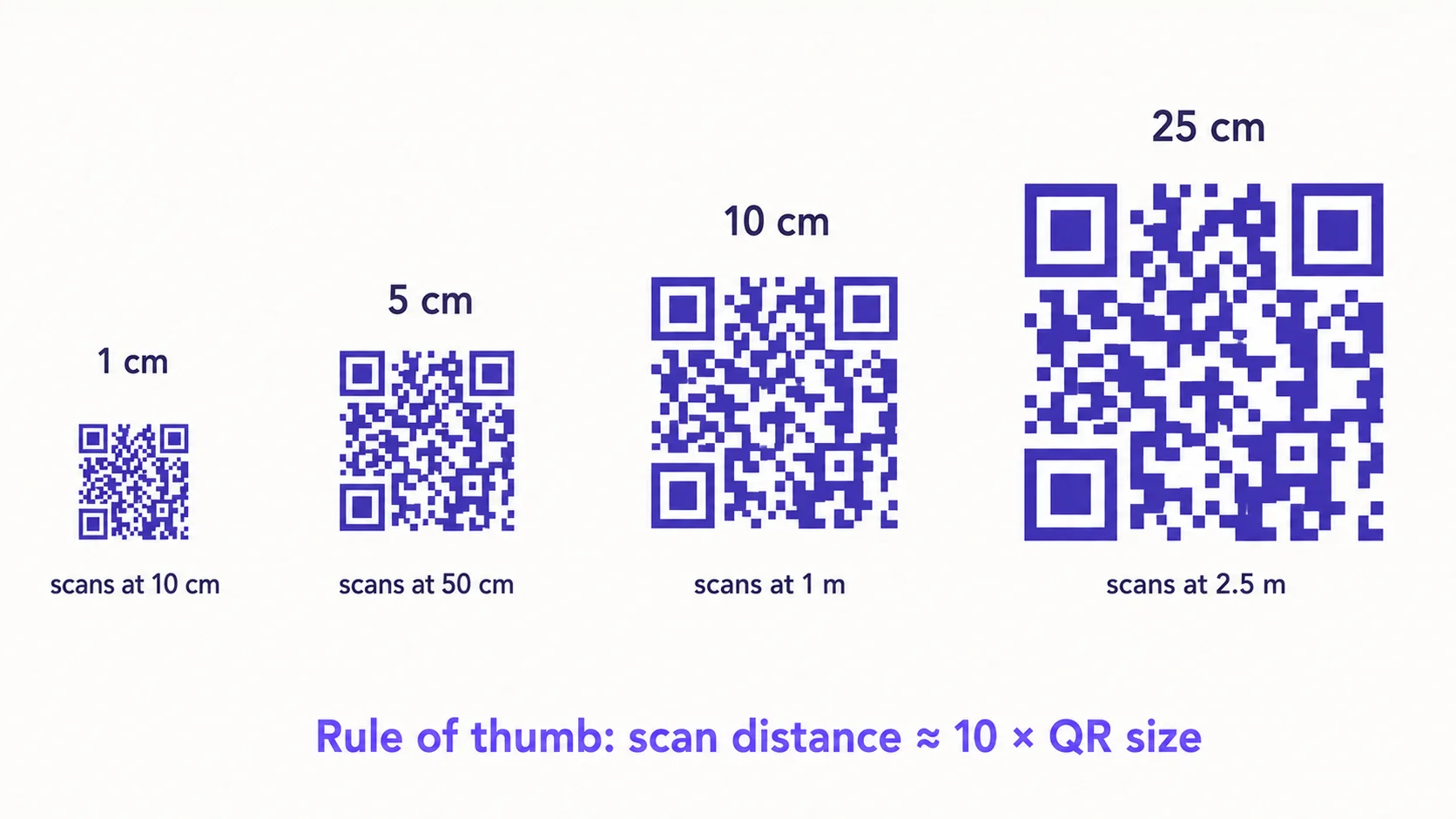
The most useful rule in QR sizing: the maximum reliable scan distance is roughly ten times the physical width of the printed code. A 1 cm QR scans well from about 10 cm away. A 5 cm QR scans up to half a metre. A 25 cm QR scans across a small room. A 1 m QR can be scanned from across a parking lot.
This isn’t a hard limit — it’s the ceiling at which a typical phone camera, in typical conditions, can still resolve the modules clearly enough to decode. Real-world conditions usually compress that ceiling, so plan for a comfortable margin rather than the ceiling itself. Aim for the code to fill 30-50% of the camera frame at the expected scan distance and you’ll rarely have a problem.
A practical sizing chart
- 1 cm code — handheld scans up to ~10 cm. Loyalty cards, business cards, jewellery tags.
- 2 cm code — ~20 cm. Back of a receipt, product labels, coffee sleeves.
- 5 cm code — ~50 cm. Restaurant table tents, packaging panels, tasting notes.
- 10 cm code — ~1 m. A4/letter posters, flyers, retail shelf talkers.
- 25 cm code — ~2.5 m. Display signs, store windows, exhibit panels.
- 50 cm code — ~5 m. Wall murals, large indoor signage, conference banners.
- 1 m+ code — ~10 m+. Outdoor billboards, building signage, stadium displays.
Why people print QR codes too small
Print designers underestimate sizing for two reasons. First, the QR usually looks fine at the design stage on a 27-inch monitor at 100% zoom — visually obvious, no problem. Second, the design constraint (a poster’s composition, a label’s real estate) usually pushes the code smaller than the use case demands. Both pressures compound, and the result is codes that work in the studio and fail on the wall.
Factors that compress the rule
The 10:1 rule assumes ideal conditions: matte print, good lighting, modern phone, unobstructed view, no logo. Each compromise eats into the available scan distance. Build margin in when any of the following apply:
- Glossy or reflective surfaces — glare hides modules, force a 30-50% bigger print.
- Curved surfaces (cans, cups, bottles) — perspective skew reduces effective resolution; size up by 20-30%.
- Dim or low-contrast lighting — restaurant interiors, evening events, indoor signage; size up by 20-40%.
- Embedded logo — a logo at 25% of the code area effectively shrinks the usable data area by the same; compensate by either bumping size up or by raising the error-correction level.
- Older or budget phones — cameras vary more than people expect; if your audience skews older devices, add 20% margin.
- Outdoor signage in changing weather — sun glare, rain, dust accumulation all chip away at scan reliability; double the margin you’d use indoors.
Don’t forget the quiet zone
The QR code itself is only part of the size you actually need. Around the code, the QR specification requires a clear margin — at least four modules wide — with no other content. This is the quiet zone. A QR placed flush against a frame, logo, or text block can fail entirely even if the code itself is the right size. When you specify a 5 cm QR, plan for closer to 6 cm of total whitespace. The whitespace is part of the code, not optional padding.
How to test before you commit to a print run
- Print the QR at the final intended size on the final intended substrate (paper, vinyl, fabric, metal — they all behave differently).
- Place it where it will live, in the actual lighting conditions.
- Walk to the expected scan distance and try to scan with three different phones — ideally a current iPhone, a current Android, and a 2-3-year-old budget phone.
- Try at varied angles (15°, 30°, 45°) — real-world scanning is rarely head-on.
- If you can scan from 30% farther than the expected distance, you have margin. If you can barely scan at the expected distance, the code is too small.
How QRA helps
When you export from QRA, the print-ready formats (SVG, PDF, EPS, PDF-CMYK) are vector — they can be scaled to any physical size without losing sharpness. The wizard recommends a minimum print size based on the data length and the chosen error-correction level, and the export dialog warns if you set a size below that. For volume print runs we recommend ordering one short pre-production run to test in the actual venue before committing to thousands of pieces.
The short answer
Print size × 10 ≈ scan distance. Add 30-50% margin when any of glare, curvature, low light, embedded logo, older phones, or outdoor exposure apply. And always test the actual print in the actual location before you commit to volume.
السبب الأكثر شيوعاً لفشل رمز QR مطبوع في الميدان ليس سوء التصميم ولا ضعف التباين. إنّه طباعته بحجم أصغر من المكان الذي سيُوضع فيه. رمز QR على لوحة إعلانية يُمسح بحجم مناسب لملصق لن يُمسح أبداً. ورمز على غلاف كوب قهوة بحجم مناسب لبطاقة عمل سيُحبط كلّ من يحاوله. الخبر الجيّد: هناك قاعدة عمليّة بسيطة تعطيك الحجم الصحيح في كلّ مرّة، ومجموعة صغيرة من العوامل تخبرك متى تضيف هامشاً.
قاعدة ١٠:١
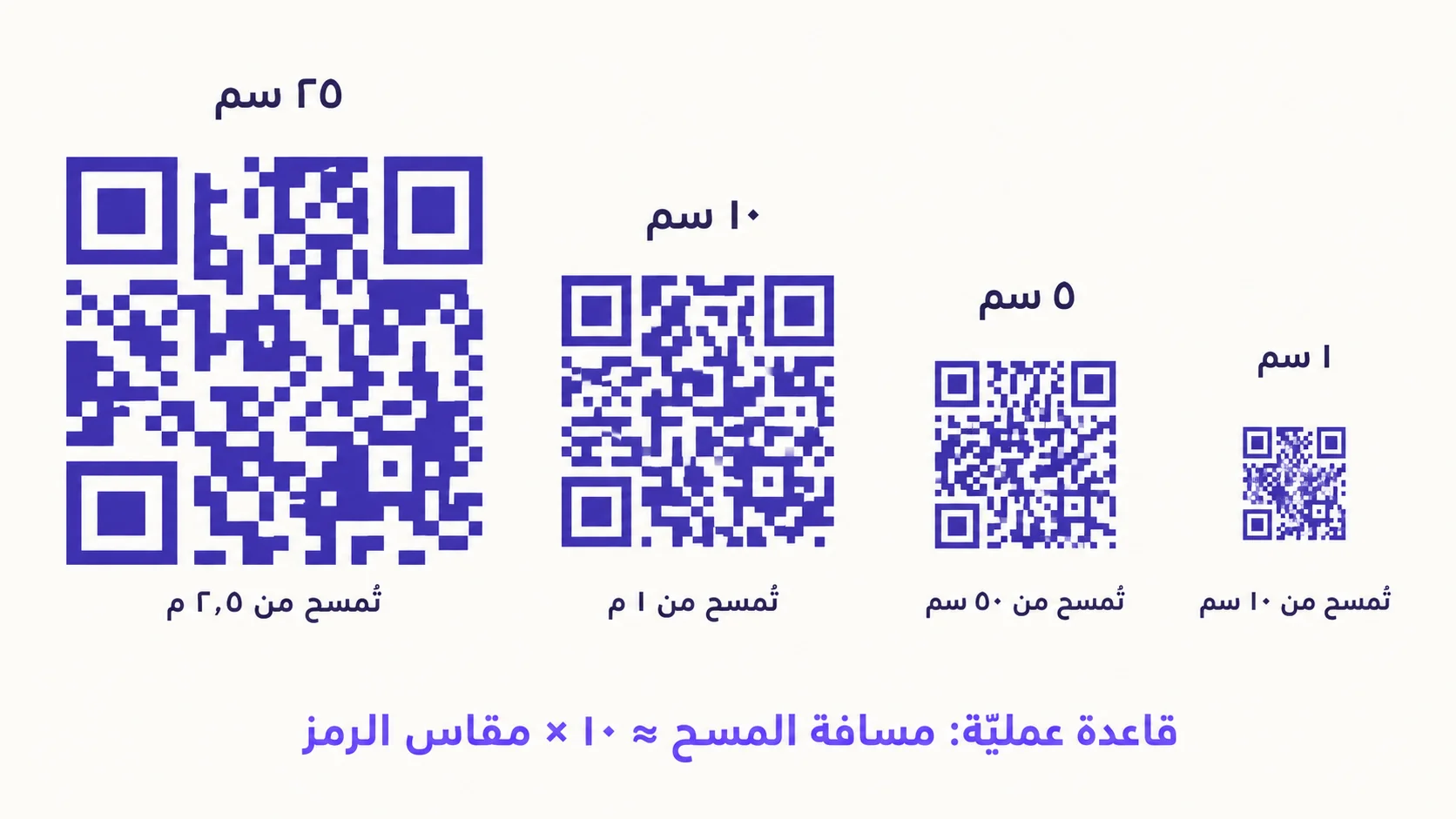
أهمّ قاعدة في حساب مقاس QR: أقصى مسافة مسح موثوقة تساوي تقريباً عشرة أضعاف العرض الفيزيائي للرمز المطبوع. رمز ١ سم يُمسح جيّداً من على بُعد ١٠ سم. رمز ٥ سم يُمسح حتّى نصف متر. رمز ٢٥ سم يُمسح من عرض غرفة صغيرة. ورمز ١ متر يمكن مسحه من جهة موقف سيّارات إلى جهته الأخرى.
هذا ليس حدّاً صارماً — إنّه السقف الذي تستطيع كاميرا هاتف اعتيادية، في ظروف اعتياديّة، أن تستوضح فيه الوحدات بدقّة كافية لفكّ التشفير. الظروف الواقعية تُضيّق هذا السقف عادةً، لذا خطّط لهامش مريح بدلاً من السقف نفسه. اجعل الرمز يملأ ٣٠-٥٠٪ من إطار الكاميرا عند مسافة المسح المتوقّعة، نادراً ما ستواجه مشكلة.
جدول مقاسات عمليّ
- رمز ١ سم — يُمسح يدوياً حتّى ١٠ سم. بطاقات الولاء، بطاقات العمل، بطاقات المجوهرات.
- رمز ٢ سم — حتّى ٢٠ سم. خلف الإيصالات، ملصقات المنتجات، أغلفة أكواب القهوة.
- رمز ٥ سم — حتّى ٥٠ سم. خيمات طاولات المطاعم، لوحات التغليف، بطاقات التذوّق.
- رمز ١٠ سم — حتّى متر. ملصقات A4، النشرات، لافتات الرفوف في التجزئة.
- رمز ٢٥ سم — حتّى ٢٫٥ متر. لافتات العرض، نوافذ المتاجر، لوحات المعارض.
- رمز ٥٠ سم — حتّى ٥ أمتار. الجداريّات الداخليّة، اللافتات الداخليّة الكبيرة، بانرات المؤتمرات.
- رمز ١ متر فأكثر — حتّى ١٠ أمتار فأكثر. اللوحات الإعلانيّة الخارجيّة، لافتات المباني، شاشات الملاعب.
لماذا يطبع الناس رموز QR بحجم أصغر من اللازم
يُقلّل المصمّمون من مقاسات الطباعة لسببين. أوّلاً، الرمز يبدو كافياً في مرحلة التصميم على شاشة ٢٧ بوصة بتكبير ١٠٠٪ — واضح بصريّاً، لا مشكلة. ثانياً، قيد التصميم (تركيب الملصق، مساحة العبوة) عادةً ما يدفع الرمز إلى مقاس أصغر ممّا يتطلّبه الاستخدام. كلا الضغطين يتراكمان، فتكون النتيجة رموزاً تعمل في الاستوديو وتفشل على الجدار.
العوامل التي تُضيّق القاعدة
تفترض قاعدة ١٠:١ ظروفاً مثاليّة: طباعة مطفية، إضاءة جيّدة، هاتف حديث، رؤية بلا حواجز، بلا شعار. كلّ تنازل يقتطع من مسافة المسح المتاحة. أضف هامشاً عندما ينطبق أيّ ممّا يلي:
- الأسطح اللامعة أو العاكسة — الانعكاس يخفي الوحدات، اطبع أكبر بـ ٣٠-٥٠٪.
- الأسطح المنحنية (علب، أكواب، قارورات) — التشوّه المنظوري يقلّل الدقّة الفعليّة؛ كبّر بـ ٢٠-٣٠٪.
- الإضاءة الخافتة أو منخفضة التباين — داخل المطاعم، الفعاليّات المسائية، اللافتات الداخليّة؛ كبّر بـ ٢٠-٤٠٪.
- شعار مدرج — شعار يأخذ ٢٥٪ من مساحة الرمز يُقلّص فعليّاً منطقة البيانات بنفس النسبة؛ عوّض بزيادة المقاس أو رفع مستوى تصحيح الأخطاء.
- الهواتف القديمة أو الاقتصاديّة — الكاميرات تتفاوت أكثر ممّا يتوقّع الناس؛ إن كان جمهورك يميل إلى أجهزة أقدم، أضف ٢٠٪ هامش.
- اللافتات الخارجيّة في طقس متغيّر — وهج الشمس، المطر، تراكم الغبار، كلّها تقتطع من موثوقية المسح؛ ضاعف الهامش الذي تستخدمه داخليّاً.
لا تنسَ المنطقة الهادئة
رمز QR نفسه ليس سوى جزء من المقاس الذي تحتاجه فعلاً. حول الرمز، تتطلّب مواصفة QR هامشاً صافياً — لا يقلّ عن أربع وحدات عرضاً — بلا أيّ محتوى آخر. هذه هي المنطقة الهادئة. رمز موضوع ملاصقاً لإطار أو شعار أو كتلة نص قد يفشل تماماً حتّى لو كان الرمز نفسه بالمقاس الصحيح. حين تحدّد رمز ٥ سم، خطّط لما يقرب من ٦ سم مساحة بيضاء كاملة. المساحة البيضاء جزء من الرمز، لا حشوة اختياريّة.
كيف تختبر قبل الالتزام بطباعة الكميّة
- اطبع الرمز بالحجم النهائي المقصود على المادّة النهائيّة المقصودة (ورق، فينيل، قماش، معدن — كلّها تتصرّف بطرق مختلفة).
- ضعه في مكانه المخطّط، في ظروف الإضاءة الفعليّة.
- امشِ إلى مسافة المسح المتوقّعة، وحاول المسح بثلاثة هواتف مختلفة — يُفضّل iPhone حديث، وAndroid حديث، وهاتف اقتصادي عمره ٢-٣ سنوات.
- جرّب زوايا متفاوتة (١٥°، ٣٠°، ٤٥°) — المسح الواقعي نادراً ما يكون مواجهاً تماماً.
- إن استطعت المسح من مسافة أبعد بـ ٣٠٪ من المتوقّعة، لديك هامش. وإن بالكاد استطعت المسح من المسافة المتوقّعة، الرمز صغير جدّاً.
كيف تساعدك QRA
حين تُصدّر من QRA، فإنّ صيغ الجاهز للطباعة (SVG، PDF، EPS، PDF-CMYK) متّجهيّة — يمكن تكبيرها إلى أيّ حجم فيزيائي دون فقدان الحدّة. يقترح المعالج حدّاً أدنى لمقاس الطباعة بناءً على طول البيانات ومستوى تصحيح الأخطاء المختار، ويُحذّر مربّع التصدير إذا حدّدت مقاساً أقلّ منه. للطباعات الكبيرة، نوصي بطلب طباعة تجريبيّة قصيرة لاختبارها في المكان الفعلي قبل الالتزام بآلاف القطع.
الإجابة المختصرة
مقاس الطباعة × ١٠ ≈ مسافة المسح. أضف هامش ٣٠-٥٠٪ عند انطباق أيّ من: الانعكاس، الانحناء، ضعف الإضاءة، الشعار المدرج، الهواتف القديمة، التعرّض للخارج. واختبر دائماً الطباعة الفعليّة في المكان الفعلي قبل الالتزام بكميّة كبيرة.
Ready to make a smarter QR?جاهز لإنشاء رمز QR أذكى؟
Sign up free — no card needed. Track every scan, edit destinations anytime.سجّل مجاناً — بدون بطاقة. تتبّع كل عملية مسح وعدّل الوجهة في أي وقت.