Error Correction Levels Explained — How Much Logo Can a QR Code Take?مستويات تصحيح الأخطاء — كم شعاراً يحتمل رمز QR؟
Every QR code carries spare data so it still scans when part of it is damaged or covered. Here’s what L, M, Q, and H actually mean — and how much of your logo each level can absorb before scans start failing.كل رمز QR يحمل بيانات احتياطيّة ليبقى قابلاً للمسح حتى لو تلف جزء منه أو غُطّي. إليك ما تعنيه المستويات L وM وQ وH فعلاً، وكم من شعارك يحتمله كلّ مستوى قبل أن يبدأ المسح بالفشل.
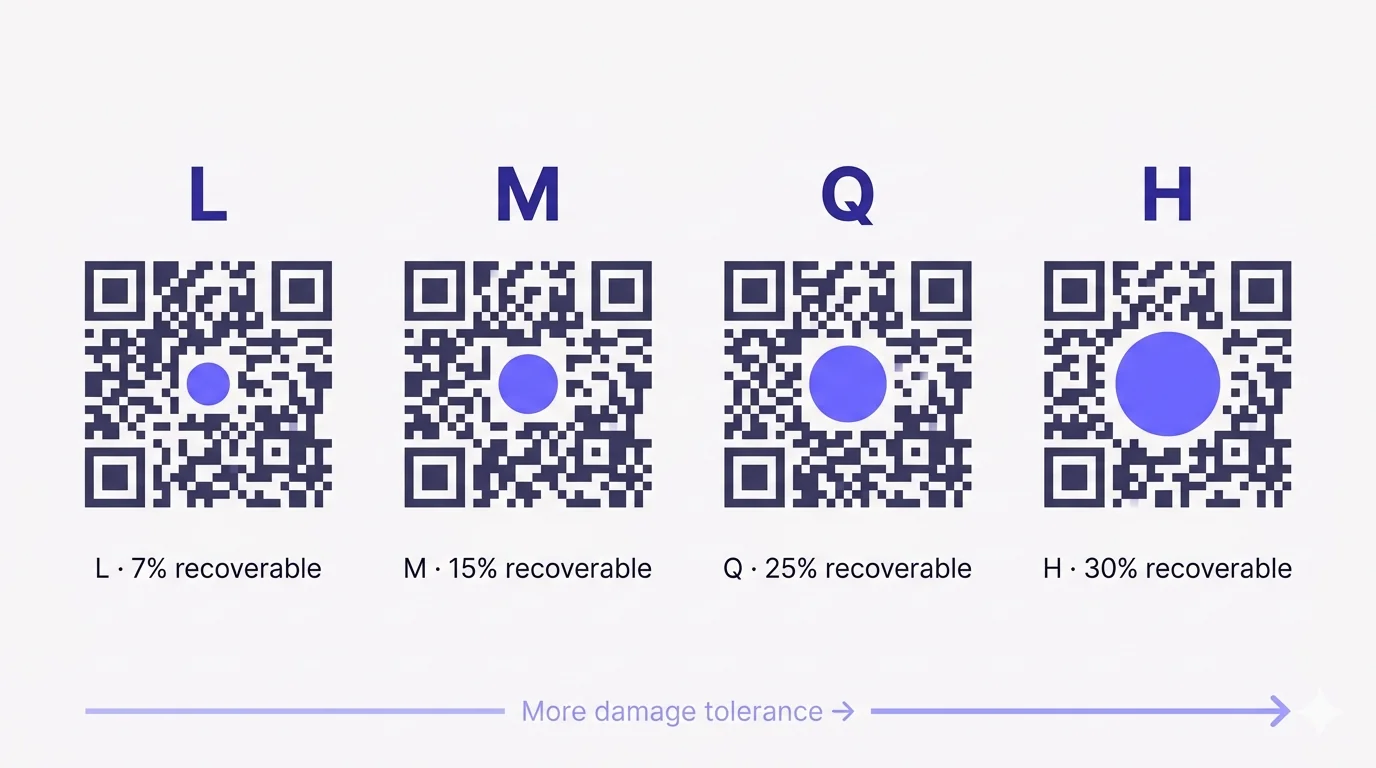
Every QR code carries spare data. That extra information is what lets a code keep working when part of it is covered by a logo, smudged by a printer, or torn off in transit. The amount of spare data baked in is set by a single choice: the error-correction level. There are four of them — L, M, Q, and H — and they each represent a trade-off between resilience and how much real content you can fit inside the same physical code.
What error correction actually does
QR codes use Reed-Solomon error correction — the same family of math that protects data on CDs, satellite transmissions, and storage drives. The encoder takes your content (URL, vCard, whatever), shreds it into bytes, and produces a set of redundant check bytes alongside the original data. Both groups get woven through the QR pattern. When a scanner reads the code, it can lose some modules — to logos, dirt, curl, or print failure — and still reconstruct the original from what survived.
The trade-off is simple: more redundancy means less room for actual content at the same physical size, or a bigger code (more modules) to fit the same content. Pick the lowest level that still survives your real-world conditions, and you keep the code small and easy to scan.
The four levels at a glance
- L — about 7% of the code can be lost and still recover. Smallest physical code per character.
- M — about 15% can be lost. The default in most generators (including QRA) because it balances size and resilience.
- Q — about 25% can be lost. Where logo embedding usually starts.
- H — about 30% can be lost. The maximum. Required for big logos, harsh environments, or curved/distorted surfaces.
Why most generators default to M
M is the sweet spot for the average use case. A typical URL fits inside a small, low-version code with enough resilience to survive normal print imperfections — toner streaks, paper fold, mild glare — without ballooning the module count. If you’re shipping a basic dynamic-redirect QR (a short URL like qra.cc/abc) and you’re not putting a logo on it, M is all you need.
When to step up to Q or H
- You want to embed a logo. The logo overlaps data modules, so you need extra redundancy to compensate for what the logo hides.
- The code will live outdoors or in a harsh environment — signage, equipment, vehicle wraps, anything exposed to weather, sunlight, scratches.
- You’re printing very small. At small physical sizes (under 2 cm), even tiny ink bleed or dust covers a meaningful proportion of the code.
- You’re printing on a curved surface — cans, cups, bottles, posts. The optical distortion adds effective “loss” the scanner has to recover from.
How logo size and error correction actually interact
Rough rule of thumb: a centred circular or square logo can occupy up to roughly the percentage of the code area listed for the chosen level — 25% at Q, 30% at H. In practice, stay 5-10% under the ceiling for safety. A logo that takes 20% of the area at Q usually scans on every device; one that hits the 25% ceiling sometimes fails on older Android cameras or in low light.
Two rules that matter more than the percentage:
- The logo MUST be centred over the data area — never over a finder pattern (the three big squares), the alignment pattern, or the timing strips. Those regions are not protected by error correction; damage there breaks the code immediately.
- Always test the printed result on at least two or three devices, ideally a mix of iPhone and Android, ideally including one older model. Cameras vary more than people expect; what scans cleanly on a flagship may fail on a 2-year-old budget phone.
When NOT to use H
H isn’t free. Forcing the highest level for a long static URL with no logo bloats the module count, which means smaller modules at the same physical print size — which is harder for cameras to read, especially at small print sizes. The right level is the lowest one that survives your conditions, not the highest available.
A practical recipe
- Plain dynamic redirect, no logo, indoor print — M is fine.
- Embedding a logo at 15-20% of the area — Q.
- Embedding a large logo, outdoor signage, curved surface, or all of the above — H.
- Whatever you choose, validate by scanning the actual printed sample on at least two devices before you commit to a print run.
How QRA handles it
The wizard exposes the level setting if you want manual control. If you embed a logo via the designer, QRA bumps the level automatically based on the logo’s area, and the live preview re-renders so you can confirm the result before exporting. If your logo crosses the safe threshold for the level we’ve picked, we surface a warning rather than letting you export a code that might silently fail in the field.
The short answer
Use M unless you have a reason not to. Step up to Q when you add a logo. Step up to H when the logo is big, the surface is rough, or the environment is harsh. And never trust a screen preview alone — print, scan, repeat, then ship.
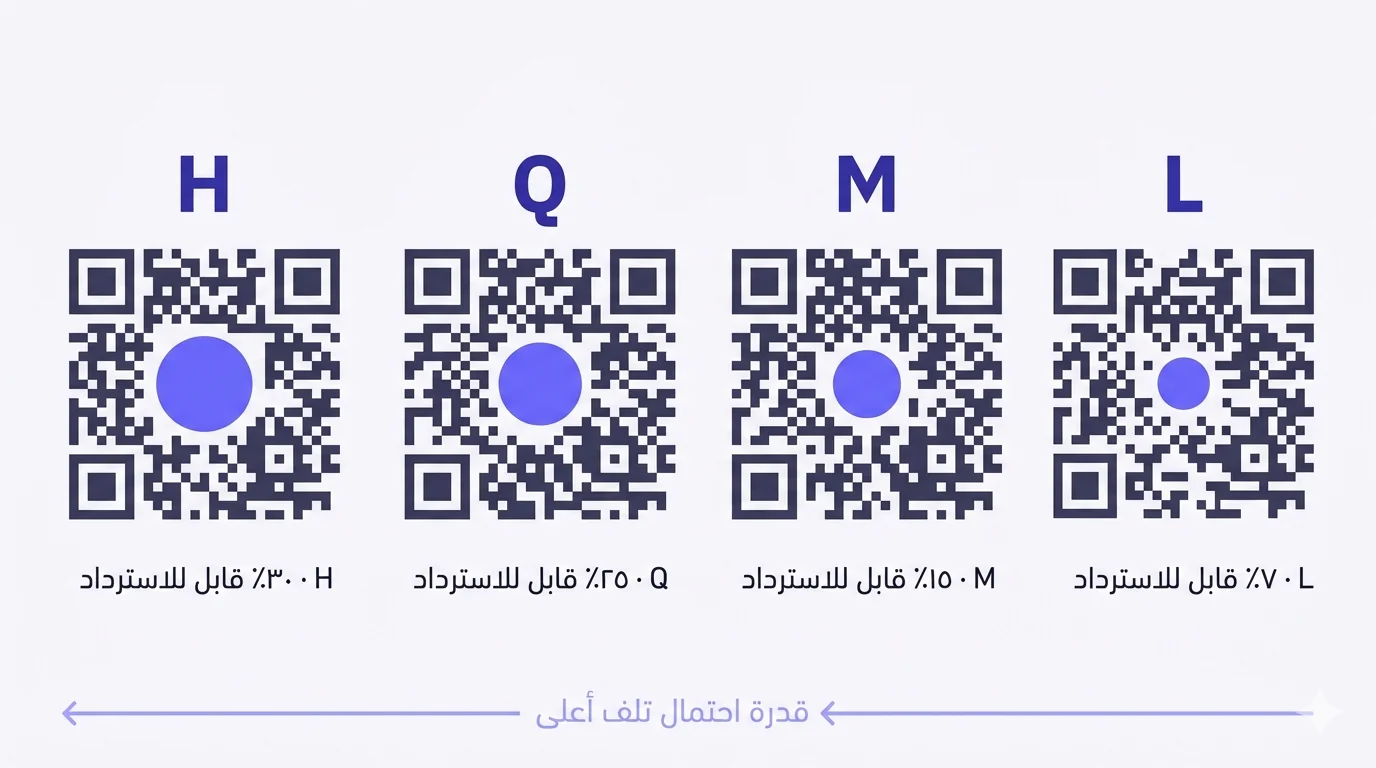
كل رمز QR يحمل بيانات احتياطيّة. هذه المعلومات الإضافيّة هي ما يجعل الرمز يستمر بالعمل حين يُغطّى جزء منه بشعار، أو يُلطّخه طابعة، أو ينقطع جزء منه أثناء النقل. كميّة هذه البيانات الاحتياطيّة يحدّدها خيار واحد: مستوى تصحيح الأخطاء. وهي أربعة مستويات — L وM وQ وH — وكلّ واحد منها يمثّل مفاضلة بين قدرة الاحتمال وكمّيّة المحتوى الفعلي الذي يمكن إدراجه داخل الرمز نفسه.
ما الذي يفعله تصحيح الأخطاء فعلاً
تستخدم رموز QR تصحيح أخطاء «ريد-سولومون» — العائلة ذاتها من الرياضيّات التي تحمي البيانات على الأقراص المضغوطة، والإرسال الفضائي، ومحرّكات التخزين. يأخذ المُشفّر محتواك (رابط، بطاقة تعارف، أو ما شئت)، يقطّعه إلى بايتات، ثم يُنتج مجموعة بايتات تحقّق احتياطيّة بجانب البيانات الأصليّة. وتُنسج المجموعتان داخل نمط QR. وعندما يقرأ الماسح الرمز، يستطيع أن يفقد بعض الوحدات — لشعار أو وسخ أو انحناء أو فشل طباعة — ويبقى قادراً على إعادة بناء الأصل ممّا تبقّى.
المفاضلة بسيطة: زيادة الاحتياطيّة تعني مساحة أقل للمحتوى الفعلي بالحجم نفسه، أو رمز أكبر (وحدات أكثر) ليتّسع للمحتوى ذاته. اختر أدنى مستوى يبقى صامداً في ظروفك الحقيقيّة، يبقى رمزك صغيراً وسهل المسح.
المستويات الأربعة بنظرة سريعة
- L — يمكن فقدان حوالي ٧٪ من الرمز والاسترداد. أصغر رمز فيزيائي لكلّ حرف.
- M — يمكن فقدان حوالي ١٥٪. الافتراضي في معظم المولّدات (بما فيها QRA) لأنّه يوازن بين الحجم وقدرة الاحتمال.
- Q — يمكن فقدان حوالي ٢٥٪. هنا يبدأ عادةً تضمين الشعار.
- H — يمكن فقدان حوالي ٣٠٪. الحدّ الأقصى. مطلوب للشعارات الكبيرة، والبيئات القاسية، والأسطح المنحنية أو المشوّهة.
لماذا تختار معظم المولّدات M افتراضيّاً
M هو نقطة التوازن للاستخدام العادي. الرابط النموذجي يتّسع داخل رمز صغير من إصدار منخفض، ومع قدرة احتمال كافية لمواجهة عيوب الطباعة الاعتياديّة — خطوط حبر، طيّ ورق، انعكاس خفيف — دون أن ينتفخ عدد الوحدات. إن كنت تشحن رمز تحويل ديناميكيّاً بسيطاً (رابط قصير مثل qra.cc/abc) دون شعار، فـ M يكفيك.
متى ترفع إلى Q أو H
- تريد تضمين شعار. الشعار يتداخل مع وحدات البيانات، لذا تحتاج احتياطيّة إضافيّة لتعويض ما يخفيه الشعار.
- سيوضع الرمز في الخارج أو في بيئة قاسية — لافتات، معدّات، أغلفة مركبات، أو أيّ شيء معرّض للطقس وأشعّة الشمس والخدوش.
- تطبع بحجم صغير جدّاً. عند الأحجام الصغيرة (أقل من ٢ سم)، حتّى نزيف الحبر أو الغبار اليسير يغطّي نسبة ملحوظة من الرمز.
- تطبع على سطح منحنٍ — علب، أكواب، قارورات، أعمدة. التشوّه البصري يُضيف «فقداً» فعليّاً يجب على الماسح التعافي منه.
كيف يتفاعل حجم الشعار مع تصحيح الأخطاء فعلاً
قاعدة تقريبيّة: يمكن لشعار دائري أو مربّع موضوع في المنتصف أن يحتلّ تقريباً النسبة من مساحة الرمز المذكورة للمستوى المختار — ٢٥٪ عند Q، و٣٠٪ عند H. عمليّاً، ابقَ أقلّ من السقف بـ ٥-١٠٪ احتياطاً. شعار يأخذ ٢٠٪ من المساحة عند Q يُمسح عادةً على كلّ جهاز؛ وشعار يصل إلى السقف ٢٥٪ يفشل أحياناً على كاميرات أندرويد القديمة أو في الإضاءة الضعيفة.
قاعدتان أهمّ من النسبة المئويّة نفسها:
- يجب وضع الشعار في وسط منطقة البيانات — وليس فوق نمط تحديد (المربّعات الكبيرة الثلاثة)، ولا فوق نمط المحاذاة، ولا فوق شرائط التوقيت. هذه المناطق لا يحميها تصحيح الأخطاء، والضرر فيها يُعطّل الرمز فوراً.
- اختبر النتيجة المطبوعة دائماً على جهازين أو ثلاثة على الأقل، ويُفضّل خليط من iPhone وAndroid، ويُفضّل تضمين طراز قديم. الكاميرات تتفاوت أكثر ممّا يتوقّع الناس؛ ما يُمسح بنظافة على هاتف قمّة قد يفشل على هاتف اقتصادي عمره عامان.
متى لا تستخدم H
H ليس مجّانيّاً. فرض المستوى الأعلى لرابط طويل ثابت بلا شعار يضخّم عدد الوحدات، ما يعني وحدات أصغر بنفس مقاس الطباعة الفيزيائي — وهذا أصعب على الكاميرات أن تقرأه، خصوصاً عند المقاسات الصغيرة. المستوى المناسب هو الأدنى الذي يبقى صامداً في ظروفك، لا الأعلى المتاح.
وصفة عمليّة
- تحويل ديناميكي بسيط، بلا شعار، طباعة داخليّة — M يكفي.
- تضمين شعار يأخذ ١٥-٢٠٪ من المساحة — Q.
- تضمين شعار كبير، أو لافتة خارجيّة، أو سطح منحنٍ، أو كلّ ذلك مجتمعاً — H.
- أيّاً كان اختيارك، تحقّق بمسح العيّنة المطبوعة الفعليّة على جهازين على الأقل قبل الالتزام بطباعة الكميّة.
كيف تتعامل QRA مع ذلك
المعالج يعرض إعداد المستوى لو أردت التحكّم اليدوي. وإن أدرجت شعاراً عبر المصمّم، ترفع QRA المستوى تلقائيّاً بناءً على مساحة الشعار، وتُعاد المعاينة الحيّة لتأكيد النتيجة قبل التصدير. وإن تخطّى شعارك العتبة الآمنة للمستوى الذي اخترناه، نُظهر لك تحذيراً بدلاً من السماح لك بتصدير رمز قد يفشل بصمت في الميدان.
الإجابة المختصرة
استخدم M ما لم يكن لديك سبب لغير ذلك. ارفع إلى Q عند إضافة شعار. ارفع إلى H حين يكون الشعار كبيراً، أو السطح خشناً، أو البيئة قاسية. ولا تثق أبداً بمعاينة الشاشة وحدها — اطبع، امسح، كرّر، ثم اشحن.
Ready to make a smarter QR?جاهز لإنشاء رمز QR أذكى؟
Sign up free — no card needed. Track every scan, edit destinations anytime.سجّل مجاناً — بدون بطاقة. تتبّع كل عملية مسح وعدّل الوجهة في أي وقت.