vCard QR Codes: The Complete Guide to Digital Business Cardsرموز QR للبطاقة الرقميّة: الدليل الكامل لبطاقات العمل الرقميّة
A vCard QR turns a printed business card into a one-tap contact save. Hold your phone over the QR, tap the prompt, your contact card appears in their phone's contacts app — name, title, phone, email, website, photo, the works. Here's how it works, what to encode, the Arabic-name and RTL contact edge cases, and why dynamic vCard QR is one of the most underused QR upgrades in MENA.رمز QR لبطاقة الاتّصال يحوّل بطاقة العمل المطبوعة إلى حفظ جهة اتّصال بنقرة واحدة. أمسك هاتفك فوق الرمز، اضغط الإشعار، تظهر بطاقتك في تطبيق جهات الاتّصال في هاتف الشخص — الاسم، المسمّى الوظيفي، الهاتف، البريد، الموقع، الصورة، كلّ شيء. إليك كيف يعمل، ما الذي ترمّزه، الحالات الطرفيّة للأسماء العربيّة وبطاقات الاتّصال RTL، ولماذا QR لبطاقة الاتّصال الديناميكي هو أحد أكثر تطويرات QR قلّةً في الاستخدام في الشرق الأوسط.
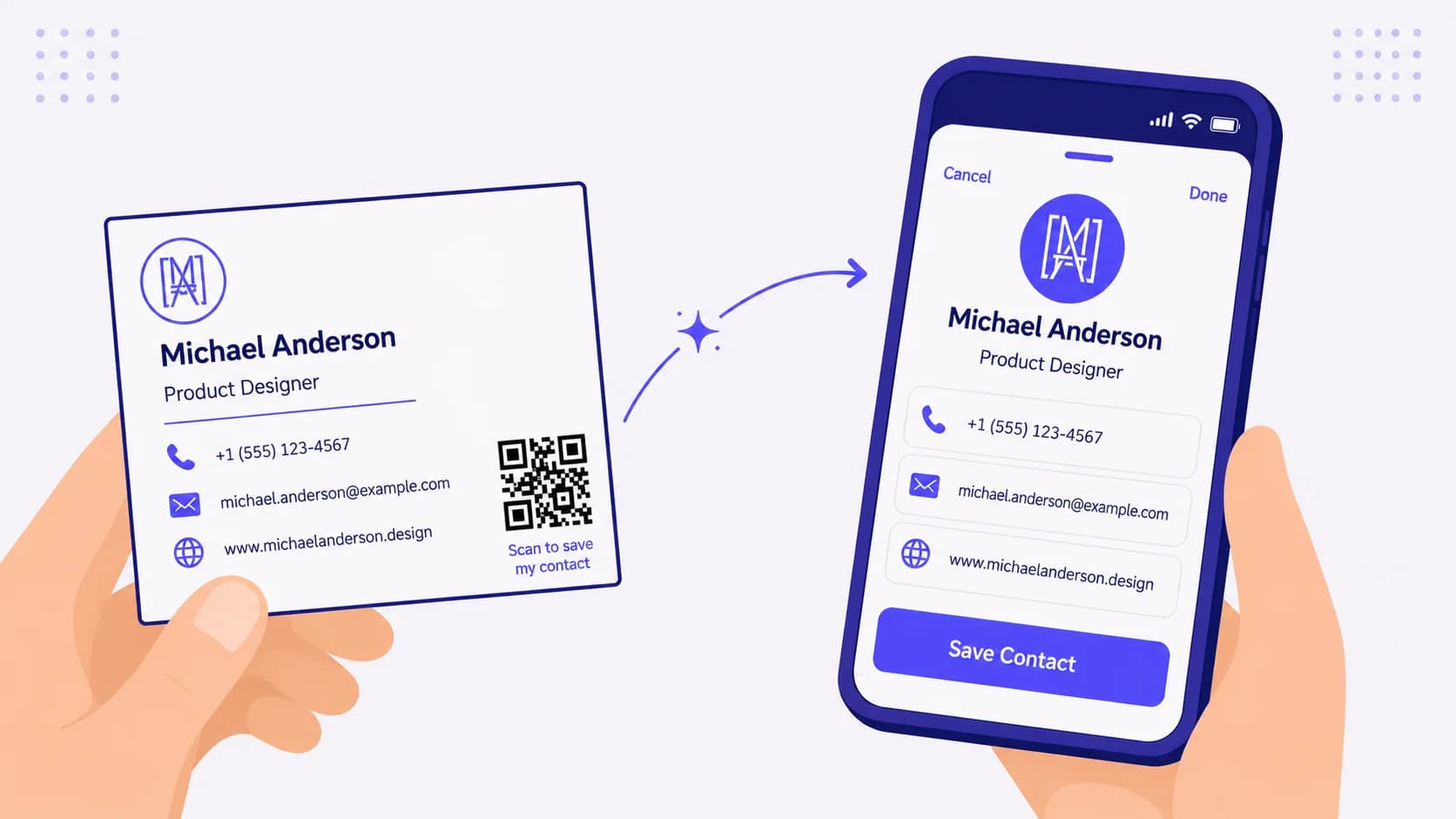
A vCard QR code is the single highest-leverage upgrade you can make to a printed business card. The flow: someone hands you their card, you scan the QR, your phone shows a 'Save Contact?' sheet pre-populated with their name, title, phone, email, website, photo, and any other fields they encoded. Tap save. The contact is in your phone. No typing, no transcription errors, no 'wait, was that an L or an I in their email', no business cards collecting dust in a desk drawer until you eventually throw them out without ever entering them into anything.
The technology is mature. The encoding is open and royalty-free (vCard is an IETF standard, MeCard is a Japanese-origin parallel, both work in every modern phone camera). The hard part is the design decisions: which fields to encode, how to handle Arabic names that the recipient's phone may or may not render correctly, when to use static vCard vs dynamic vCard, and what to do about the inevitable 'wait, I rebranded' situation. This piece walks through all of it.
vCard vs MeCard — the two formats
Two competing standards encode a contact card into a QR-compatible text string:
vCard (RFC 6350)
The full vCard format supports rich data: name with separate given/family/prefix/suffix fields, multiple phones with labels (work, mobile, home), multiple emails with labels, structured address (street/city/region/postal/country), photo (embedded base64 or URL reference), title, organisation, URL, notes, social profiles, and more. The encoded string is long — a typical vCard with photo embedded can easily exceed 1000 characters, requiring a larger QR pattern (Version 10-15 or higher). Modern phones decode vCard QR universally — iOS and Android both natively handle vCard parsing.
MeCard
Originally NTT DoCoMo's compact format, MeCard is simpler and more compact: name, reading (phonetic for CJK languages), phone, email, address, URL, birthday, memo. No embedded photo, no multiple-instance support for phones/emails. The MECARD: prefix and semicolon-separated fields keep the encoded string short, fitting comfortably in a smaller QR pattern. Modern phones decode MeCard universally, but the support quality is slightly less rich than vCard on iOS.
Practical choice: use vCard if you want photo, multiple phones, structured address, or any rich data — and your QR generator handles the larger pattern cleanly. Use MeCard if you want a minimal, compact, fast-scanning QR with just name + phone + email + URL. Both work. Most QRA-generated business-card QRs are vCard because the photo and the multiple-phone support are worth the larger QR.
What to encode (and what NOT to encode)
Always encode
- Full name (with given-name and family-name split if your generator supports it — many phones use this for sorting in contacts).
- Job title.
- Organisation name (your company).
- Primary phone number with country code (+966, +971, +20, +965, +44, +1, etc.) — never a local-format phone, always international format.
- Primary email address.
- Website / portfolio URL.
Encode if relevant
- Photo of yourself (embedded vCard photo) — recognisable headshot, kept under 100 KB so the QR doesn't bloat. Helps the recipient remember who you are from the contact-app entry alone.
- Multiple phones (work + mobile + landline) only if all are operationally distinct and you want all in the recipient's phone.
- Address (structured) — only if your business specifically benefits from the recipient navigating to it (retail location, gallery, consulting office). Most knowledge workers don't need this.
- LinkedIn URL or other primary social profile — pick one or two, not five.
- Note field for a one-line summary of who you are and what you do (e.g. 'Co-founder, QRA — QR codes for MENA businesses').
Do NOT encode
- Personal phone number you don't want indexed in every recipient's phone forever. Static QRs cannot be 'recalled' — once your vCard QR is in the wild, every printed card with it remains valid until the cards themselves are destroyed.
- Home address. Use office or commercial address only.
- Birthday in vCard format unless you specifically want every business contact to add it to their calendar.
- Anything you would feel uncomfortable sharing with someone you've handed exactly one business card to in your life — vCard QR is a broadcast, not a private exchange.
Arabic names and bilingual contact cards — the edge cases
MENA-specific complexity that almost no English-language vCard tutorial covers.
Arabic-only names
vCard supports UTF-8 throughout, so encoding a name in Arabic script ('أحمد الفهد') works structurally. Modern iPhones and Androids handle the Arabic-script contact correctly — the contact saves with Arabic name display, Arabic name sorting (which uses Arabic alphabetical order on phones with Arabic locale), and renders in the contact app correctly.
The edge case: if the recipient's phone is configured in a non-Arabic locale and they don't have Arabic system fonts installed, your Arabic name displays as boxes or missing-glyph squares. This is rare on modern phones (most ship with Arabic font support by default) but happens on older Android devices and corporate-managed phones with restricted font sets. The practical mitigation: include BOTH Arabic and English/transliterated versions in the vCard. The vCard format supports this — typically Arabic in the FN (formatted name) field and English transliteration in the SORT-AS or NICKNAME field, or both versions stacked in the N (structured name) field.
Bilingual professional name
If your professional identity is bilingual — common in MENA business contexts — encode the bilingual form: 'أحمد الفهد / Ahmed Al Fahd'. The space-slash-space pattern is human-readable on both sides and saves cleanly in most contact apps. Some QRA-style generators will format this for you with appropriate vCard field separation; some generators won't and require you to enter it manually.
Phone numbers in Arabic-Indic numerals
Phone numbers in vCard should be in Western/ASCII numerals (0-9), NEVER Arabic-Indic numerals (٠-٩), regardless of the rest of the card being in Arabic. Western numerals are universal phone-format; Arabic-Indic numerals will break the recipient's phone's dialer (it can't dial a phone number with non-ASCII digits). This is the most common Arabic-name vCard mistake and it's silent — the contact saves, the dialer fails when you tap to call.
Static vs dynamic vCard QR — the rebrand problem
Static vCard QR encodes the contact data directly into the dot pattern. The QR scans offline (no internet round-trip needed), the recipient's phone parses the embedded data, the contact saves. Fast, reliable, no infrastructure dependency. The downside: you can never change anything. Your phone number changes — every printed business card with that static vCard QR is now wrong forever. You leave a job and switch organisations — same problem. You add a second phone, change your job title, get a new email — same problem.
Dynamic vCard QR encodes a short URL (something like qra.cc/v/abc123) that resolves to a vCard payload hosted on the QR service. The phone scans, follows the URL, fetches the latest vCard, and the contact prompt appears. Fast (one round-trip), and editable forever. Change your phone? Update the dashboard; every printed card with the same QR now serves the new data. Get a new title? Same workflow.
For business cards, dynamic vCard is the clear default. The lifespan of a printed business card — usually 1-3 years between rebrands or job changes — is far longer than the typical interval between contact-detail changes. Investing in a dynamic vCard QR once and editing the destination over time is the right architecture. Static vCard makes sense only for stable, never-changing scenarios: the founder's permanent personal contact on a long-tenure card, a public-figure 'contact me' QR that doesn't change.
Business-card design with vCard QR
A few practical placement and design considerations:
QR size on the card
Standard business cards are ~9 × 5.5 cm. The QR should occupy roughly 2-2.5 cm square — large enough to scan reliably from a normal arm's-length distance (15-25 cm), small enough to leave room for the human-readable card content. A 1 cm QR is too small for reliable scanning on most printed cardstock; a 4 cm QR dominates the card visually.
Placement on the card
Three common patterns: (1) QR on the back of the card, full-width, with a 'Scan to save my contact' label — cleanest, lets the front of the card be pure branding. (2) QR in a corner of the front, with the human-readable name + contact details on the rest. (3) QR on its own designated portion (front-right column or back-right column) with a clear label. All work. Avoid: QR in the dead-centre of the card (forces the human reader to look around it), QR overlapping with text (kills both).
Print quality for vCard QR specifically
vCard QRs encode more data than URL QRs, so the dot pattern is denser (Version 10-15 typical for a vCard with photo; Version 3-5 for a short URL QR). Denser patterns are more sensitive to print quality. Always export the vCard QR as vector (SVG or EPS) and print on a coated business-card stock, not uncoated kraft or matte cardstock that's prone to ink bleed. Set error-correction to H (30%) so the QR survives the small print imperfections business-card production frequently introduces.
Include human-readable contact details too
Even with a vCard QR, print the name, phone, and email on the card in human-readable form. Three reasons: (1) recipients without a phone handy can transcribe manually; (2) the human-readable text gives the QR a context (recipients trust 'Scan to save Michael Anderson's contact' more than a bare QR); (3) some recipients prefer to read the card and decide later whether to scan, rather than scanning blind on first encounter.
Networking-event use cases
MENA business networking — conferences, GITEX, LEAP, Riyadh Season events, Dubai business breakfasts, Cairo Arab Health, Marrakech investor summits — runs on rapid contact exchange. vCard QR turns the friction of mid-conversation card exchange into a 5-second flow:
- Conference badge with personal vCard QR — every attendee's badge contains their vCard, scannable peer-to-peer across the venue floor. Several major MENA conferences now print this by default.
- Tradeshow booth with team vCard QRs — booth staff each have their personal vCard QR on the badge; attendees who want to follow up with a specific person scan that person's badge specifically.
- Speaker slides with vCard QR — a 'Connect with me' QR on the final speaker slide; audience members scan from their seat and save the speaker's contact without having to hunt them down post-talk.
- Restaurant/coffee-shop business owner with bilingual vCard QR — the owner's card on the counter for vendor inquiries; passing professionals scan and save with no awkwardness.
Common vCard QR mistakes
- Static vCard for a contact that will inevitably change. Job titles change, phone numbers change. Default to dynamic.
- Arabic-Indic numerals in the phone field — looks fine, breaks the dialer.
- Embedded photo at 2 MB — bloats the QR to unreadable size. Compress to <100 KB.
- Forgetting to test the QR with two different phones (iPhone + Android) before printing. The decoding-quality asymmetry between platforms is real.
- QR too small (under 2 cm) on the printed card — scan fails at normal arm's-length.
- Multiple QRs on one card without labels (one for vCard, one for website, one for portfolio). Recipients don't know which to scan — they scan one or none.
How QRA handles vCard QR
Generate a 'vCard' QR in QRA, enter name (with Arabic/English bilingual support), title, organisation, phone numbers with country codes, email, website, optional photo upload (auto-compressed to optimal size), optional structured address. Choose dynamic (default — recommended) or static. Customise the QR's visual styling and embedded logo. Export as PNG, SVG, or EPS for print. The QR includes a built-in landing page (the destination URL) that previews the contact across all phones — if a recipient's phone fails to natively prompt the contact-save sheet (rare but happens on some custom Android builds), they see a clean web preview with a 'Download .vcf' button as fallback. Update the dashboard anytime your details change; every printed card continues to deliver the updated contact.
The short answer
A vCard QR on the back of every business card you print is one of the cheapest, highest-leverage upgrades you can make. Encode the essentials (name, title, organisation, phone, email, website, optional photo), skip the over-shares, use international phone format and Western numerals always, default to dynamic so a future rebrand doesn't reprint, and test with at least two phones before the print run. The friction of contact exchange goes from 'transcribe a printed card later' to 'scan, save, done' in five seconds — and you stop losing the cards that used to die in desk drawers.
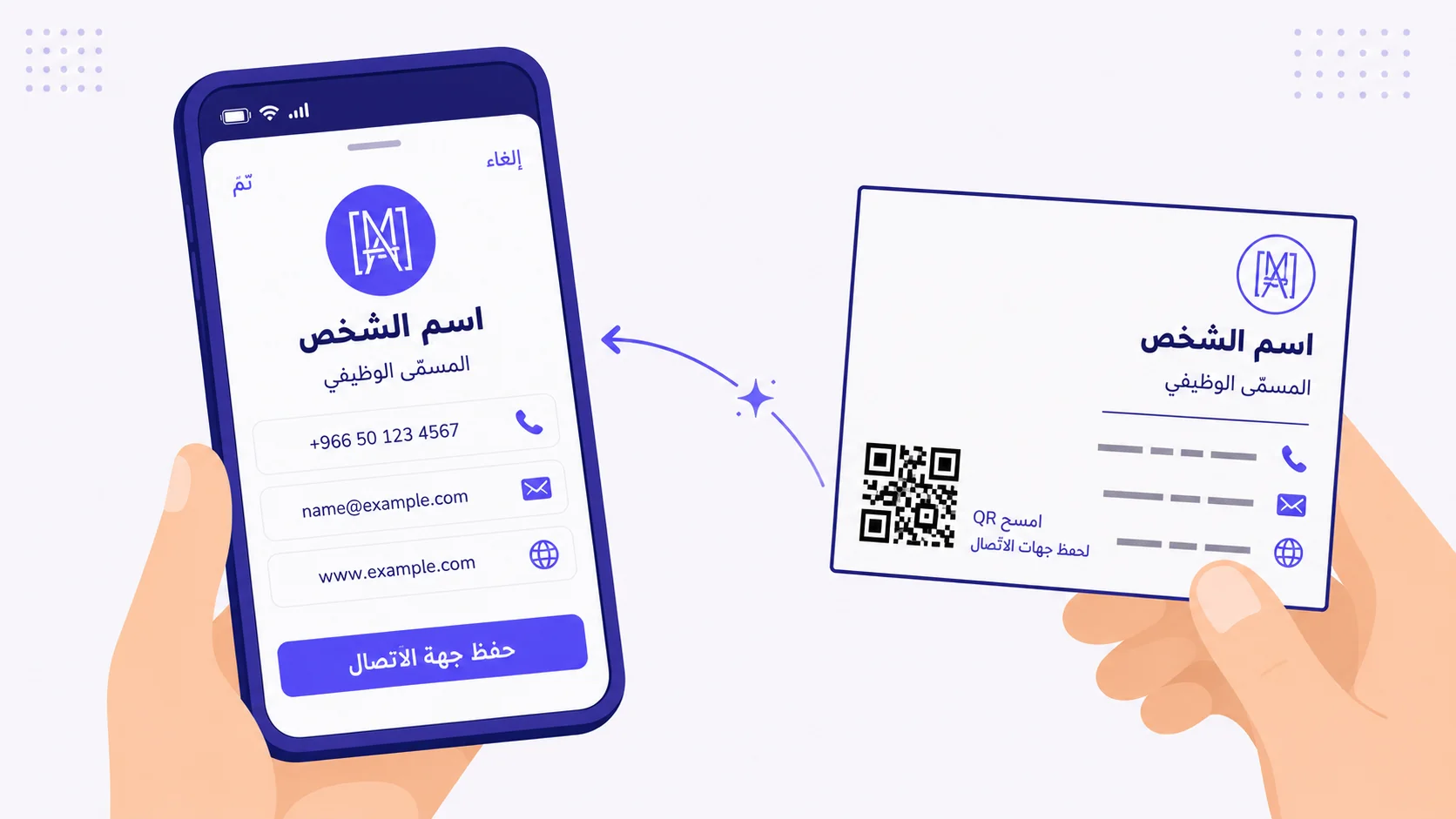
رمز QR لبطاقة الاتّصال (vCard) هو الترقية الوحيدة الأعلى رفعاً التي يمكن أن تقوم بها لبطاقة عمل مطبوعة. التدفّق: يسلّمك شخص بطاقته، تمسح الرمز، يعرض هاتفك ورقة «حفظ جهة الاتّصال؟» معبّأة مسبقاً باسمه، مسمّاه الوظيفي، هاتفه، بريده، موقعه، صورته، وأيّ حقول أخرى رمّزها. اضغط حفظ. جهة الاتّصال في هاتفك. لا كتابة، لا أخطاء نقل، لا «انتظر، هل كان ذلك L أم I في بريده»، لا بطاقات عمل تتجمّع غباراً في درج المكتب حتّى ترميها في النهاية دون أن تُدخلها في أيّ شيء.
التقنية ناضجة. الترميز مفتوح وبلا حقوق ملكيّة (vCard معيار IETF، MeCard موازٍ من أصل ياباني، كلاهما يعمل في كلّ كاميرا هاتف حديث). الجزء الصعب هو قرارات التصميم: أيّ الحقول ترمّز، كيف تتعامل مع الأسماء العربيّة التي قد يصيّرها هاتف المتلقّي بشكل صحيح وقد لا يفعل، متى تستخدم vCard ثابتاً مقابل ديناميكي، وماذا تفعل بشأن حالة «انتظر، أعدت العلامة التجاريّة» الحتميّة. هذا المقال يمشي عبر كلّ ذلك.
vCard مقابل MeCard — الصيغتان
معياران متنافسان يرمّزان بطاقة اتّصال في سلسلة نصّ متوافقة مع QR:
vCard (RFC 6350)
صيغة vCard الكاملة تدعم بيانات غنيّة: اسم بحقول منفصلة للأوّل/العائلة/البادئة/اللاحقة، عدّة هواتف بتسميات (عمل، جوّال، منزل)، عدّة بريد إلكتروني بتسميات، عنوان منظّم (شارع/مدينة/منطقة/رمز بريدي/بلد)، صورة (مدمجة base64 أو مرجع URL)، مسمّى وظيفي، مؤسّسة، رابط، ملاحظات، ملفّات اجتماعيّة، والمزيد. السلسلة المُرمَّزة طويلة — vCard نموذجي بصورة مدمجة يمكن أن يتجاوز بسهولة ١٠٠٠ محرف، ممّا يتطلّب نمط QR أكبر (الإصدار ١٠-١٥ أو أعلى). تفكّ الهواتف الحديثة ترميز vCard QR عالميّاً — iOS وأندرويد كلاهما يتعاملان مع تحليل vCard أصليّاً.
MeCard
صيغة MeCard الأصليّة من NTT DoCoMo، أبسط وأكثر اختصاراً: اسم، قراءة (صوتي للغات الصينيّة-اليابانيّة-الكوريّة)، هاتف، بريد، عنوان، رابط، تاريخ ميلاد، مذكّرة. لا صورة مدمجة، لا دعم لمثيلات متعدّدة للهواتف/البريد. بادئة MECARD: وحقول مفصولة بفاصلة منقوطة تبقي السلسلة المُرمَّزة قصيرة، تتّسع بشكل مريح في نمط QR أصغر. تفكّ الهواتف الحديثة ترميز MeCard عالميّاً، لكنّ جودة الدعم أقلّ ثراءً قليلاً من vCard على iOS.
الخيار العملي: استخدم vCard إن أردت صورة، عدّة هواتف، عنواناً منظّماً، أو أيّ بيانات غنيّة — ومولّد QR لديك يتعامل مع النمط الأكبر بنظافة. استخدم MeCard إن أردت QR مختصراً ومكتنزاً سريع المسح بالاسم + الهاتف + البريد + الرابط فقط. كلاهما يعمل. معظم رموز QR لبطاقة العمل المولَّدة من QRA هي vCard لأنّ دعم الصورة وعدّة الهواتف يستحقّ QR الأكبر.
ماذا ترمّز (وماذا لا ترمّز)
رمّز دائماً
- الاسم الكامل (مع تقسيم الاسم-الأوّل واسم-العائلة إن كان مولّدك يدعمه — كثير من الهواتف تستخدم هذا للفرز في جهات الاتّصال).
- المسمّى الوظيفي.
- اسم المؤسّسة (شركتك).
- رقم الهاتف الأساسي مع رمز البلد (+966، +971، +20، +965، +44، +1، إلخ) — لا رقم بصيغة محلّيّة أبداً، دائماً صيغة دوليّة.
- عنوان البريد الإلكتروني الأساسي.
- رابط الموقع / المحفظة.
رمّز إن كان ذا صلة
- صورة لك (صورة vCard مدمجة) — لقطة وجه قابلة للتعرّف، مضغوطة تحت ١٠٠ كيلوبايت لكي لا ينتفخ QR. تساعد المتلقّي على تذكّر من أنت من إدخال تطبيق جهات الاتّصال وحده.
- عدّة هواتف (عمل + جوّال + أرضي) فقط إن كانت كلّها مختلفة تشغيليّاً وتريدها جميعاً في هاتف المتلقّي.
- عنوان (منظّم) — فقط إن كان عملك يستفيد تحديداً من تنقّل المتلقّي إليه (موقع تجزئة، صالة عرض، مكتب استشاري). معظم عمّال المعرفة لا يحتاجون هذا.
- رابط LinkedIn أو ملفّ اجتماعي أساسي آخر — اختر واحداً أو اثنَين، لا خمسة.
- حقل ملاحظة لخلاصة سطر واحد عمّن أنت وماذا تفعل (مثلاً «مشارك مؤسّس، QRA — رموز QR لأعمال الشرق الأوسط»).
لا ترمّز
- رقم هاتف شخصي لا تريد فهرسته في هاتف كلّ متلقٍّ إلى الأبد. الرموز الثابتة لا يمكن «استدعاؤها» — بمجرّد أن يكون vCard QR لديك في الميدان، كلّ بطاقة مطبوعة به تبقى صالحة حتّى تُتلف البطاقات نفسها.
- عنوان المنزل. استخدم عنوان المكتب أو التجاري فقط.
- تاريخ الميلاد بصيغة vCard إلّا إن أردت تحديداً أن يضيفه كلّ جهة عمل إلى تقويمه.
- أيّ شيء قد تشعر بعدم الراحة لمشاركته مع شخص سلّمته بطاقة عمل واحدة بالضبط في حياتك — vCard QR بثّ، لا تبادل خاصّ.
الأسماء العربيّة وبطاقات الاتّصال ثنائيّة اللغة — الحالات الطرفيّة
تعقيد خاصّ بالشرق الأوسط لا يغطّيه تقريباً أيّ شرح vCard باللغة الإنجليزيّة.
أسماء عربيّة فقط
vCard يدعم UTF-8 على الكامل، فترميز اسم بنصّ عربي («أحمد الفهد») يعمل هيكليّاً. تتعامل هواتف آيفون وأندرويد الحديثة مع جهة الاتّصال العربيّة بشكل صحيح — تُحفَظ جهة الاتّصال بعرض اسم عربي، وفرز اسم عربي (الذي يستخدم الترتيب الأبجدي العربي على الهواتف بمحلّيّة عربيّة)، وتُصيَّر في تطبيق جهات الاتّصال بشكل صحيح.
الحالة الطرفيّة: إن كان هاتف المتلقّي مكوَّناً بمحلّيّة غير عربيّة وليست لديه خطوط نظام عربيّة مثبّتة، يظهر اسمك العربي كصناديق أو مربّعات حروف-مفقودة. هذا نادر على الهواتف الحديثة (معظمها يُشحَن مع دعم خطّ عربي افتراضيّاً) لكنّه يحدث على أجهزة أندرويد القديمة والهواتف المُدارَة-مؤسّسيّاً بمجموعات خطوط مقيّدة. التخفيف العملي: ضمّن نسختَين عربيّة وإنجليزيّة/مكتوبة-صوتيّاً في vCard. صيغة vCard تدعم ذلك — عادةً العربيّة في حقل FN (الاسم المنسّق) والكتابة الصوتيّة الإنجليزيّة في حقل SORT-AS أو NICKNAME، أو كلتا النسختَين مرصوفتَين في حقل N (الاسم المنظّم).
اسم مهني ثنائي اللغة
إن كانت هويّتك المهنيّة ثنائيّة اللغة — شائع في سياقات أعمال الشرق الأوسط — رمّز الصيغة ثنائيّة اللغة: «أحمد الفهد / Ahmed Al Fahd». نمط مسافة-شرطة-مسافة قابل للقراءة بشريّاً من كلا الجانبَين ويُحفَظ بنظافة في معظم تطبيقات جهات الاتّصال. بعض المولّدات من نمط QRA ستنسّق ذلك لك بفصل حقول vCard المناسب؛ بعض المولّدات لن تفعل وستتطلّب منك إدخاله يدويّاً.
أرقام الهاتف بالأرقام العربيّة-الهنديّة
أرقام الهاتف في vCard يجب أن تكون بأرقام غربيّة/ASCII (0-9)، أبداً ليس بأرقام عربيّة-هنديّة (٠-٩)، بغضّ النظر عن بقيّة البطاقة بالعربيّة. الأرقام الغربيّة هي صيغة هاتف عالميّة؛ والأرقام العربيّة-الهنديّة ستكسر مُدوِّر هاتف المتلقّي (لا يستطيع طلب رقم هاتف بأرقام غير ASCII). هذا أكثر خطأ شائع في vCard للأسماء العربيّة وهو صامت — تُحفَظ جهة الاتّصال، يفشل المُدوِّر حين تضغط للاتّصال.
vCard QR ثابت مقابل ديناميكي — مشكلة إعادة العلامة
vCard QR الثابت يرمّز بيانات جهة الاتّصال مباشرةً في نمط النقاط. يُمسح QR دون اتّصال (لا حاجة إلى ذهاب-وإياب للإنترنت)، يحلّل هاتف المتلقّي البيانات المدمجة، تُحفَظ جهة الاتّصال. سريع، موثوق، لا اعتماد على بنية تحتيّة. السلبي: لا تستطيع تغيير أيّ شيء أبداً. يتغيّر رقم هاتفك — كلّ بطاقة عمل مطبوعة بـ vCard QR ثابت أصبحت الآن خاطئة إلى الأبد. تترك عملاً وتنتقل إلى مؤسّسة أخرى — المشكلة نفسها. تضيف هاتفاً ثانياً، تغيّر مسمّاك الوظيفي، تحصل على بريد جديد — المشكلة نفسها.
vCard QR الديناميكي يرمّز رابطاً مختصراً (شيء مثل qra.cc/v/abc123) يحلّ إلى حمولة vCard مستضافة على خدمة QR. يمسح الهاتف، يتبع الرابط، يجلب vCard الأخير، ويظهر إشعار جهة الاتّصال. سريع (ذهاب-وإياب واحد)، وقابل للتعديل إلى الأبد. تغيّر هاتفك؟ حدّث لوحة التحكّم؛ كلّ بطاقة مطبوعة بنفس QR تخدم الآن البيانات الجديدة. حصلت على مسمّى جديد؟ سير العمل نفسه.
لبطاقات العمل، vCard الديناميكي هو الافتراضي الواضح. عمر بطاقة العمل المطبوعة — عادةً ١-٣ سنوات بين إعادات العلامة أو تغييرات الوظيفة — أطول بكثير من الفترة النموذجيّة بين تغييرات تفاصيل الاتّصال. الاستثمار في vCard QR ديناميكي مرّة واحدة وتعديل الوجهة عبر الزمن هو البنية الصحيحة. vCard الثابت يصلح فقط لسيناريوهات مستقرّة لا تتغيّر أبداً: جهة اتّصال شخصيّة دائمة للمؤسّس على بطاقة طويلة المدّة، QR «اتّصل بي» لشخصيّة عامّة لا يتغيّر.
تصميم بطاقة العمل مع vCard QR
بعض اعتبارات الموضع والتصميم العمليّة:
حجم QR على البطاقة
بطاقات العمل القياسيّة ~٩ × ٥٫٥ سم. يجب أن يحتلّ QR تقريباً ٢-٢٫٥ سم مربّعاً — كبير بما يكفي للمسح بثبات من مسافة طول الذراع العاديّة (١٥-٢٥ سم)، صغير بما يكفي لترك مساحة للمحتوى المقروء بشريّاً. QR من ١ سم صغير جدّاً للمسح الموثوق على ورق بطاقات العمل المطبوع؛ QR من ٤ سم يهيمن على البطاقة بصريّاً.
الموضع على البطاقة
ثلاثة أنماط شائعة: (١) QR على ظهر البطاقة، بعرض كامل، مع تسمية «امسح لحفظ جهة اتّصالي» — الأنظف، يسمح لوجه البطاقة بأن يكون علامة تجاريّة بحتة. (٢) QR في زاوية على الوجه، مع الاسم + تفاصيل الاتّصال المقروءة بشريّاً على البقيّة. (٣) QR في جزء مخصّص له (عمود يميني على الوجه أو الظهر) مع تسمية واضحة. كلّها تعمل. تجنّب: QR في وسط البطاقة الميّت (يجبر القارئ البشري على النظر حوله)، QR متداخل مع النصّ (يقتل كلَيهما).
جودة الطباعة لـ vCard QR تحديداً
vCard QR يرمّز بيانات أكثر من URL QR، فنمط النقاط أكثر كثافة (الإصدار ١٠-١٥ نموذجي لـ vCard بصورة؛ الإصدار ٣-٥ لـ QR رابط قصير). الأنماط الأكثر كثافة أكثر حساسيّة لجودة الطباعة. صدّر دائماً vCard QR كمتّجهي (SVG أو EPS) واطبع على ورق بطاقة عمل مطلي، لا كرافت غير مطلي أو ورق مطفأ معرّض لنزف الحبر. اضبط تصحيح الأخطاء على H (٣٠٪) لكي ينجو QR من العيوب الصغيرة في إنتاج بطاقات العمل التي تظهر بشكل متكرّر.
ضمّن تفاصيل الاتّصال المقروءة بشريّاً أيضاً
حتّى مع vCard QR، اطبع الاسم والهاتف والبريد على البطاقة بصيغة مقروءة بشريّاً. ثلاثة أسباب: (١) المتلقّون بلا هاتف في متناول اليد يستطيعون النقل يدويّاً؛ (٢) النصّ المقروء بشريّاً يعطي QR سياقاً (يثق المتلقّون بـ «امسح لحفظ جهة اتّصال أحمد الفهد» أكثر من QR عاري)؛ (٣) بعض المتلقّين يفضّلون قراءة البطاقة والقرار لاحقاً ما إذا كانوا سيمسحون، بدلاً من المسح أعمى عند اللقاء الأوّل.
حالات استخدام أحداث التواصل
تواصل أعمال الشرق الأوسط — المؤتمرات، GITEX، LEAP، فعاليّات موسم الرياض، إفطارات أعمال دبي، Arab Health القاهرة، قمم مستثمري مرّاكش — يسير على التبادل السريع لجهات الاتّصال. vCard QR يحوّل احتكاك تبادل البطاقات في منتصف المحادثة إلى تدفّق ٥ ثوان:
- شارة المؤتمر بـ vCard QR شخصي — شارة كلّ حاضر تحوي vCard، قابلة للمسح من قِبَل أقرانه عبر أرضيّة الموقع. عدّة مؤتمرات شرق-أوسطيّة كبرى تطبع هذا الآن افتراضيّاً.
- كشك معرض تجاري بـ vCard QR للفريق — موظّفو الكشك لكلّ منهم vCard QR شخصي على الشارة؛ يمسح الحاضرون الذين يريدون متابعة شخص محدّد شارة ذلك الشخص تحديداً.
- شرائح المتحدّث بـ vCard QR — رمز «تواصل معي» على شريحة المتحدّث الأخيرة؛ يمسح أعضاء الجمهور من مقعدهم ويحفظون جهة اتّصال المتحدّث دون الاضطرار إلى البحث عنه بعد الحديث.
- صاحب مطعم/مقهى بـ vCard QR ثنائي اللغة — بطاقة المالك على الكاونتر لاستفسارات الموردين؛ يمسح المهنيّون العابرون ويحفظون بلا إحراج.
أخطاء vCard QR شائعة
- vCard ثابت لجهة اتّصال ستتغيّر حتماً. المسمّيات الوظيفيّة تتغيّر، أرقام الهواتف تتغيّر. تخلّف افتراضيّاً إلى الديناميكي.
- أرقام عربيّة-هنديّة في حقل الهاتف — تبدو جيّدة، تكسر المُدوِّر.
- صورة مدمجة بـ ٢ ميغابايت — تنفّخ QR إلى حجم غير قابل للقراءة. اضغط إلى أقلّ من ١٠٠ كيلوبايت.
- نسيان اختبار QR بهاتفَين مختلفَين (آيفون + أندرويد) قبل الطباعة. عدم تماثل جودة فكّ الترميز بين المنصّتَين حقيقي.
- QR صغير جدّاً (تحت ٢ سم) على البطاقة المطبوعة — يفشل المسح على مسافة طول الذراع العاديّة.
- رموز QR متعدّدة على بطاقة واحدة دون تسميات (واحد لـ vCard، واحد للموقع، واحد للمحفظة). لا يعرف المتلقّون أيّاً يمسحون — يمسحون واحداً أو لا شيء.
كيف تتعامل QRA مع vCard QR
ولّد QR من نوع «vCard» في QRA، أدخل الاسم (مع دعم ثنائي اللغة عربيّة/إنجليزيّة)، المسمّى، المؤسّسة، أرقام الهواتف مع رموز البلد، البريد، الموقع، رفع صورة اختياري (مضغوطة تلقائيّاً للحجم الأمثل)، عنوان منظّم اختياري. اختر ديناميكي (افتراضي — موصى به) أو ثابت. خصّص أسلوب QR البصري والشعار المدمج. صدّر بصيغة PNG أو SVG أو EPS للطباعة. يحوي QR صفحة هبوط مدمجة (رابط الوجهة) تعاين جهة الاتّصال عبر كلّ الهواتف — إن فشل هاتف المتلقّي في إشعار ورقة حفظ جهة الاتّصال أصليّاً (نادر لكن يحدث على بعض أنظمة أندرويد المخصّصة)، يرى معاينة ويب نظيفة مع زرّ «تنزيل .vcf» كاحتياط. حدّث لوحة التحكّم متى تغيّرت تفاصيلك؛ كلّ بطاقة مطبوعة تستمرّ في توصيل جهة الاتّصال المحدّثة.
الإجابة المختصرة
vCard QR على ظهر كلّ بطاقة عمل تطبعها هو أحد أرخص الترقيات وأعلاها رفعاً يمكن أن تقوم بها. رمّز الأساسيّات (الاسم، المسمّى، المؤسّسة، الهاتف، البريد، الموقع، صورة اختياريّة)، تخطّى المشاركة المفرطة، استخدم صيغة هاتف دوليّة وأرقاماً غربيّة دائماً، تخلّف افتراضيّاً إلى الديناميكي لكي لا تطبع إعادة علامة مستقبليّة مجدّداً، واختبر بهاتفَين على الأقلّ قبل دفعة الطباعة. احتكاك تبادل جهة الاتّصال يذهب من «نقل بطاقة مطبوعة لاحقاً» إلى «مسح، حفظ، تمّ» في خمس ثوان — وتتوقّف عن خسارة البطاقات التي كانت تموت في أدراج المكاتب.
Ready to make a smarter QR?جاهز لإنشاء رمز QR أذكى؟
Sign up free — no card needed. Track every scan, edit destinations anytime.سجّل مجاناً — بدون بطاقة. تتبّع كل عملية مسح وعدّل الوجهة في أي وقت.