QR Code vs Barcode: The Real Differences (And When to Use Each)رمز QR مقابل الباركود: الفروق الحقيقيّة (ومتى تستخدم أيّاً)
QR codes and barcodes get used interchangeably in conversation, but they're not interchangeable in practice. One is 1D, designed for industrial scanning of fixed product SKUs. The other is 2D, designed for smartphone cameras and rich data. Here's exactly how they differ — capacity, scanning, error correction, history — and when each one is the right tool.تُستخدم رموز QR والباركود بالتبادل في الحديث، لكنّهما ليسا قابلَين للتبادل عمليّاً. أحدهما أحادي البعد، مصمَّم للمسح الصناعي لرموز منتجات ثابتة. والآخر ثنائي البعد، مصمَّم لكاميرات الهواتف الذكيّة والبيانات الغنيّة. إليك بالضبط كيف يختلفان — السعة، المسح، تصحيح الأخطاء، التاريخ — ومتى يكون كلّ منهما الأداة الصحيحة.
Walk into a grocery store anywhere in the world and you'll find both — barcodes on the side of every cereal box and a QR code on the back of every register receipt, on the door of every restaurant for the menu, on the shelf-edge tags for promotional links. People talk about them interchangeably, but they're not interchangeable. They're related — both are machine-readable codes that compress data into a printed pattern — but they were invented for different problems, scan with different technology, hold radically different amounts of data, and are correct for different use cases.
This piece is the clean explainer. What a barcode actually is. What a QR code actually is. The technical and operational differences. And — most usefully — when you should pick one over the other in 2026.
The short version
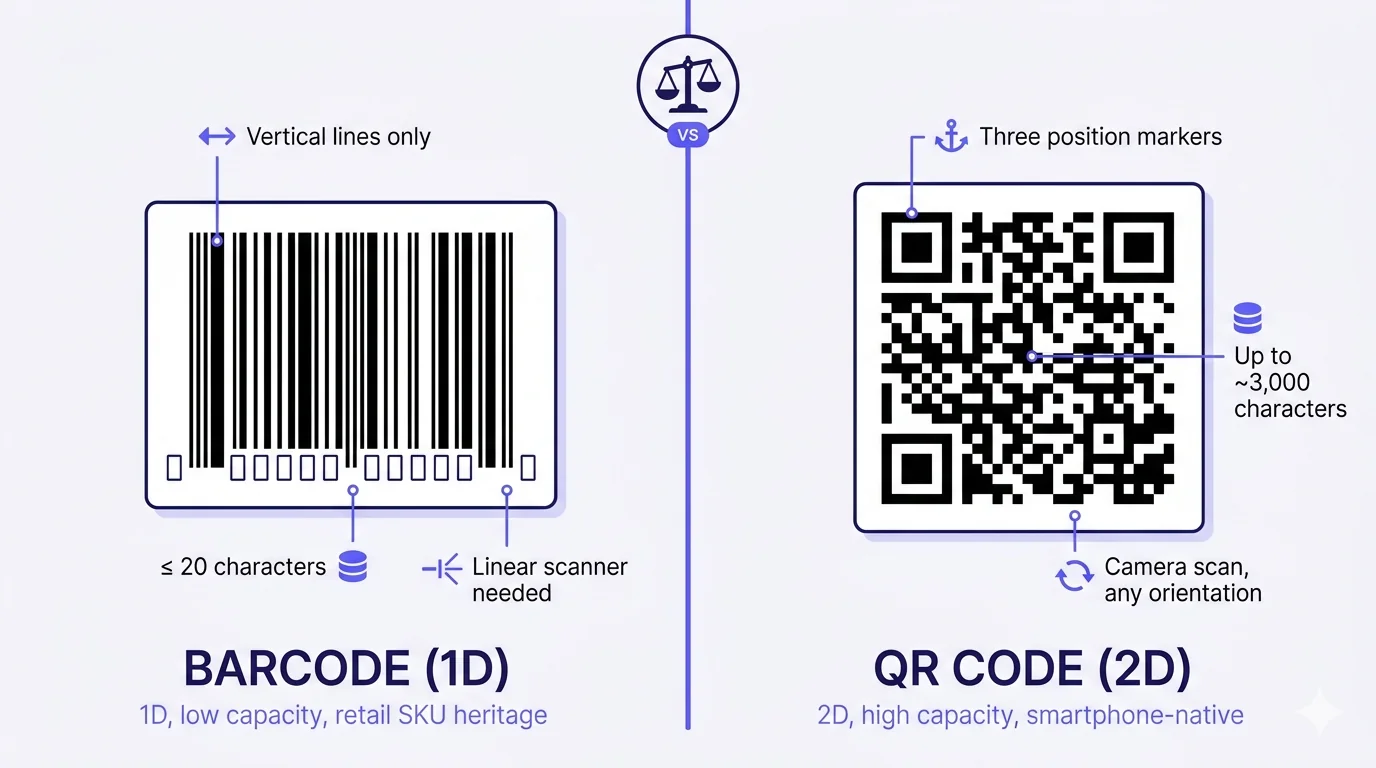
- A barcode is 1D — data encoded into the widths of vertical lines, read by a laser scanner moving across the bars in one direction.
- A QR code is 2D — data encoded into a grid of black-and-white squares, read by a camera that can interpret the pattern from any angle.
- A typical retail barcode holds ~12 digits. A typical QR code holds up to ~3,000 characters — about 250× the capacity.
- Barcodes are the right tool for fixed industrial inventory (SKU lookup, shipping labels, price tags). QR codes are the right tool for anything a consumer's phone needs to read (links, vCards, menus, payments, ticketing).
Where each came from
Barcode — invented in 1948, commercialised in 1974
The barcode was patented by Norman Joseph Woodland and Bernard Silver in 1952, inspired by a problem the supermarket industry asked Drexel University to solve: how to automate checkout. Woodland's original idea was a bull's-eye pattern — concentric circles — but the technology to scan it cheaply didn't exist yet. The horizontal-bars design came later, and the first commercial use was on a 10-pack of Wrigley's Juicy Fruit gum, scanned at a Marsh Supermarket in Troy, Ohio, on 26 June 1974. The Universal Product Code (UPC) system became the global standard for retail SKU identification, and it's been ubiquitous ever since.
The barcode was designed for one job: identify a fixed product in inventory. The data it holds — a 12-digit UPC number, or a 13-digit EAN-13 number in Europe and most of the world outside North America — is just a lookup key. The barcode doesn't carry the product's price, description, or details; those live in the retailer's database, queried by the UPC. The barcode is a pointer to a database row.
QR code — invented in 1994
The QR code was invented by Masahiro Hara at Denso Wave (a subsidiary of Toyota) in 1994 to solve a specific problem: car-parts inventory. Conventional barcodes couldn't hold enough data to identify the parts going through Toyota's manufacturing process — each barcode could carry maybe 20 characters, but the parts catalogue needed Japanese kanji, alphanumeric IDs, and manufacturing-stage codes. Hara's team designed a 2D code that could hold 200+ times the data, scan from any orientation (using the three corner position-detection patterns), and survive partial damage through built-in error correction.
QR stood for 'Quick Response' — the design priority was scan speed, achieved by the position-detection markers that let a camera lock onto the QR's orientation in milliseconds. Denso Wave released the QR-code specification royalty-free, which is the single most important business decision in the QR's history. Anyone could make a QR generator or QR scanner without paying anyone, and the standard exploded into universal use.
The QR code was designed for richer data than barcodes ever needed to carry. It's not a database lookup key — it's the data itself, or a URL that links to it.
Capacity comparison — the 250× difference
Capacity is the single most important practical difference.
- UPC barcode: 12 digits. EAN-13: 13 digits. Code 128 (used in shipping labels): up to ~80 characters depending on type.
- QR Code Version 1 (smallest): 25 numeric characters or 17 alphanumeric. QR Code Version 40 (largest commonly used): 7,089 numeric characters, 4,296 alphanumeric, 2,953 bytes of binary data, 1,817 Japanese kanji characters.
- Typical web-link QR (a short URL like https://qra.cc/abc123): 22-30 characters. Fits comfortably in a small QR pattern at Version 3 or 4.
Why this matters: a barcode can identify a product. A QR code can carry the product's URL, vCard, payment details, Wi-Fi credentials, formatted text, a chunk of JSON, even a small image encoded in base64. The capacity unlock is what made QR codes useful for everything beyond inventory tracking.
Scanning technology — laser vs camera
Barcode scanning
Barcodes are scanned by sweeping a laser line across the bars and measuring the reflected pattern of light-and-dark widths. The scanner needs to read along the bars in one direction (vertically across the bars) — if you hold the scanner sideways or upside-down, it can't read. Industrial-grade laser scanners are fast and reliable; the consumer-grade barcode scanning that phone apps do (using the camera to simulate a laser sweep) works but is slower and less reliable, especially in low light or with reflective packaging.
QR code scanning
QR codes are scanned by a camera that captures the whole 2D pattern at once, finds the three position-detection markers in the corners, derives the QR's orientation and size from those markers, then decodes the modules between them. Because the position markers are recognisable from any rotation, the QR scans from any angle — upside-down, sideways, tilted — without the user having to align it. This is what makes QR codes practical for posters, menus, and signage where the visitor's phone won't be perfectly aligned with the printed surface.
The camera-vs-laser difference is also why QR codes are smartphone-native and barcodes really aren't. Every phone with a rear camera has a perfectly capable QR scanner built into the camera app since 2017-2019. Phones can read barcodes too — but it requires a dedicated barcode-scanning app or third-party SDK, and the experience is materially less smooth than QR scanning. The infrastructure favours QR codes for consumer scanning.
Error correction — what happens when the code is damaged
Barcodes have minimal error correction. If a bar gets smudged, scratched, or partially obscured, the scanner fails. Repeat scans, reorient the package, sometimes type the UPC manually.
QR codes have built-in Reed-Solomon error correction at four levels:
- Level L (Low): ~7% of the QR can be damaged or obscured before decoding fails.
- Level M (Medium): ~15%.
- Level Q (Quartile): ~25%.
- Level H (High): ~30%.
This is why a QR with a logo placed in the centre (which obscures some modules) still scans — the error correction tolerates the obscured area. It's also why a coffee-splashed QR on a cafe placard usually still works, while a coffee-splashed barcode on a product label fails outright. For any QR that will live in an unpredictable physical environment, raise the error-correction level to Q or H during generation. The trade-off is slightly larger physical size for the same data — error correction takes up modules — but reliability is worth more than minor size compactness in most field deployments.
When to use a barcode (not a QR code)
Retail SKU and inventory
Every product sold through traditional retail has a UPC/EAN barcode on the packaging. This is the industry standard for SKU identification, with global infrastructure (GS1 organisation issues the codes, every POS in the world recognises them, every supply-chain system processes them). If you're manufacturing a physical product for retail sale, you need a UPC/EAN barcode whether you also have a QR code on the packaging or not. The barcode is mandatory infrastructure; a QR is optional value-add.
Shipping labels and logistics
Shipping labels (UPS, FedEx, DHL, regional logistics across MENA) use Code 128 and Code 39 barcodes — also 1D, also designed for laser scanners on conveyor systems and warehouse handhelds. The conveyor scanners are calibrated for 1D codes; introducing QR codes into shipping label workflow would require fleet-wide hardware upgrades. Stick with the barcode standard logistics ecosystem expects.
Healthcare and pharmaceutical
Medication labels, patient wristbands, lab specimen tubes — all use specialised 1D barcodes (Code 128, Data Matrix in some cases). These are regulatory standards built around 1D infrastructure, and switching to QR would require regulatory approval that isn't going to happen near-term. The compliance landscape is barcode-anchored.
Industrial asset tracking with fixed-position scanners
Warehouse pickers using handheld 1D scanners, manufacturing-floor part-tracking with fixed-position laser scanners, library books with their long-established barcode workflow — all use barcodes because the operational ecosystem is built around them. The scanning hardware is the constraint, not the code design.
When to use a QR code (not a barcode)
Anything consumers will scan with a phone
Restaurant menus, retail-storefront promotional links, business cards, wedding invitations, museum exhibits, posters, flyers, table tents, payment QRs, Wi-Fi sharing, vCard contact exchange, marketing campaigns, event tickets. Every consumer-facing scan use case is QR territory. Asking a consumer to use a barcode scanner is asking them to install a special-purpose app for something their phone's camera already handles natively.
Rich data beyond a database lookup
Encoding a URL, a phone number, an email address, a Wi-Fi credential, formatted contact information, calendar event details, an SMS template — all require capacity well beyond a barcode's ceiling. QR is the right tool whenever the encoded data is the destination, not just a key.
Anywhere the printed surface is exposed to wear, damage, or partial obscuration
QR's error correction means it survives the real-world abuse of restaurant table tents, outdoor signage, packaging that gets stickered or scuffed, business cards that bend in wallets. Barcodes need pristine surfaces; QRs tolerate imperfect ones.
Marketing surfaces with brand-style requirements
QR codes accept colour customisation, logo embedding in the centre, frame and corner styling. Barcodes are stuck with black-on-white verticals because their scanning depends on the specific contrast pattern. If your QR has to fit the brand's visual identity, you have design latitude that barcodes simply don't offer.
What about Data Matrix and PDF417?
Worth mentioning briefly: there are 2D code formats other than QR. Data Matrix (small square 2D code, used heavily in healthcare and pharmaceutical labelling) and PDF417 (rectangular 2D code, used on driver's licences in the US and in some shipping labels) are both real, in use, and not QR codes. They have specific use cases, mostly in regulated industries with established standards. For general-purpose 2D scanning that consumers can do with their phones, QR is the dominant standard; the others are niche.
The short answer
Barcode for fixed product identification in retail and logistics infrastructure scanned by lasers. QR code for anything a consumer's phone needs to read, anything carrying more than 20 characters of data, anything that needs to survive imperfect printed conditions, anything where brand-styled design matters. They're related, they're both machine-readable patterns, they're both useful — but they're not interchangeable. Pick the one that matches the scanning hardware your audience will actually use. For the modern world, where everyone has a smartphone camera in their pocket, that's almost always QR.
ادخل أيّ متجر بقالة في أيّ مكان في العالم ستجد كلا الاثنَين — رموز باركود على جانب كلّ علبة حبوب ورموز QR على ظهر كلّ إيصال محاسبة، على باب كلّ مطعم لقائمة الطعام، على ملصقات حواف الرفوف لروابط ترويجيّة. يتحدّث الناس عنهما بالتبادل، لكنّهما ليسا قابلَين للتبادل. هما مرتبطان — كلاهما رموز قابلة للقراءة الآليّة تضغط البيانات في نمط مطبوع — لكنّهما اخترعا لمشاكل مختلفة، يُمسحان بتقنيّات مختلفة، يحملان كمّيّات بيانات مختلفة جذريّاً، وكلّ منهما صحيح لحالات استخدام مختلفة.
هذا المقال هو الشرح النظيف. ما هو الباركود فعلاً. ما هو رمز QR فعلاً. الفروق التقنيّة والتشغيليّة. والأهمّ من ذلك — متى يجب أن تختار أحدهما على الآخر في ٢٠٢٦.
النسخة المختصرة
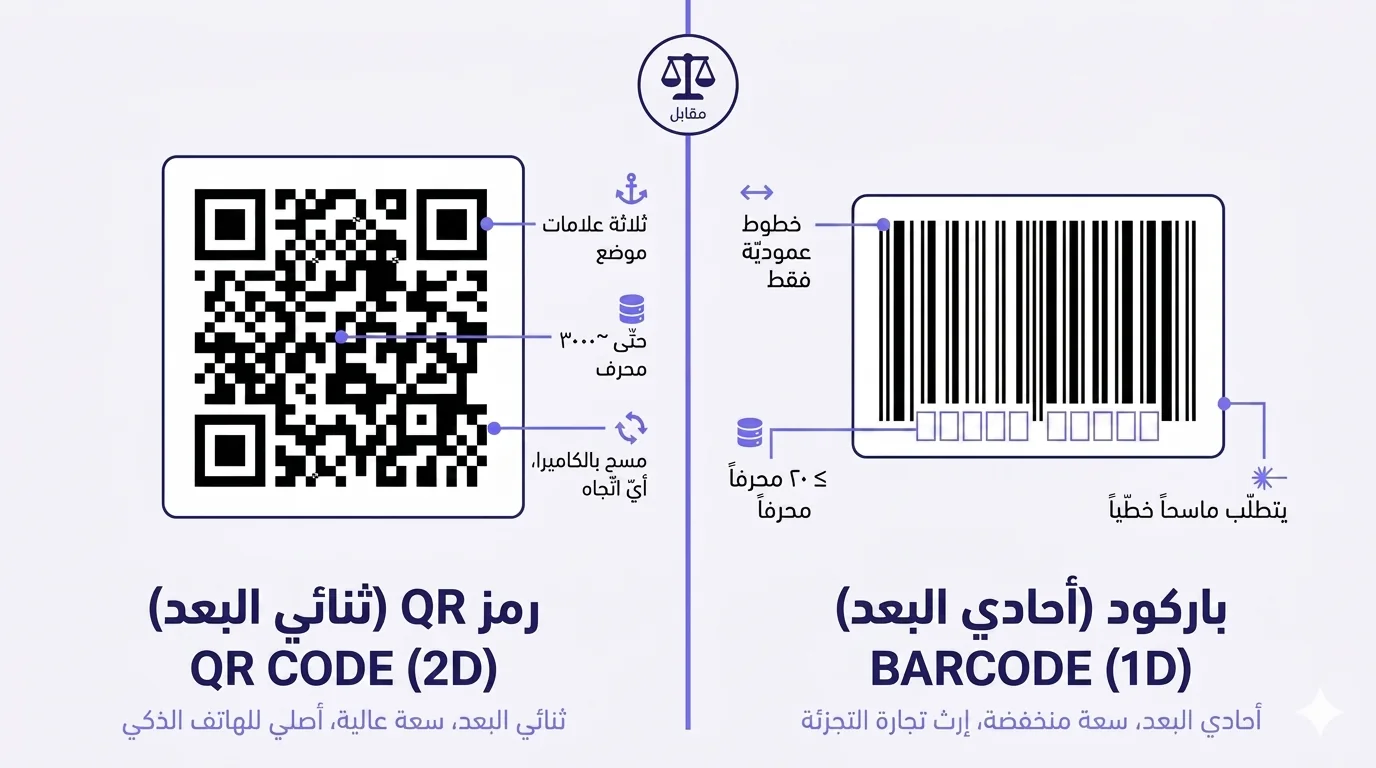
- الباركود أحادي البعد — بيانات مُرمَّزة في عرض خطوط عموديّة، يقرؤها ماسح ليزر يتحرّك عبر الخطوط في اتّجاه واحد.
- رمز QR ثنائي البعد — بيانات مُرمَّزة في شبكة من المربّعات السوداء والبيضاء، تقرؤها كاميرا تستطيع تفسير النمط من أيّ زاوية.
- باركود تجارة التجزئة النموذجي يحمل ~١٢ رقماً. رمز QR النموذجي يحمل حتّى ~٣٠٠٠ محرف — حوالي ٢٥٠ ضعف السعة.
- الباركود الأداة الصحيحة للمخزون الصناعي الثابت (البحث عن SKU، ملصقات الشحن، بطاقات الأسعار). رمز QR الأداة الصحيحة لأيّ شيء يحتاج هاتف المستهلك إلى قراءته (روابط، بطاقات تعارف، قوائم، مدفوعات، تذاكر).
من أين أتى كلّ منهما
الباركود — اخترع في ١٩٤٨، ثم تجاريّاً في ١٩٧٤
حصل نورمان جوزيف وودلاند وبرنارد سيلفر على براءة اختراع الباركود في ١٩٥٢، بإلهام من مشكلة طلبت صناعة السوبر ماركت من جامعة دريكسل حلّها: كيف تؤتمت المحاسبة. فكرة وودلاند الأصليّة كانت نمط عين الثور — دوائر متراكزة — لكنّ تقنية مسحها برخصها لم تكن موجودة بعد. جاء تصميم الخطوط الأفقيّة لاحقاً، وكان أوّل استخدام تجاري على علبة من ١٠ علب علكة Wrigley's Juicy Fruit، مُسحت في سوبر ماركت Marsh في تروي، أوهايو، في ٢٦ يونيو ١٩٧٤. أصبح نظام رمز المنتج العالمي (UPC) المعيار العالمي لتعريف SKU في تجارة التجزئة، وظلّ موجوداً في كلّ مكان منذ ذلك الحين.
صُمِّم الباركود لمهمّة واحدة: تعريف منتج ثابت في المخزون. البيانات التي يحملها — رقم UPC من ١٢ رقماً، أو رقم EAN-13 من ١٣ رقماً في أوروبا ومعظم العالم خارج أمريكا الشمالية — مجرّد مفتاح بحث. لا يحمل الباركود سعر المنتج أو وصفه أو تفاصيله؛ كلّ هذا يعيش في قاعدة بيانات تاجر التجزئة، يُبحث عنه بواسطة UPC. الباركود مؤشّر إلى صفّ قاعدة بيانات.
رمز QR — اخترع في ١٩٩٤
اخترع رمز QR ماساهيرو هارا في Denso Wave (فرع من تويوتا) في ١٩٩٤ لحلّ مشكلة محدّدة: مخزون قطع غيار السيّارات. لم تستطع رموز الباركود التقليديّة حمل بيانات كافية لتعريف القطع التي تمرّ عبر عمليّة تصنيع تويوتا — يمكن لكلّ باركود حمل ٢٠ محرفاً ربّما، لكنّ كتالوج القطع كان يحتاج إلى كانجي يابانيّة، ومعرّفات أبجديّة-رقميّة، ورموز مراحل تصنيع. صمّم فريق هارا رمزاً ثنائي البعد يستطيع حمل ٢٠٠+ ضعف البيانات، ومسح من أيّ اتّجاه (باستخدام أنماط كشف الموضع الثلاثة في الزوايا)، والنجاة من الضرر الجزئي عبر تصحيح أخطاء مدمج.
اختصار QR يعني «استجابة سريعة» — كانت أولويّة التصميم سرعة المسح، تحقّقت بعلامات كشف الموضع التي تسمح للكاميرا بإمساك اتّجاه QR في ميلّي ثوان. أصدرت Denso Wave مواصفات رمز QR بلا حقوق ملكيّة، وهو القرار التجاري الأهمّ في تاريخ QR. يستطيع أيّ شخص صنع مولّد QR أو ماسح QR دون دفع أيّ شيء لأيّ شخص، وانفجر المعيار إلى استخدام عالمي.
صُمِّم رمز QR لبيانات أغنى ممّا احتاج الباركود إلى حمله. ليس مفتاح بحث في قاعدة بيانات — هو البيانات نفسها، أو رابط يحيل إليها.
مقارنة السعة — الفرق ٢٥٠ ضعفاً
السعة هي الفرق العملي الأهمّ.
- باركود UPC: ١٢ رقماً. EAN-13: ١٣ رقماً. Code 128 (يُستخدم في ملصقات الشحن): حتّى ~٨٠ محرفاً حسب النوع.
- رمز QR إصدار ١ (الأصغر): ٢٥ محرفاً رقميّاً أو ١٧ أبجديّاً-رقميّاً. رمز QR إصدار ٤٠ (الأكبر شائع الاستخدام): ٧٠٨٩ محرفاً رقميّاً، ٤٢٩٦ أبجديّاً-رقميّاً، ٢٩٥٣ بايت من البيانات الثنائيّة، ١٨١٧ محرف كانجي ياباني.
- رمز QR رابط ويب نموذجي (رابط مختصر مثل https://qra.cc/abc123): ٢٢-٣٠ محرفاً. يتّسع بشكل مريح في نمط QR صغير بإصدار ٣ أو ٤.
لماذا يهمّ هذا: يستطيع الباركود تعريف منتج. ويستطيع رمز QR حمل رابط المنتج، أو بطاقة تعارف، أو تفاصيل الدفع، أو بيانات الواي فاي، أو نصّ منسّق، أو جزء JSON، أو حتّى صورة صغيرة مُرمّزة بـ base64. فتح السعة هو ما جعل رموز QR مفيدة لكلّ شيء يتجاوز تتبّع المخزون.
تقنية المسح — ليزر مقابل كاميرا
مسح الباركود
تُمسح رموز الباركود بمسح خطّ ليزر عبر الخطوط وقياس نمط الضوء-والظلام المنعكس. يحتاج الماسح إلى القراءة على طول الخطوط في اتّجاه واحد (عموديّاً عبر الخطوط) — إن أمسكت الماسح جانبيّاً أو مقلوباً، لا يستطيع القراءة. ماسحات الليزر الصناعيّة سريعة وموثوقة؛ المسح الاستهلاكي للباركود الذي تقوم به تطبيقات الهاتف (باستخدام الكاميرا لمحاكاة مسحة الليزر) يعمل لكنّه أبطأ وأقلّ موثوقيّة، خاصّةً في الإضاءة المنخفضة أو مع التغليف العاكس.
مسح رمز QR
تُمسح رموز QR بكاميرا تلتقط النمط ثنائي البعد كلّه دفعةً واحدة، تجد علامات كشف الموضع الثلاثة في الزوايا، تستنتج اتّجاه QR وحجمه من تلك العلامات، ثمّ تفكّ ترميز الوحدات بينها. لأنّ علامات الموضع قابلة للتعرّف من أيّ دوران، يُمسح QR من أيّ زاوية — مقلوباً، جانبيّاً، مائلاً — دون أن يضطرّ المستخدم إلى محاذاته. هذا ما يجعل رموز QR عمليّة للملصقات وقوائم الطعام واللافتات حيث لن يكون هاتف الزائر محاذياً تماماً للسطح المطبوع.
الفرق بين الكاميرا والليزر هو أيضاً السبب في أنّ رموز QR أصليّة للهاتف الذكي وأنّ الباركود ليس كذلك حقّاً. كلّ هاتف بكاميرا خلفيّة يحوي ماسح QR قادراً تماماً مدمجاً في تطبيق الكاميرا منذ ٢٠١٧-٢٠١٩. تستطيع الهواتف قراءة الباركود أيضاً — لكن يتطلّب الأمر تطبيق مسح باركود مخصّصاً أو SDK من طرف ثالث، والتجربة أقلّ سلاسة بشكل ملموس من مسح QR. البنية التحتيّة تفضّل رموز QR للمسح الاستهلاكي.
تصحيح الأخطاء — ماذا يحدث حين يتضرّر الرمز
الباركود يحوي تصحيح أخطاء ضئيلاً. إن لطخ خطّ، أو خُدش، أو حُجب جزئيّاً، يفشل الماسح. عمليّات مسح متكرّرة، إعادة توجيه العلبة، أحياناً كتابة UPC يدويّاً.
رموز QR تحوي تصحيح أخطاء Reed-Solomon مدمجاً بأربعة مستويات:
- المستوى L (منخفض): ~٧٪ من QR يمكن أن يتضرّر أو يُحجب قبل فشل فكّ الترميز.
- المستوى M (متوسّط): ~١٥٪.
- المستوى Q (ربع): ~٢٥٪.
- المستوى H (عال): ~٣٠٪.
لهذا يبقى QR مع شعار موضوع في المنتصف (الذي يحجب بعض الوحدات) يُمسح — يتسامح تصحيح الأخطاء مع المنطقة المحجوبة. وأيضاً لهذا يبقى QR ملطّخ بقهوة على لافتة مقهى يعمل، بينما يفشل باركود ملطّخ بقهوة على ملصق منتج تماماً. لأيّ QR سيعيش في بيئة فيزيائيّة لا يمكن التنبّؤ بها، ارفع مستوى تصحيح الأخطاء إلى Q أو H أثناء التوليد. المقايضة هي حجم فيزيائي أكبر قليلاً للبيانات نفسها — تصحيح الأخطاء يأخذ وحدات — لكنّ الموثوقيّة تستحقّ أكثر من اختصار حجم طفيف في معظم النشرات الميدانيّة.
متى تستخدم الباركود (لا رمز QR)
SKU تجارة التجزئة والمخزون
كلّ منتج يُباع عبر تجارة التجزئة التقليديّة لديه باركود UPC/EAN على التغليف. هذا هو المعيار الصناعي لتعريف SKU، مع بنية تحتيّة عالميّة (تصدر منظّمة GS1 الرموز، كلّ نقطة بيع في العالم تتعرّف عليها، كلّ نظام سلسلة توريد يعالجها). إن كنت تصنع منتجاً فيزيائيّاً لبيع تجارة التجزئة، فأنت بحاجة إلى باركود UPC/EAN سواء كان لديك أيضاً رمز QR على التغليف أم لا. الباركود بنية تحتيّة إلزاميّة؛ ورمز QR قيمة مضافة اختياريّة.
ملصقات الشحن واللوجستيّات
تستخدم ملصقات الشحن (UPS، FedEx، DHL، اللوجستيّات الإقليميّة عبر الشرق الأوسط) رموز Code 128 و Code 39 — أيضاً أحاديّة البعد، أيضاً مصمّمة لماسحات الليزر على أنظمة الناقلات والأجهزة المحمولة في المستودعات. ماسحات الناقلات مُعَايَرة للرموز أحاديّة البعد؛ إدخال رموز QR في تدفّق عمل ملصقات الشحن سيتطلّب ترقيات أجهزة على مستوى الأسطول. التزم بالمعيار الذي يتوقّعه نظام اللوجستيّات.
الرعاية الصحّيّة والأدوية
ملصقات الأدوية، أساور المرضى، أنابيب عيّنات المختبر — كلّها تستخدم رموز باركود متخصّصة أحاديّة البعد (Code 128، Data Matrix في بعض الحالات). هذه معايير تنظيميّة مبنيّة حول بنية تحتيّة أحاديّة البعد، والتحوّل إلى QR يتطلّب موافقة تنظيميّة لن تحدث في الأمد القريب. مشهد الامتثال مرسى بالباركود.
تتبّع الأصول الصناعيّة بماسحات موضع ثابتة
عمّال انتقاء المستودعات يستخدمون ماسحات أحاديّة البعد محمولة، تتبّع قطع أرضيّة التصنيع بماسحات ليزر موضع ثابتة، كتب المكتبات بسير عمل باركودها المُؤَسَّس منذ زمن — كلّها تستخدم الباركود لأنّ النظام التشغيلي مبني حولها. أجهزة المسح هي القيد، لا تصميم الرمز.
متى تستخدم رمز QR (لا الباركود)
أيّ شيء سيمسحه المستهلكون بهاتف
قوائم المطاعم، روابط ترويج واجهات المتاجر، بطاقات العمل، دعوات الأعراس، معروضات المتاحف، الملصقات، النشرات، حاملات الطاولات، رموز QR للدفع، مشاركة الواي فاي، تبادل بطاقات تعارف، الحملات التسويقيّة، تذاكر المناسبات. كلّ حالة استخدام مسح تواجه المستهلك هي أرض QR. أن تطلب من مستهلك استخدام ماسح باركود هو أن تطلب منه تثبيت تطبيق غرض-خاصّ لشيء تتعامل معه كاميرا هاتفه أصليّاً.
بيانات غنيّة وراء بحث قاعدة بيانات
ترميز رابط، رقم هاتف، عنوان بريد إلكتروني، بيانات واي فاي، معلومات تعارف منسّقة، تفاصيل حدث تقويم، قالب SMS — كلّها تتطلّب سعة أعلى بكثير من سقف الباركود. QR هو الأداة الصحيحة كلّما كانت البيانات المُرمَّزة هي الوجهة، لا مجرّد مفتاح.
أيّ مكان يتعرّض فيه السطح المطبوع للتلف أو الضرر أو الحجب الجزئي
تصحيح أخطاء QR يعني أنّه ينجو من الإساءة الواقعيّة لحاملات طاولات المطاعم، اللافتات الخارجيّة، التغليف الذي يُلصق أو يُخدش، بطاقات العمل التي تنحني في المحافظ. الباركود يحتاج أسطحاً مثاليّة؛ وQR يتحمّل غير المثاليّة.
أسطح تسويقيّة بمتطلّبات أسلوب علامة
رموز QR تقبل تخصيص الألوان، تضمين الشعار في المنتصف، أسلوب الإطار والزوايا. الباركود عالق بالعموديّات السوداء على الأبيض لأنّ مسحه يعتمد على نمط التباين المحدّد. إن كان رمز QR لديك يجب أن يناسب الهويّة البصريّة للعلامة، فلديك حرّيّة تصميم لا يقدّمها الباركود ببساطة.
ماذا عن Data Matrix و PDF417؟
يستحقّ الذكر باختصار: هناك صيغ رموز ثنائيّة البعد غير QR. Data Matrix (رمز ثنائي البعد مربّع صغير، يُستخدم بكثرة في وسم الرعاية الصحّيّة والأدوية) و PDF417 (رمز ثنائي البعد مستطيل، يُستخدم على رخص القيادة في الولايات المتّحدة وفي بعض ملصقات الشحن) كلاهما حقيقي، مستخدم، وليس رمز QR. لديهما حالات استخدام محدّدة، معظمها في صناعات منظَّمة بمعايير راسخة. للمسح ثنائي البعد للأغراض العامّة الذي يستطيع المستهلكون فعله بهواتفهم، QR هو المعيار المهيمن؛ والآخرون متخصّصون.
الإجابة المختصرة
الباركود لتعريف المنتجات الثابتة في بنية تجارة التجزئة واللوجستيّات الممسوحة بالليزر. رمز QR لأيّ شيء يحتاج هاتف المستهلك إلى قراءته، أو يحمل أكثر من ٢٠ محرفاً من البيانات، أو يحتاج إلى النجاة من ظروف الطباعة غير المثاليّة، أو حيث يهمّ التصميم بأسلوب العلامة. هما مرتبطان، كلاهما أنماط قابلة للقراءة الآليّة، كلاهما مفيد — لكنّهما ليسا قابلَين للتبادل. اختر الذي يطابق أجهزة المسح التي سيستخدمها جمهورك فعلاً. للعالم الحديث، حيث لدى الجميع كاميرا هاتف ذكي في جيبه، هذا تقريباً دائماً QR.
Ready to make a smarter QR?جاهز لإنشاء رمز QR أذكى؟
Sign up free — no card needed. Track every scan, edit destinations anytime.سجّل مجاناً — بدون بطاقة. تتبّع كل عملية مسح وعدّل الوجهة في أي وقت.