Are QR Codes Safe? Spotting Quishing and QR Phishing Scams in 2026هل رموز QR آمنة؟ كيف تكتشف رموز الاحتيال والتصيّد عبر QR في 2026
A QR code is just a URL container — the safety question is what URL it points to. Quishing (phishing via QR) tripled in 2025: stickers slapped over parking meters, fake login pages, mada/STC Pay scams, donation QRs around Ramadan. Here's how the four attack patterns work, the 5-step check before you tap, and how branded dynamic QRs make impersonation visible.رمز QR ليس أكثر من حاوية لرابط — وسؤال الأمان الحقيقي هو: إلى أين يقودك هذا الرابط؟ ارتفع التصيّد عبر QR («Quishing») ثلاثة أضعاف خلال 2025: ملصقات تُلصق فوق عدّادات الوقوف، صفحات تسجيل دخول مزيّفة، احتيال بأسماء «مدى» و«STC Pay»، ورموز تبرّع وهميّة حول رمضان. إليك الأنماط الأربعة للهجمات، خطوات الفحص الخمس قبل النقر، وكيف تجعل رموز QR الديناميكيّة المُعلَّمة بالعلامة التجاريّة الانتحال مرئيّاً.
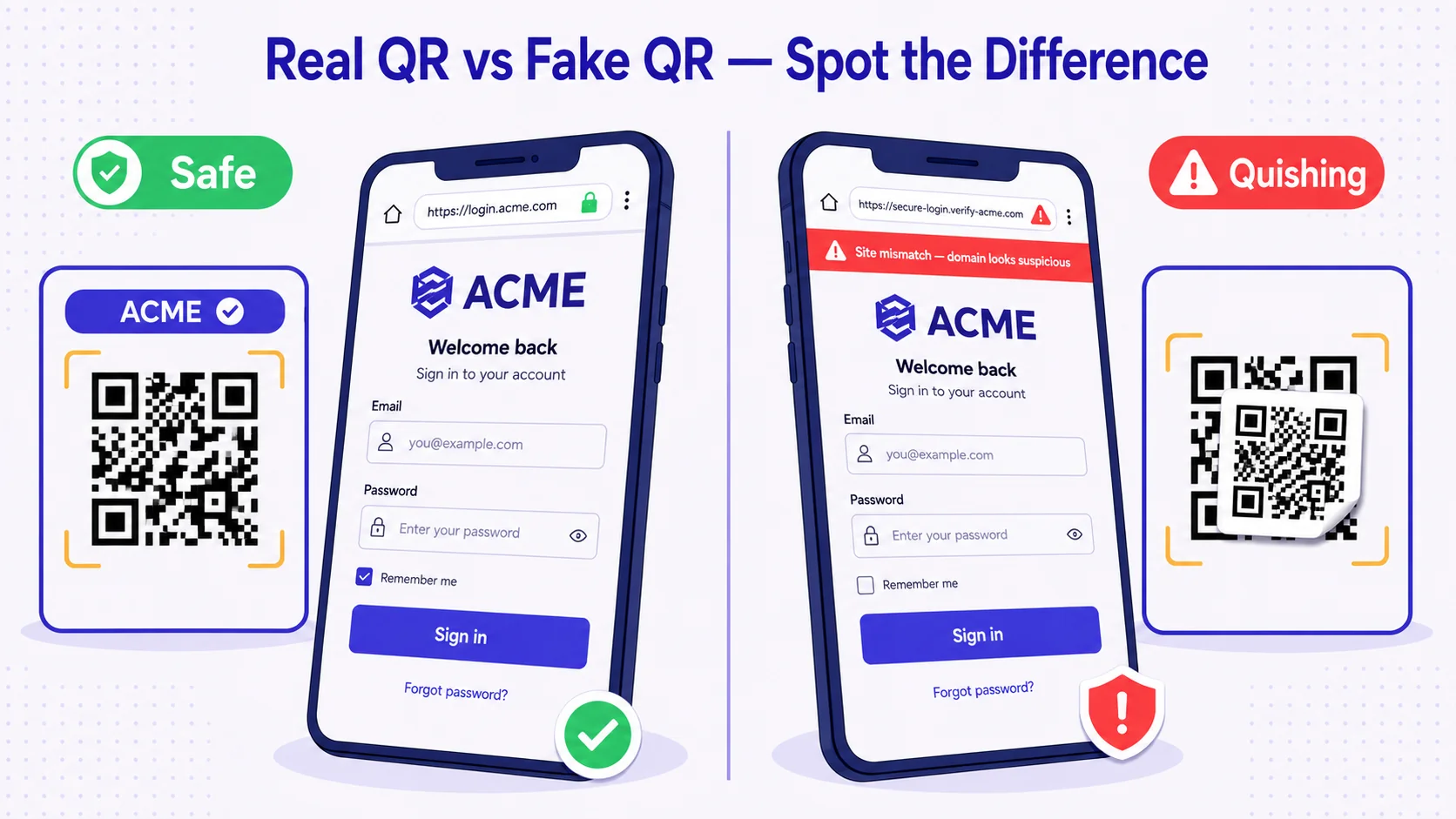
A QR code is not a thing you scan. A QR code is a URL. The black-and-white dots are a printed encoding of a string of characters — usually a web address. The phone's camera converts the dots back into the string, the operating system recognises it as a URL, and the browser opens it. That's the whole process. The QR itself is no more dangerous than reading a URL off a poster and typing it into your phone. The danger, when there is danger, lives entirely in what URL the QR points to and whether you can tell, from the QR alone, that the URL is the one the owner intended.
This piece is the safety primer. It covers what quishing (QR phishing) is, why it has become one of the fastest-growing attack categories in 2025-26, the four attack patterns to recognise, the five-step check before you tap, and what businesses can do to make impersonation of their own QRs visibly hard. The framing matters: QR safety is not a question of whether QR is a 'safe technology' (it is, in the same way that hyperlinks are a safe technology) — it's a question of whether you and your customers can verify, in two seconds, that the QR in front of you is real.
What quishing is and why it tripled in 2025
Quishing is phishing where the malicious URL is delivered via a QR code instead of a hyperlink. The user scans, the phone shows a tappable URL preview, the user taps, and the browser opens a destination designed to steal credentials, take payment, or install malware. The fact that this is structurally identical to old-style email phishing is the point — attackers have rediscovered that wrapping the URL in a QR strips most of the defences enterprises have built up over twenty years. Email gateways scan and quarantine suspicious URLs in message text; they cannot scan a URL that lives inside a JPEG of a QR code. The user is exposed in a way they would not be exposed if the same URL were a plain hyperlink.
Industry threat reports from 2025 (Egress, Proofpoint, KnowBe4, Microsoft Defender data) converged on a roughly 3× increase in QR-based phishing campaigns versus 2024. The growth is not because QR is new — QR is twenty-six years old — it is because pandemic-era QR proliferation (menus, contactless menus, contactless payments, public health check-ins) trained the entire population to scan unfamiliar QRs without thinking. The attackers followed the trained behaviour. By 2026 it is fair to assume that any printed QR in a public space — parking, transit, restaurant tables, charity signage, conference booths — is in a category where impersonation has been attempted somewhere, even if not at the specific QR in front of you.
The four attack patterns
Pattern 1 — Sticker overlay (the parking-meter attack)
The simplest and most-deployed attack. The attacker prints a malicious QR sticker and physically glues it on top of a legitimate QR in a public space. Parking meters, transit ticket machines, restaurant tables, hotel-room key cards, charity-donation posters, public-Wi-Fi check-in signs — anywhere a QR is in a place where the operator can't monitor it twenty-four hours a day. The user scans the sticker, not the original, and is directed to a fake payment page that captures card details. Atlanta, Houston, San Antonio, multiple UK cities, and reported cases in Dubai, Riyadh, Manama have all seen this pattern hit parking infrastructure between 2023 and 2025.
The visual giveaway is that the malicious sticker often sits very slightly off-centre over the original, or the sticker's paper finish differs from the surrounding signage (a glossy sticker on a matte sign, a fresh sticker on a weathered sign). The peeling edge is also common — the attacker has no way to laminate the sticker into the underlying surface, so within days or weeks the edges begin to lift.
Pattern 2 — Email-embedded QR (the corporate-bypass attack)
An attacker emails a target an image of a QR with a pretext: 'Multi-factor authentication update — scan to re-register your device.' 'Document signature pending — scan to view.' 'Mailbox quota exceeded — scan to verify.' The user scans the QR with their phone, leaving the protected work environment (where URL filtering catches suspicious links in real-time) and entering their personal phone's browser (where no such filtering exists). The destination is a credential-capture page designed to look like Microsoft 365, Google Workspace, or the corporate VPN portal.
This attack pattern is responsible for most of the 3× growth — corporate phishing campaigns that previously delivered URL links now deliver QR images precisely to bypass the URL-based defences. Security teams in 2025-26 are catching up with image-OCR-based QR extraction at the email gateway, but coverage is uneven and many organisations remain exposed.
Pattern 3 — Brand impersonation (the lookalike-domain attack)
The attacker buys a domain that visually resembles a legitimate brand domain — `mada-pay.com` instead of `mada.com.sa`, `careem-rider.com` instead of `careem.com`, `talabat-promo.com` instead of `talabat.com` — and prints QR signage that drives users to the lookalike. The destination loads a near-exact clone of the brand's real login page and asks for credentials, OTP, or payment details. Variants include homoglyph attacks (a Cyrillic 'а' replacing a Latin 'a' in the domain, indistinguishable in most browsers' URL bars at mobile size), subdomain attacks (`secure.mada-pay.com` to make the URL feel more legitimate), and lengthened-URL attacks (a URL so long that the visible portion in the phone's preview shows only the legitimate-looking start).
Pattern 4 — Crypto / payment hijack (the wallet-address swap)
QR codes used to encode crypto wallet addresses, payment-app handles, or bank-transfer details. The attacker replaces the legitimate QR in a charity poster, invoice, or merchant-table sign with one encoding their own wallet/handle. Funds flow to the attacker instead of the intended recipient. This pattern was especially prevalent around 2024-25 Ramadan donation campaigns across MENA, with cases reported in Saudi Arabia, UAE, and Egypt of fake-donation QRs appearing in mosque areas and on social-media-shared donation posters that had been retouched to swap the legitimate QR.
Why mobile users are uniquely exposed
Three structural features of the mobile experience make quishing harder to detect than email phishing.
First, the URL bar on a phone is small and truncates aggressively. A user scanning a QR on a 6-inch screen sees the first ~25 characters of the URL in the preview tooltip. `https://mada-pay.com/login/auth/...` looks fine in those 25 characters; the actual domain is `mada-pay.com`, not `mada.com.sa`, but the user cannot see far enough into the URL to verify. The desktop equivalent of this experience would show 80-100 characters; mobile shows a quarter of that.
Second, the one-tap action eliminates the pause that desktop hyperlink-hovering provides. On desktop, hovering a link reveals the destination in the status bar; the user has a one-second buffer to decide whether the destination matches expectation. On mobile, the scan-tap is a single fluid motion — the user has already committed to opening the URL by the time their thumb leaves the screen.
Third, the public-context bias. People scan QRs in places where they are not in security-aware mode — restaurants, transit, parking, retail. The mental frame is 'I'm just paying for parking', not 'I'm authenticating into a financial system that will charge my card'. The attacker exploits exactly this context mismatch.
The 5-step check before you tap
The defence is not paranoia. It is a five-second pause in which you verify five things, every time you scan a QR that will lead to anything sensitive (payment, login, account creation, file download).
- Look at the QR itself before scanning. Is there a sticker glued over another sticker? Off-centre placement, peeling edges, mismatched paper finish — all signs the QR you're about to scan is not the operator's original.
- Read the URL preview before tapping. Every modern phone (iOS Camera, Android Camera, Google Lens) shows the destination URL before you open it. Read the full domain — not just the start. Look for misspellings, extra hyphens, country-code suffix mismatches (`.com` where you expected `.com.sa`).
- Match the URL to what you expect from this brand. If a parking meter directs you to `parkpay-uae.com`, ask: is that the operator your municipality uses? If you don't know, don't tap — open the operator's app or website directly.
- Never enter credentials prompted by a QR-launched page. If a QR opens a 'log in to verify' or 'enter OTP' page, close it, open the brand's app or known website fresh, and proceed from there. Credentials should originate from your trusted launch surface, not from a URL handed to you by a sticker.
- Trust your phone's warnings. Both iOS and Android browsers flag known-malicious domains with full-screen red warnings. If the warning appears, it appeared for a reason — don't bypass it.
These five steps take fewer than ten seconds. They do not block legitimate QR use; they catch the impersonation cases. Train the habit once and it becomes automatic.
What businesses can do to make their own QRs hard to impersonate
If you operate a business that publishes QRs in public spaces, your job is to make impersonation visible to your own customers. There are four practical levers.
Brand-frame your QRs (visible verification)
A QR sitting alone in white space is the most-impersonable form factor — any sticker glued on top looks plausible. A QR sitting inside a branded frame (your logo, brand colours, the wordmark) is much harder to overlay convincingly. The attacker has to reproduce the frame as well as the QR, and any sticker glued on top either covers the frame (visibly destroying the brand identity, a giveaway) or leaves the frame visible while replacing only the dot pattern (a different giveaway — the framed QR is now a different size from the original). Branded frames are not security theatre; they raise the cost of impersonation enough that opportunistic attackers move on to easier targets.
Use dynamic QRs you can revoke
A static QR — one that hard-codes the destination URL into the printed dots — cannot be revoked once printed. If your domain is compromised or the destination is taken over, every printed copy of the QR remains active and now points to attacker-controlled infrastructure. A dynamic QR points to a short redirect URL you control (qra.cc/xyz) which itself redirects to your real destination — and the redirect target is editable in your dashboard. If you ever need to point all copies of a QR to a different destination — a takedown, a maintenance page, a notice — you can do it from a single screen without reprinting.
Monitor scan analytics for anomalies
If your parking-meter QR normally takes 200 scans a day from the local area and one morning it takes zero, that is a strong indicator that a sticker has been overlaid on the original (your QR is no longer being scanned because attackers have hidden it under their own). If your QR suddenly takes scans from a country where your business does not operate, that is a strong indicator that an image of your QR is being distributed via social media as part of a fraud campaign. Dynamic-QR platforms surface these patterns; static QRs are invisible to monitoring once printed.
Educate the customer with the QR itself
Print micro-copy next to the QR: 'Verify the URL before tapping. We will only direct you to {domain}.' This single sentence converts the user from passive scanner to active verifier and raises the bar for the attacker, who now has to either match the printed claim (very hard) or produce a sticker that visibly contradicts the surrounding signage (visibly suspicious).
MENA-specific quishing patterns to watch
Three quishing patterns are over-represented in the Gulf, Levant, and North Africa relative to global averages.
Mada / STC Pay / KNET impersonation. The high trust placed in local payment schemes (mada in Saudi Arabia, STC Pay across Saudi, KNET in Kuwait, MEEZA in Egypt) makes them a high-value impersonation target. Fake QRs claiming to be 'mada-secure', 'stcpay-promo', 'knet-refund' have appeared in 2024-25 attached to merchant-table signage, parking, and even some pharmacy storefronts. The pattern: scan, fake login, capture mada credentials + OTP, drain account in minutes.
Ramadan-themed donation scams. Charity QRs spike in volume during Ramadan, and so do impersonations. Mosque-area posters, WhatsApp-shared donation graphics, and social-media reels with embedded QRs have all been documented as vectors for fake-charity quishing during 2024 and 2025 Ramadan periods. The scam exploits the legitimate impulse to give and the visual pattern that all donation QRs look similar.
Hajj / Umrah service impersonation. With millions of pilgrims arriving in Saudi Arabia each year and operational QRs at every step of the pilgrimage logistics (transport, tents, water stations, lost-and-found), the surface for impersonation is enormous. Pilgrim-targeted scams in 2024 and 2025 included fake 'Hajj logistics check-in' QRs that captured passport details and 'official transport booking' QRs that captured card payments. The Saudi Ministry of Hajj and Umrah and the GCC anti-fraud bodies have issued repeated guidance: scan only QRs inside official, branded operator signage.
Where 2026 is heading
The trust frontier is shifting. Apple's iOS 18 and 19 expanded the URL-preview warnings shown after a QR scan, including domain-similarity heuristics that flag visually-confusable domain names. Google Chrome's mobile URL bar in 2025 added a 'highlighted registrable domain' display that bolds the meaningful part of the URL (so `mada-pay.com/login` shows `mada-pay` in bold, making the substitution easier to spot). These browser-level defences will gradually erode the most-naive quishing campaigns, in the same way that browser anti-phishing eroded URL phishing through the 2010s. They will not eliminate the attack class — attackers will move up the sophistication stack, as they always do — but they will raise the floor for the average user.
On the business side, branded dynamic QRs become the default. A printed QR without a branded frame, without a revocable destination, without analytics monitoring is increasingly considered a security gap by enterprise procurement, not just a marketing choice. By the end of 2026, expect public-sector tendering for QR-based services (parking, transit, ticketing) to specify dynamic + branded + monitored as baseline requirements.
How QRA hardens against impersonation
Every QR generated on QRA is dynamic by default — the destination is editable in your dashboard, revocable in a click, and pointed at a `qra.cc` short URL that is monitored for anomaly patterns. Branded frames are first-class: your logo, brand colours, and wordmark wrap every QR, raising the visual cost of impersonation. Scan analytics surface the metrics that matter for fraud detection — unexpected geographies, sudden volume drops at a known-public-installation QR, scan-rate anomalies. For high-risk surfaces (payment, login, sensitive document access), the platform supports password-gated destinations so that even a successfully impersonated QR redirect cannot land the user on the credential-capture page without an extra factor. Branded, dynamic, monitored — three lines of defence built in, not bolted on.
The short answer
Are QR codes safe? The QR itself is safe — it's a URL container, no more, no less. What's unsafe is scanning an unverified QR into a credential-or-payment workflow without checking five things: the physical QR for sticker overlay, the URL preview for domain mismatch, the destination against what you expect from this brand, the page's request for credentials (never enter from a QR-launched page), the phone's own warnings. Businesses make their own QRs harder to impersonate with branded frames, dynamic revocable destinations, scan analytics monitoring, and printed verification micro-copy. The technology is fine. The verification habit is what matters.
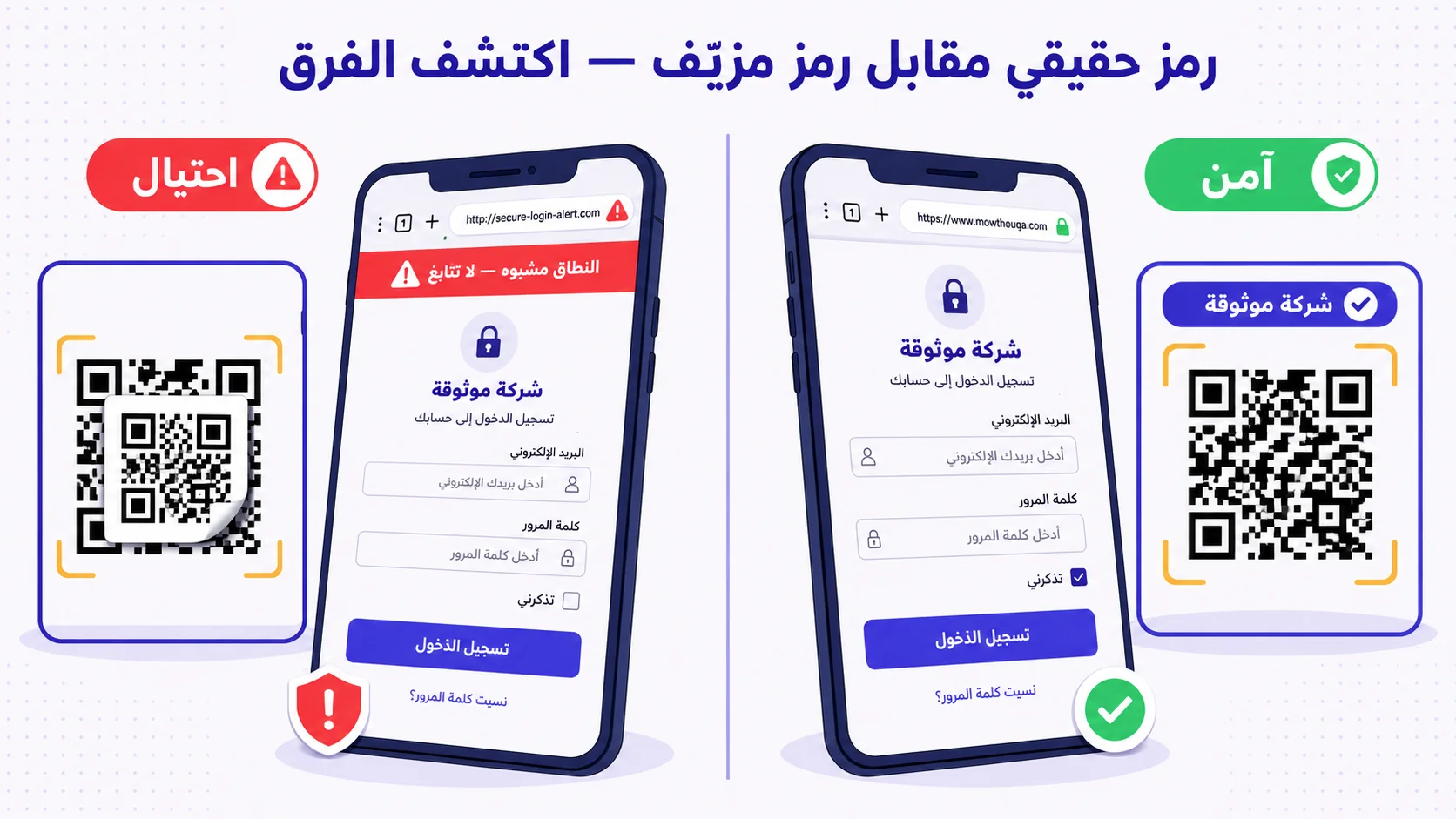
رمز QR ليس شيئاً تمسحه. رمز QR هو رابط. النقاط السوداء والبيضاء ليست سوى ترميز مطبوع لسلسلة من الأحرف — عادةً عنوان موقع إلكتروني. تحوّل كاميرا الهاتف النقاط مجدّداً إلى سلسلة الأحرف، يتعرّف نظام التشغيل عليها كرابط، ثمّ يفتحها المتصفّح. هذه هي العمليّة برمّتها. رمز QR ليس أكثر خطورة من قراءة رابط على ملصق ثمّ كتابته بنفسك في الهاتف. الخطر، حين يوجد، يكمن كلّياً في الوجهة التي يقودك إليها الرابط، وفي مدى قدرتك على التحقّق — من الرمز وحده — أنّ هذا الرابط هو فعلاً ما قصده مالك الرمز.
هذا المقال هو دليلك الموجز للأمان. سنغطّي ما هو التصيّد عبر QR (المعروف بـ«Quishing»)، ولماذا أصبح من أسرع فئات الهجمات نموّاً في 2025-2026، والأنماط الأربعة الأساسيّة التي يجب التعرّف عليها، والخطوات الخمس قبل النقر، وما يمكن للشركات فعله لجعل انتحال رموزها مرئيّاً وصعباً. النقطة المحوريّة: أمان QR ليس سؤالاً عمّا إذا كانت التقنيّة نفسها «آمنة» (هي آمنة، تماماً كما أنّ الروابط الإلكترونيّة آمنة) — بل هو سؤال عمّا إذا كان بإمكانك أنت وعملاؤك التحقّق، خلال ثانيتين، أنّ الرمز الذي أمامكم هو الرمز الحقيقي.
ما هو الـ«Quishing» ولماذا تضاعف ثلاث مرّات في 2025
الـQuishing هو تصيّد إلكتروني يكون فيه الرابط الخبيث مُسلَّماً عبر رمز QR بدلاً من رابط نصّي. المستخدم يمسح، الهاتف يعرض معاينة الرابط، المستخدم ينقر، ثمّ يفتح المتصفّح وجهة مصمّمة لسرقة بيانات الدخول أو الاستيلاء على دفعة ماليّة أو تنزيل برمجيّة خبيثة. أنّ هذا متطابق هيكليّاً مع التصيّد عبر البريد القديم هو الفكرة بالضبط — اكتشف المهاجمون أنّ تغليف الرابط داخل رمز QR يُجرّد المؤسّسات من معظم الدفاعات التي بنتها على مدى عشرين عاماً. بوّابات البريد الإلكتروني تفحص الروابط النصّيّة وتحجبها؛ لكنّها لا تستطيع فحص رابط مدفون داخل صورة رمز QR. المستخدم مكشوف بشكل لم يكن سيكون مكشوفاً به لو كان الرابط نفسه رابطاً نصّيّاً.
تقارير التهديدات السيبرانيّة لعام 2025 (من Egress و Proofpoint و KnowBe4 و Microsoft Defender) تقاربت على أنّ حملات التصيّد عبر QR زادت تقريباً ثلاثة أضعاف مقارنةً بـ2024. الزيادة ليست لأنّ QR تقنيّة جديدة — فهي عمرها ستّة وعشرون عاماً — بل لأنّ انتشار QR في عصر الجائحة (قوائم المطاعم، الدفع اللاتلامسي، تسجيل الدخول للأماكن العامّة) درّب السكّان جميعاً على مسح رموز غير مألوفة دون تفكير. تبع المهاجمون هذا السلوك المدرَّب. بحلول 2026 من المنصف افتراض أنّ أيّ رمز QR مطبوع في مكان عامّ — مواقف، نقل، طاولات مطاعم، لافتات تبرّع، أكشاك معارض — يقع في فئة جُرِّبَ فيها الانتحال في مكان ما، حتّى لو لم يكن ذلك على الرمز المحدّد أمامك.
الأنماط الأربعة للهجمات
النمط الأوّل — ملصق فوق ملصق (هجمة عدّاد الوقوف)
أبسط الهجمات وأكثرها انتشاراً. يطبع المهاجم ملصق QR خبيث ويلصقه فعليّاً فوق رمز QR شرعي في مكان عامّ. عدّادات الوقوف، آلات تذاكر النقل، طاولات المطاعم، بطاقات غرف الفنادق، ملصقات التبرّع الخيري، لافتات الواي-فاي العامّة — أيّ مكان فيه رمز QR لا يستطيع المشغّل مراقبته أربعاً وعشرين ساعة. المستخدم يمسح الملصق المُلصَق، لا الأصلي، ويُوجَّه إلى صفحة دفع مزيّفة تلتقط بيانات البطاقة. أتلانتا، هيوستن، عدد من المدن البريطانيّة، وحالات موثّقة في دبي والرياض والمنامة، جميعها شهدت هذا النمط على البنية التحتيّة للمواقف بين 2023 و2025.
العلامة البصريّة هي أنّ الملصق الخبيث غالباً ما يقع بشكل غير متمركز قليلاً فوق الأصلي، أو أنّ نوع الورق يختلف عن اللافتة المحيطة (ملصق لامع على لافتة مطفأة، أو ملصق طازج على لافتة عتيقة). الحافّة المقشّرة شائعة أيضاً — لا يستطيع المهاجم تغليف الملصق ضمن السطح الأصلي، فبعد أيّام أو أسابيع تبدأ الحواف بالانفصال.
النمط الثاني — QR مُضمَّن في بريد إلكتروني (تجاوز دفاعات الشركات)
يرسل المهاجم للمستهدف بريداً إلكترونيّاً يحوي صورة لرمز QR مع ذريعة: «تحديث التحقّق الثنائي — امسح لإعادة تسجيل جهازك». «توقيع وثيقة معلَّق — امسح للعرض». «صندوق البريد ممتلئ — امسح للتحقّق». المستخدم يمسح الرمز بهاتفه الشخصي، فيخرج من بيئة العمل المحميّة (حيث يُلتقط الرابط المشبوه في الوقت الحقيقي) ويدخل متصفّح هاتفه الشخصي (حيث لا توجد مثل هذه الفلترة). الوجهة هي صفحة لالتقاط بيانات الدخول مصمّمة لتبدو مطابقة لـMicrosoft 365 أو Google Workspace أو بوّابة VPN الشركة.
هذا النمط هو المسؤول عن معظم نموّ الـ3× — حملات التصيّد التي كانت تُسلَّم سابقاً عبر روابط نصّيّة باتت تُسلَّم عبر صور QR تحديداً للتحايل على الدفاعات المبنيّة حول الروابط. فرق الأمان في 2025-2026 تلحق بهذا التهديد عبر استخراج محتوى QR بالـOCR على بوّابة البريد، لكنّ التغطية متفاوتة وكثير من المؤسّسات لا تزال مكشوفة.
النمط الثالث — انتحال العلامة التجاريّة (هجمة النطاق المتشابه)
يشتري المهاجم نطاقاً يشبه نطاق علامة تجاريّة شرعيّة — مثلاً `mada-pay.com` بدلاً من `mada.com.sa`، أو `careem-rider.com` بدلاً من `careem.com`، أو `talabat-promo.com` بدلاً من `talabat.com` — ويطبع لافتات QR تقود إلى النطاق المتشابه. الوجهة تُحمّل نسخة شبه مطابقة لصفحة تسجيل دخول العلامة الحقيقيّة وتطلب بيانات الدخول أو رمز التحقّق أو تفاصيل الدفع. أشكال الهجوم تشمل استبدال أحرف متشابهة بصريّاً (حرف سيريلي مكان حرف لاتيني)، أو هجمات النطاق الفرعي (`secure.mada-pay.com` ليبدو الرابط أكثر شرعيّة)، أو روابط طويلة جدّاً حيث يُظهر الجزء المرئي في معاينة الهاتف بدايةً تبدو شرعيّة فقط.
النمط الرابع — اختطاف عملات رقميّة أو دفعات (استبدال عنوان المحفظة)
رموز QR تُستخدم لترميز عنوان محفظة عملات رقميّة، أو معرّف تطبيق دفع، أو تفاصيل تحويل بنكي. يستبدل المهاجم الرمز الشرعي في ملصق تبرّع، فاتورة، أو لافتة طاولة تاجر، برمز يحمل عنوانه/معرّفه. الأموال تتدفّق إلى المهاجم بدلاً من المستفيد المقصود. كان هذا النمط منتشراً بشكل خاصّ خلال حملات التبرّع في رمضان 2024-2025 في الشرق الأوسط، مع حالات موثّقة في السعوديّة والإمارات ومصر لرموز تبرّع وهميّة ظهرت في مناطق المساجد وعلى ملصقات تبرّع متداولة في وسائل التواصل بعد تعديلها لاستبدال الرمز الشرعي.
لماذا مستخدمو الهاتف مكشوفون بشكل خاصّ
ثلاث خصائص بنيويّة في تجربة الهاتف تجعل كشف الـquishing أصعب من كشف التصيّد عبر البريد.
أوّلاً، شريط الرابط على الهاتف صغير ويُختصر بقوّة. المستخدم الذي يمسح QR على شاشة ٦ بوصات يرى أوّل ٢٥ حرفاً تقريباً من الرابط في معاينة التلميح. `https://mada-pay.com/login/auth/...` يبدو طبيعيّاً في تلك الـ٢٥ حرفاً؛ النطاق الفعلي هو `mada-pay.com`، لا `mada.com.sa`، لكنّ المستخدم لا يستطيع رؤية ما يكفي من الرابط للتحقّق. المكافئ على الحاسوب سيُظهر ٨٠ إلى ١٠٠ حرف؛ الهاتف يُظهر ربع ذلك.
ثانياً، الإجراء بنقرة واحدة يُلغي الوقفة التي يوفّرها تمرير الفأرة على الروابط على الحاسوب. على الحاسوب، تمرير المؤشّر فوق الرابط يكشف الوجهة في شريط الحالة؛ يحصل المستخدم على ثانية واحدة من المهلة ليقرّر هل الوجهة تطابق توقّعه. على الهاتف، المسح والنقر حركة واحدة سلسة — المستخدم التزم بفتح الرابط قبل أن يرفع إصبعه عن الشاشة.
ثالثاً، الانحياز السياقي العامّ. يمسح الناس رموز QR في أماكن ليسوا فيها في وضع التيقّظ الأمني — مطاعم، نقل، مواقف، تجزئة. الإطار الذهني هو «أنا أدفع رسوم وقوف فقط»، لا «أنا أصادق على نظام مالي سيحاسب بطاقتي». المهاجم يستثمر تماماً هذا التباين السياقي.
الخطوات الخمس قبل النقر
الدفاع ليس الذعر. إنّه وقفة من خمس ثوان تتحقّق فيها من خمسة أشياء، في كلّ مرّة تمسح فيها رمز QR سيقودك إلى أيّ شيء حسّاس (دفع، تسجيل دخول، إنشاء حساب، تنزيل ملفّ).
- انظر إلى الرمز نفسه قبل المسح. هل ثمّة ملصق ملصوق فوق ملصق آخر؟ موضع غير متمركز، حواف مقشّرة، نوع ورق مختلف — كلّها إشارات إلى أنّ الرمز الذي ستمسحه ليس الأصلي.
- اقرأ معاينة الرابط قبل النقر. كلّ هاتف حديث (كاميرا iOS، كاميرا Android، Google Lens) يعرض الرابط قبل فتحه. اقرأ النطاق بالكامل — لا البداية فقط. ابحث عن أخطاء إملائيّة، شرطات إضافيّة، لاحقات نطاق غير متوقَّعة (`.com` حيث كنت تتوقّع `.com.sa`).
- طابق الرابط مع ما تتوقّعه من هذه العلامة. إذا قاد عدّاد وقوف إلى `parkpay-uae.com`، اسأل: هل هذا هو المشغّل الذي تستخدمه بلديّتك فعلاً؟ إن لم تكن متأكّداً، لا تنقر — افتح تطبيق المشغّل أو موقعه الرسمي مباشرةً.
- لا تُدخل أبداً بيانات دخول استدعتها صفحة فُتحت من QR. إذا فتح رمز QR صفحة «سجّل الدخول للتحقّق» أو «أدخل رمز OTP»، أغلقها، افتح تطبيق العلامة أو موقعها المعروف من البداية، وأكمل من هناك. بيانات الدخول يجب أن تنطلق من سطح إطلاق موثوق، لا من رابط سلّمه لك ملصق.
- ثق بتحذيرات هاتفك. كلٌّ من iOS وAndroid يعرضان تحذيرات حمراء بملء الشاشة على النطاقات المعروفة بالخبث. إن ظهر التحذير، فقد ظهر لسبب — لا تتجاوزه.
هذه الخطوات الخمس تستغرق أقلّ من عشر ثوان. لا تعطّل الاستخدام الشرعي للرموز؛ لكنّها تلتقط حالات الانتحال. درّب العادة مرّةً واحدة فتصبح تلقائيّة.
ما يمكن للشركات فعله لجعل رموزها صعبة الانتحال
إن كنت تشغّل عملاً تجاريّاً ينشر رموز QR في الأماكن العامّة، فعملك هو جعل الانتحال مرئيّاً لعملائك. هناك أربع أدوات عمليّة.
ضع إطار علامة تجاريّة حول رموزك (تحقّق مرئيّ)
رمز QR يقف وحيداً في فراغ أبيض هو أكثر الأشكال قابليّةً للانتحال — أيّ ملصق يُلصَق فوقه يبدو معقولاً. رمز يقف داخل إطار يحمل علامتك التجاريّة (شعارك، ألوانك، اسم الماركة) أصعب بكثير في تغطيته بإقناع. على المهاجم أن يعيد إنتاج الإطار بقدر ما يعيد إنتاج الرمز، وأيّ ملصق يُلصَق فوقه إمّا أن يغطّي الإطار (مدمّراً الهويّة بصريّاً، علامة فاضحة) أو يترك الإطار ظاهراً مع استبدال نمط النقاط فقط (علامة فاضحة أخرى — الرمز المؤطّر يصبح بحجم مختلف عن الأصلي). الإطارات الموسومة بالعلامة ليست استعراضاً أمنيّاً؛ بل ترفع تكلفة الانتحال بما يكفي لجعل المهاجم الانتهازي ينتقل إلى هدف أسهل.
استخدم رموزاً ديناميكيّة قابلة للإلغاء
الرمز الثابت — الذي يخزّن الوجهة فعليّاً في النقاط المطبوعة — لا يمكن إلغاؤه بعد الطباعة. إن اختُرق نطاقك أو استُولِيَ على وجهتك، تبقى كلّ النسخ المطبوعة فعّالة وتقود الآن إلى بنية يسيطر عليها المهاجم. الرمز الديناميكي يقود إلى رابط قصير تتحكّم به أنت (مثلاً qra.cc/xyz) ثمّ يعيد التوجيه إلى وجهتك الحقيقيّة — وهدف إعادة التوجيه قابل للتعديل من لوحة التحكّم. إذا احتجت يوماً إلى تحويل كلّ نسخ الرمز إلى وجهة أخرى — إيقاف خدمة، صفحة صيانة، إشعار — تستطيع فعل ذلك من شاشة واحدة دون إعادة الطباعة.
راقب تحليلات المسح بحثاً عن الشذوذ
إذا كان رمز عدّاد الوقوف يأخذ عادةً ٢٠٠ مسح يوميّاً من المنطقة المحلّيّة وفي صباح ما لم يأخذ أيّ مسح، فهذا مؤشّر قوي على أنّ ملصقاً قد لُصِق فوق الأصلي (رمزك لم يعد يُمسح لأنّ المهاجمين أخفوه تحت ملصقهم). إذا أخذ رمزك فجأةً مسحات من بلد لا يعمل فيه نشاطك، فهذا مؤشّر قوي على أنّ صورة رمزك تُوزَّع عبر وسائل التواصل ضمن حملة احتيال. منصّات QR الديناميكي تُظهر هذه الأنماط؛ الرموز الثابتة غير مرئيّة للمراقبة بمجرّد طباعتها.
علِّم العميل من خلال الرمز نفسه
اطبع نصّاً صغيراً بجانب الرمز: «تحقّق من الرابط قبل النقر. لن نوجّهك إلّا إلى {النطاق}». هذه الجملة الواحدة تحوّل المستخدم من ماسح سلبي إلى متحقّق نشط، وترفع العتبة على المهاجم الذي عليه الآن إمّا أن يطابق الادّعاء المطبوع (صعب جدّاً) أو ينتج ملصقاً يتعارض بشكل ظاهر مع اللافتات المحيطة (مشبوه ظاهراً).
أنماط Quishing خاصّة بمنطقتنا
ثلاثة أنماط quishing ممثَّلة بشكل أكبر في الخليج وبلاد الشام وشمال إفريقيا مقارنةً بالمتوسّط العالمي.
انتحال «مدى» و«STC Pay» و«كي نت». الثقة العالية في أنظمة الدفع المحلّيّة (مدى في السعوديّة، STC Pay عبر السعوديّة، كي نت في الكويت، MEEZA في مصر) يجعلها هدفاً ذا قيمة عالية للانتحال. ظهرت رموز مزيّفة تدّعي «mada-secure» أو «stcpay-promo» أو «knet-refund» في 2024-2025 على لافتات طاولات التجّار والمواقف وحتّى على واجهات بعض الصيدليّات. النمط: مسح، تسجيل دخول مزيّف، التقاط بيانات «مدى» مع رمز التحقّق، استنزاف الحساب في دقائق.
احتيال التبرّعات في رمضان. رموز QR الخيريّة تتصاعد في الحجم خلال رمضان، وكذلك الانتحال. ملصقات المساجد، الرسومات المتداولة على واتساب، الفيديوهات القصيرة على وسائل التواصل بالرموز المضمَّنة — جميعها وُثِّقت كقنوات لـquishing تبرّعات مزيّف خلال رمضان ٢٠٢٤ و٢٠٢٥. الاحتيال يستثمر الدافع المشروع للعطاء، والنمط البصري المتشابه لكلّ رموز التبرّع.
انتحال خدمات الحجّ والعمرة. مع وصول ملايين الحجّاج إلى السعوديّة سنويّاً ووجود رموز تشغيليّة في كلّ خطوة من خطوات الحجّ (النقل، الخيام، محطّات المياه، المفقودات)، فإنّ سطح الانتحال هائل. شملت عمليّات الاحتيال المستهدفة للحجّاج في 2024-2025 رموز «تسجيل دخول لوجستيات الحجّ» مزيّفة التقطت تفاصيل جواز السفر، ورموز «حجز نقل رسمي» التقطت دفعات بالبطاقة. وزارة الحجّ والعمرة وهيئات مكافحة الاحتيال في دول الخليج أصدرت إرشادات متكرّرة: امسح فقط الرموز ضمن لافتات المشغّل الرسمي ذات العلامة التجاريّة.
إلى أين تتّجه الأمور في 2026
حدود الثقة تتحرّك. iOS 18 وiOS 19 وسّعا تحذيرات معاينة الرابط بعد مسح QR، شاملةً اكتشاف التشابه بين النطاقات للإشارة إلى أسماء النطاقات القابلة للالتباس بصريّاً. متصفّح Chrome للهاتف في 2025 أضاف عرض «النطاق القابل للتسجيل المُبرز» الذي يُسمِّك الجزء ذا المعنى من الرابط (مثلاً `mada-pay.com/login` يُسمَّك فيه «mada-pay»، ما يجعل الاستبدال أسهل في الاكتشاف). هذه الدفاعات على مستوى المتصفّح ستُضعف تدريجيّاً حملات quishing البدائيّة، تماماً كما أضعفت دفاعات المتصفّحات تصيّد الروابط النصّيّة خلال عقد ٢٠١٠. لن تُلغي فئة الهجوم — المهاجمون سيرتقون في تعقيدهم، كما يفعلون دائماً — لكنّها ترفع الأرضيّة للمستخدم العادي.
على جانب الشركات، تصبح الرموز الديناميكيّة الموسومة بالعلامة هي الافتراضي. الرمز المطبوع بدون إطار علامة، بدون وجهة قابلة للإلغاء، بدون مراقبة تحليلات، يُعتبر بشكل متزايد فجوةً أمنيّة من قِبَل المشتريات المؤسّسيّة، لا مجرّد اختيار تسويقي. بنهاية 2026، من المتوقّع أن تشترط مناقصات القطاع العامّ للخدمات المعتمدة على QR (المواقف، النقل، التذاكر) كون الرمز ديناميكيّاً + موسوماً + مراقَباً كمتطلّبات أساسيّة.
كيف تحمي QRA من الانتحال
كلّ رمز يُولَّد على QRA هو ديناميكي افتراضيّاً — الوجهة قابلة للتعديل من لوحة التحكّم، قابلة للإلغاء بنقرة، وتمرّ عبر رابط `qra.cc` قصير مراقَب بحثاً عن أنماط الشذوذ. الإطارات الموسومة بالعلامة درجة أولى: شعارك، ألوانك، اسم الماركة تغلّف كلّ رمز، رافعةً الكلفة البصريّة للانتحال. تحليلات المسح تُبرز المؤشّرات المهمّة لاكتشاف الاحتيال — مناطق جغرافيّة غير متوقّعة، انخفاضات حجم مفاجئة في رمز معروف بأنّه في تركيب عامّ، شذوذ في معدّلات المسح. للأسطح عالية الخطورة (الدفع، تسجيل الدخول، الوصول لوثائق حسّاسة)، تدعم المنصّة وجهات محميّة بكلمة مرور بحيث لا يستطيع حتّى رمز انتحال ناجح إيصال المستخدم إلى صفحة التقاط البيانات دون عامل إضافي. موسوم، ديناميكي، مراقَب — ثلاث طبقات دفاع مبنيّة في الأساس، لا مُضافة لاحقاً.
الإجابة المختصرة
هل رموز QR آمنة؟ الرمز نفسه آمن — حاوية لرابط، لا أكثر ولا أقلّ. الذي ليس آمناً هو مسح رمز غير محقَّق ضمن مسار يطلب بيانات دخول أو دفعاً دون التحقّق من خمسة أشياء: الرمز فعليّاً بحثاً عن ملصق فوقه، معاينة الرابط بحثاً عن نطاق غير مطابق، الوجهة مقارنةً بما تتوقّعه من هذه العلامة، طلب الصفحة لبيانات الدخول (لا تُدخل أبداً من صفحة فُتحت من QR)، وتحذيرات هاتفك. الشركات تجعل رموزها أصعب في الانتحال عبر الإطارات الموسومة، الوجهات الديناميكيّة القابلة للإلغاء، مراقبة تحليلات المسح، والنصّ التحقّقي المطبوع. التقنيّة بخير. عادة التحقّق هي ما يهمّ.
Ready to make a smarter QR?جاهز لإنشاء رمز QR أذكى؟
Sign up free — no card needed. Track every scan, edit destinations anytime.سجّل مجاناً — بدون بطاقة. تتبّع كل عملية مسح وعدّل الوجهة في أي وقت.