Anatomy of a QR Code — What Every Square Actually Doesمكونات رمز QR — ماذا يفعل كل مربع؟
Finder patterns, alignment patterns, timing rows, data modules, and the quiet zone — a plain-English breakdown of every part of a QR code and why scanners need each one.أنماط التحديد، نمط المحاذاة، نمط التوقيت، وحدات البيانات، والمنطقة الهادئة — شرح مبسّط لكل جزء من رمز QR ولماذا تحتاج إليه الماسحات.
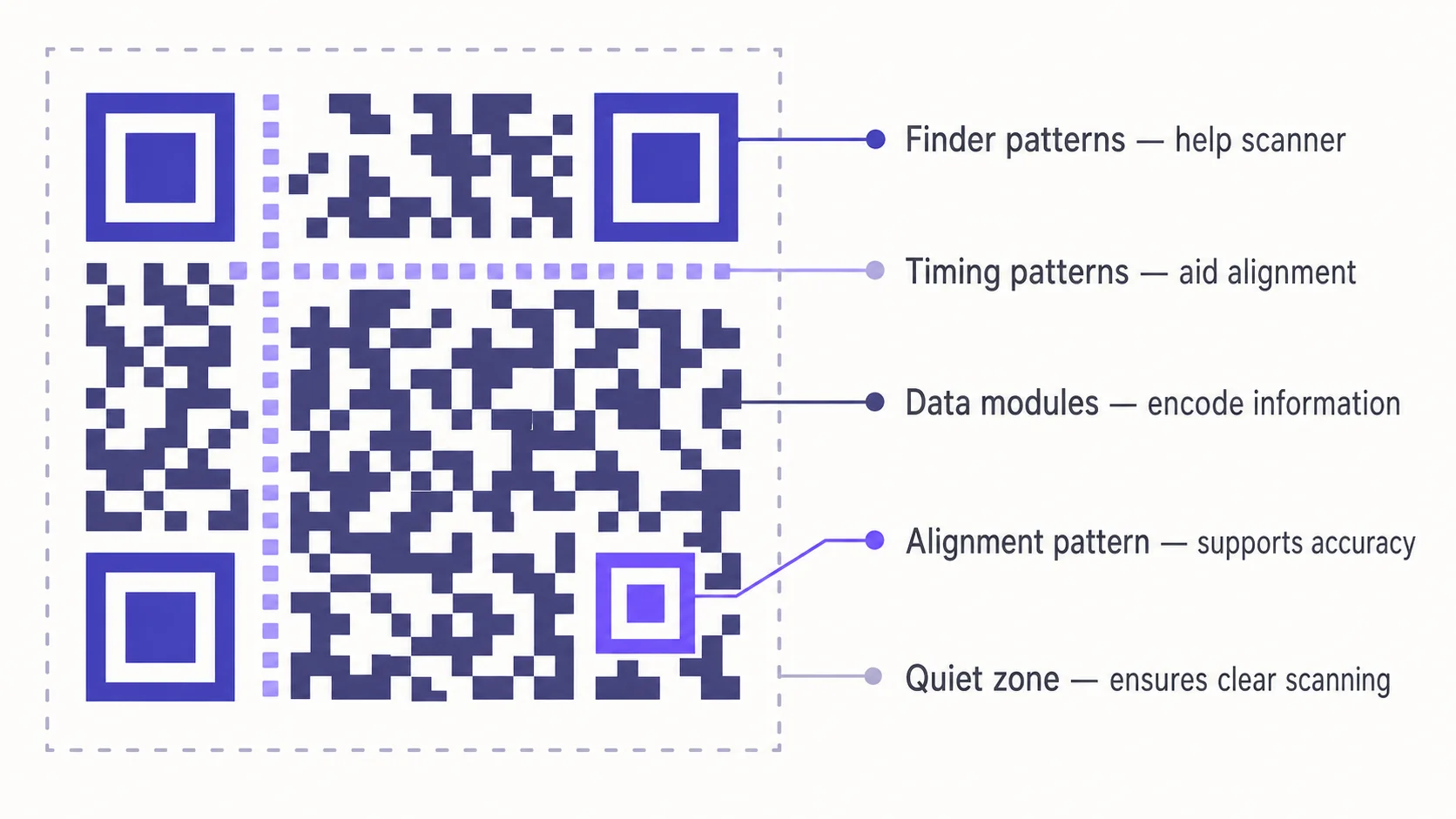
Look at any QR code closely and the pattern can seem random. It isn’t. Every black square has a job, and every functional region is doing something specific to make the code reliable. Here is a guided tour of what each part of a QR actually does — useful background for anyone designing, printing, or troubleshooting them.
Finder patterns — the three big squares in the corners
The first thing you notice on any QR are three nested squares in the top-left, top-right, and bottom-left corners. These are finder patterns. Their sole job is to tell a scanner “this is a QR code, and here’s how it’s oriented in space.”
The reason there are three corners and not four is the clever bit. With three, a scanner can figure out which corner is which by elimination — the empty corner (bottom-right) gives away the rotation. That’s why you can hold your phone at any angle, mirror the code, or scan it upside down and it still resolves correctly.
Alignment pattern — the small nested square inside the body
On QR codes larger than the smallest version, you’ll see one or more smaller nested squares scattered through the body, usually toward the bottom-right area. These are alignment patterns. They give the scanner anchor points to correct for distortion when the code is printed on a curved surface (a can, a cup, a bottle) or photographed at an angle. Without them, perspective skew would make scanning unreliable on anything that isn’t perfectly flat.
Timing pattern — the dotted line between the finders
Between any two finder patterns runs a single row and a single column of alternating black and white modules. That’s the timing pattern. It’s the metronome the scanner uses to count how many modules wide the code is. On a slightly warped print, this gives the algorithm a way to lock onto the correct grid spacing instead of guessing.
Data modules — your actual content
Everything that isn’t a finder, alignment, timing, or format/version block is data. Your URL, vCard, WiFi credentials, or whatever else you encoded gets converted into binary, padded, error-corrected, and laid out across these modules in a defined zigzag pattern. The dots aren’t decoration — each one is a 1 or a 0 in a structured grid.
Quiet zone — the invisible margin around everything
Every QR code requires a clear margin around it — at least four modules wide, with no other content inside. This is the quiet zone. Scanners use it to be sure they’ve identified the edge of the code.
Format and version information
Two short strips of modules near the finder patterns encode the QR’s metadata: which error-correction level it uses (L, M, Q, or H), which mask pattern was applied to the data, and — for larger codes — which version it is. Scanners read these first so they know how to interpret everything else.
Why this matters when you design QR codes
- You can replace data modules with brand colours, dot styles, or stylised shapes — the code still scans as long as contrast and quiet zone hold.
- You cannot stylise the finder patterns aggressively. Soft rounding usually works; coloured or fragmented finders often break scans.
- A logo placed in the centre of the code overlaps data modules. Error correction can compensate up to a limit (about 30% with the highest level), beyond which the code becomes unreliable.
- The quiet zone is the most-skipped requirement in real-world print jobs and the most common cause of “why won’t this scan?”
A quick way to test your design
After every design tweak — changing colours, embedding a logo, adjusting frame padding — scan the result with at least three different phones (typically two iPhones and an Android, or vice versa). Mobile camera apps are tolerant in different ways; what scans cleanly on one model can fail on another if you’ve pushed the design too far. QRA’s designer reruns this kind of validation in the live preview so you see issues before printing.
The short version
Finder patterns find the code. Alignment patterns correct distortion. Timing patterns set the rhythm. Data modules carry the content. The quiet zone tells the scanner where the code ends. Style the data — not the structural parts — and you’ll keep your QRs scannable while still looking like they belong to your brand.
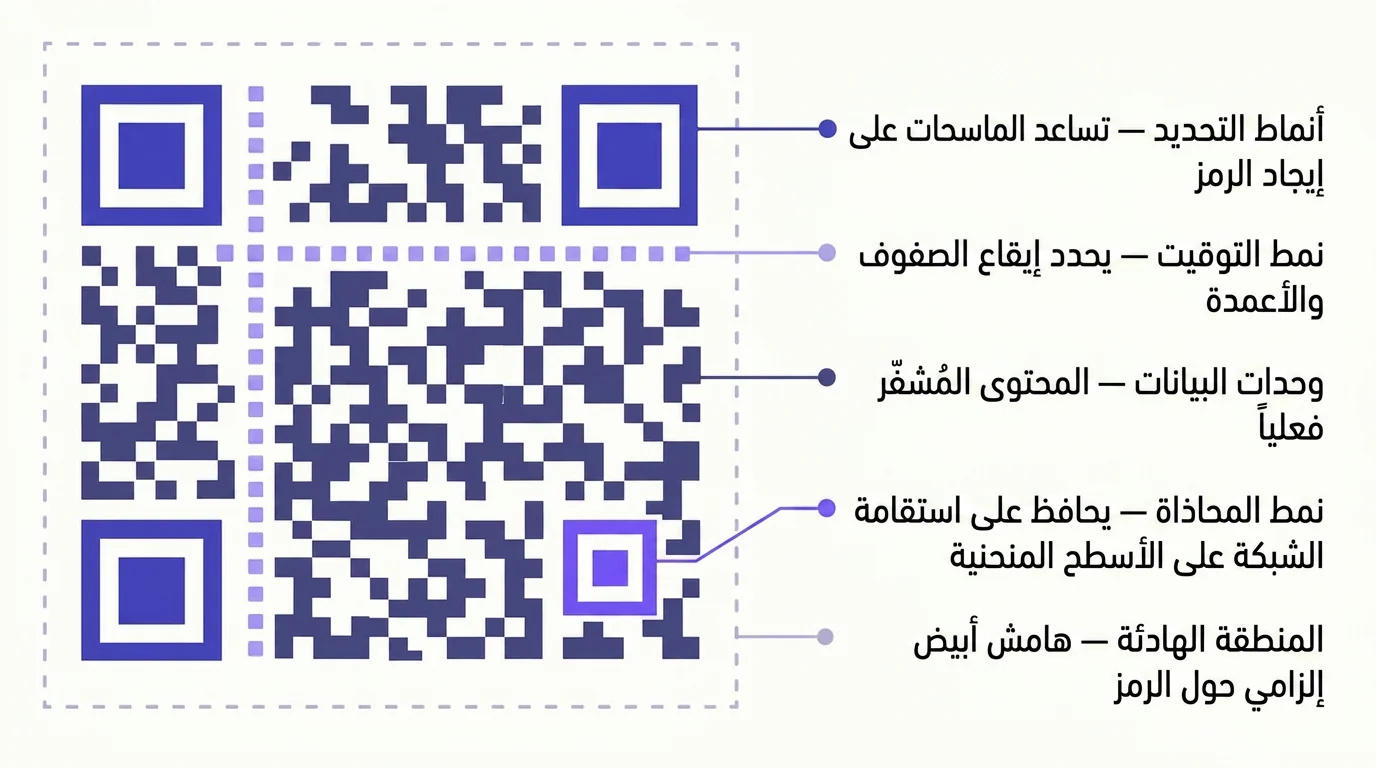
إذا نظرت إلى أي رمز QR عن قرب، قد يبدو النمط عشوائياً. وهو ليس كذلك. كل مربع أسود له وظيفة، وكل منطقة من المناطق الوظيفية تؤدي دوراً محدداً يجعل الرمز موثوقاً. في ما يلي جولة موجّهة في ما يفعله كل جزء من رمز QR — معلومات مفيدة لكل من يصمّمه أو يطبعه أو يحاول حل مشكلاته.
أنماط التحديد — المربعات الكبيرة الثلاثة في الزوايا
أول ما تلاحظه في أي رمز QR هو ثلاثة مربعات متداخلة في الزاوية العلوية اليسرى، والعلوية اليمنى، والسفلية اليسرى. هذه أنماط التحديد. وظيفتها الوحيدة أن تُخبر الماسح أن “هذا رمز QR، وهذا اتجاهه في الفضاء”.
السبب في أنها ثلاث زوايا لا أربع هو الجزء الذكي. بثلاث زوايا يستطيع الماسح أن يستنتج أيها أي بالاستبعاد — فالزاوية الفارغة (السفلية اليمنى) تكشف الدوران. ولهذا تستطيع أن تمسك هاتفك بأي زاوية، أو تعكس الرمز، أو تمسحه مقلوباً، ومع ذلك يُقرأ بشكل صحيح.
نمط المحاذاة — المربع الصغير داخل جسم الرمز
في رموز QR الأكبر من أصغر إصدار، ترى مربعاً صغيراً متداخلاً أو أكثر موزّعة داخل الرمز، عادة قرب المنطقة السفلية اليمنى. هذه أنماط المحاذاة. تمنح الماسح نقاط ارتكاز ليصحّح التشوّه عندما يُطبع الرمز على سطح منحنٍ (علبة، كوب، قارورة) أو يُلتقط بزاوية. بدونها، يجعل الانحراف المنظوري المسح غير موثوق على أي سطح ليس مستوياً تماماً.
نمط التوقيت — الخط المنقّط بين أنماط التحديد
بين أي اثنين من أنماط التحديد يمتدّ صف واحد وعمود واحد من الوحدات السوداء والبيضاء المتناوبة. هذا هو نمط التوقيت. وهو الميزان الذي يستخدمه الماسح ليعدّ كم وحدة عَرض الرمز. على مطبوع منحرف قليلاً، يمنح هذا الخوارزمية وسيلةً لتثبيت تباعد الشبكة الصحيح بدلاً من التخمين.
وحدات البيانات — المحتوى الفعلي
كل ما ليس نمط تحديد أو محاذاة أو توقيت أو معلومات صيغة/إصدار، هو بيانات. الرابط أو بطاقة التعارف أو بيانات الواي فاي أو أي شيء آخر قمت بتشفيره يتحوّل إلى ثنائي، ثم يُحشى ويُضاف إليه تصحيح أخطاء، ثم يُرتّب على هذه الوحدات بنمط زجزاج محدد. النقاط ليست زخرفة — كل واحدة منها 0 أو 1 في شبكة منظّمة.
المنطقة الهادئة — الهامش غير المرئي حول كل شيء
كل رمز QR يستلزم هامشاً صافياً حوله — لا يقلّ عن أربع وحدات عرضاً، ولا يحوي أي محتوى آخر. هذه هي المنطقة الهادئة. يستخدمها الماسح ليتأكد أنه عرف حافة الرمز فعلاً.
معلومات الصيغة والإصدار
شريطان قصيران من الوحدات قرب أنماط التحديد يحتويان بيانات تعريف الرمز: أي مستوى من تصحيح الأخطاء يستخدم (L أو M أو Q أو H)، وأي نمط قناع طُبّق على البيانات، وفي الرموز الأكبر، أي إصدار هو. يقرأ الماسح هذه أولاً ليعرف كيف يفسّر بقية الرمز.
لماذا يهمّك ذلك عند تصميم QR
- تستطيع استبدال وحدات البيانات بألوان علامتك التجارية وأنماط نقاط وأشكال مزخرفة — وسيبقى الرمز قابلاً للمسح ما دام التباين والمنطقة الهادئة محفوظَين.
- لا تستطيع تنميق أنماط التحديد بشكل عدواني. التدوير الخفيف يصلح عادةً، أما الأنماط الملوّنة أو المجزّأة فتكسر المسح غالباً.
- الشعار الموضوع في وسط الرمز يتداخل مع وحدات البيانات. يستطيع تصحيح الأخطاء التعويض حتى حدّ ما (نحو 30٪ بأعلى مستوى)، وما بعد ذلك يصبح الرمز غير موثوق.
- المنطقة الهادئة هي الشرط الأكثر تجاهلاً في مطابع العالم الحقيقي، والسبب الأشيع لسؤال “لماذا لا يُقرأ هذا الرمز؟”
طريقة سريعة لاختبار تصميمك
بعد كل تعديل في التصميم — تغيير لون، إدراج شعار، تعديل هامش الإطار — امسح النتيجة بثلاثة هواتف مختلفة على الأقل (عادةً اثنان iPhone وواحد Android، أو العكس). تطبيقات الكاميرا في الموبايل تتسامح بطرق مختلفة، وما يُمسح بنظافة على طراز قد يفشل على آخر إذا دفعت التصميم بعيداً. مصمّم QRA يجري هذا النوع من التحقق مباشرة في المعاينة الحيّة، فترى المشاكل قبل أن تطبع.
الخلاصة بإيجاز
أنماط التحديد تجد الرمز. أنماط المحاذاة تصحّح التشوّه. نمط التوقيت يضبط الإيقاع. وحدات البيانات تحمل المحتوى. والمنطقة الهادئة تخبر الماسح أين ينتهي الرمز. صمّم البيانات لا المكوّنات البنيوية، يبقَ رمزك قابلاً للمسح ويتشبّه بعلامتك التجارية في الوقت ذاته.
Ready to make a smarter QR?جاهز لإنشاء رمز QR أذكى؟
Sign up free — no card needed. Track every scan, edit destinations anytime.سجّل مجاناً — بدون بطاقة. تتبّع كل عملية مسح وعدّل الوجهة في أي وقت.