How to Edit a QR Code After Printing (And Why Most Can't)كيف تُعدّل رمز QR بعد الطباعة (ولماذا لا تستطيع معظم الرموز)
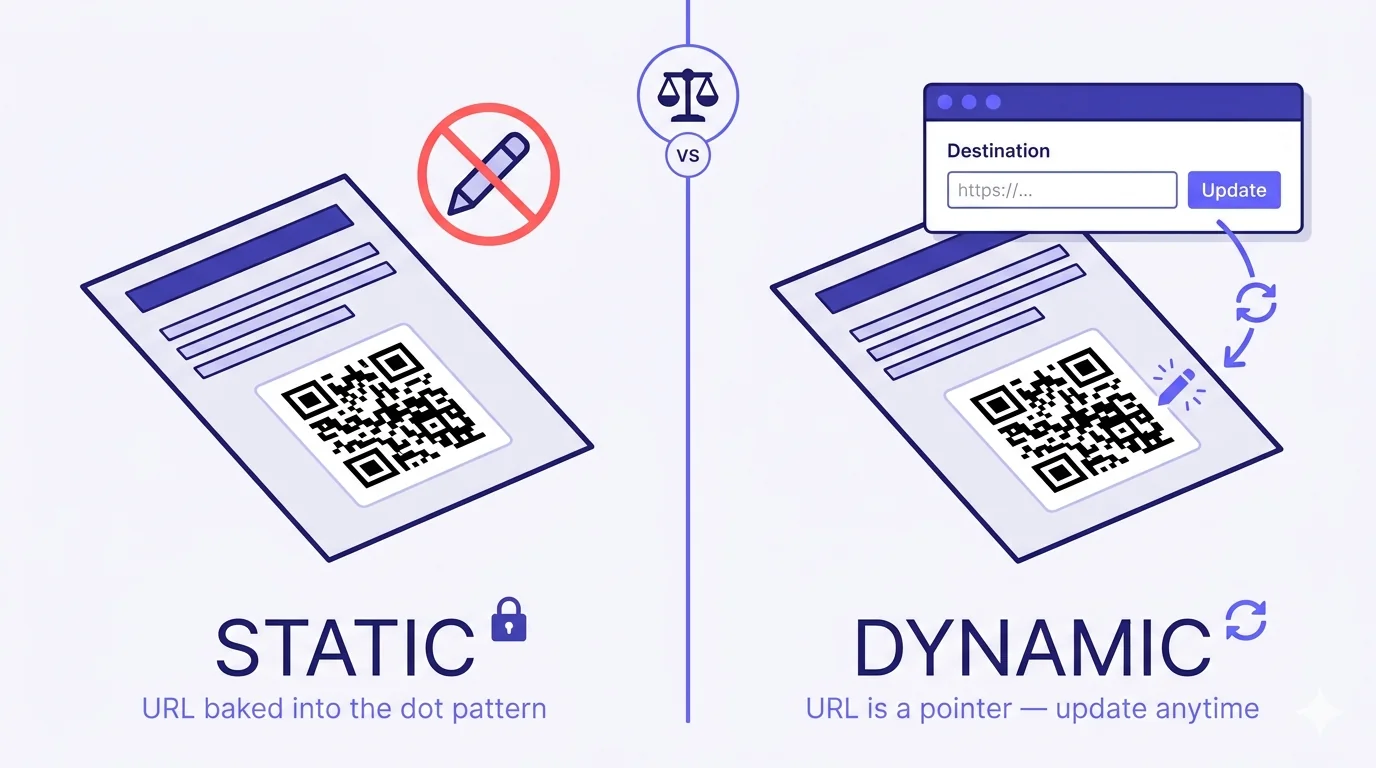
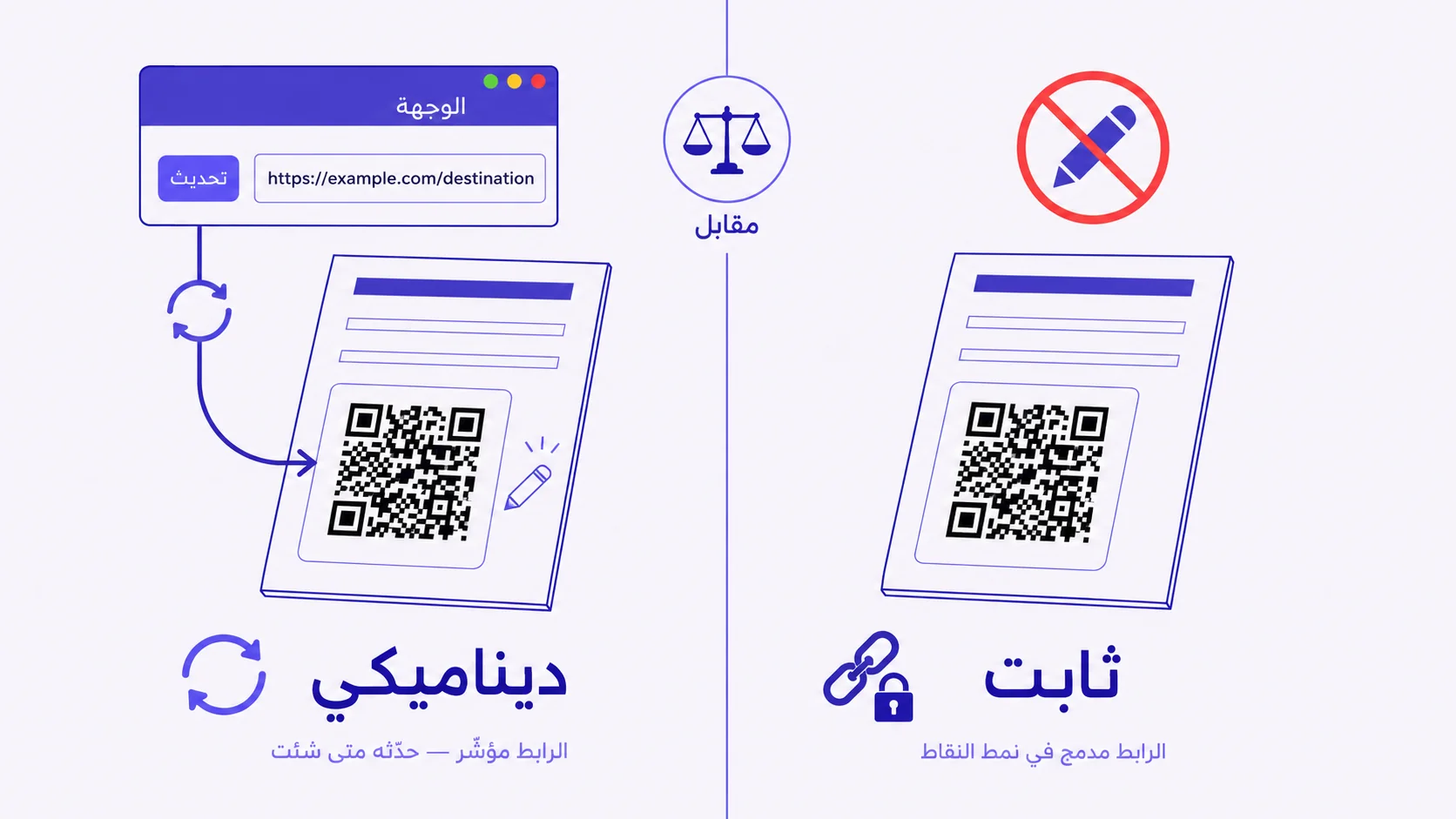
If your printed QR code points to the wrong place, the answer depends on one thing: did you generate it as a static or a dynamic QR? Static QRs cannot be edited — the URL is baked into the dot pattern. Dynamic QRs can be re-pointed indefinitely. Here's how to tell which one you have, what your options are if you're stuck with a static, and how to never be stuck again.إذا كان رمز QR المطبوع يشير إلى المكان الخاطئ، فالجواب يعتمد على شيء واحد: هل ولّدته كرمز ثابت أم ديناميكي؟ الرموز الثابتة لا يمكن تعديلها — الرابط مدمج في نمط النقاط. أمّا الرموز الديناميكيّة فيمكن إعادة توجيهها إلى الأبد. إليك كيف تعرف أيّ نوع تملك، ما خياراتك إن كنت عالقاً مع رمز ثابت، وكيف لا تعلق مرّة أخرى.
Sooner or later, every QR code points to the wrong place. The URL changed. The phone number switched. The PDF moved. The campaign ended. The Instagram handle rebranded. The menu got a redesign and a new URL slug. And the QR is already on five thousand printed menus, three hundred yard signs, or the back of a business card you handed out for six months. So: can you edit a QR code after it's been printed?
The answer comes down to a single distinction that almost no one explains clearly when generating their first QR: was it created as a static QR or a dynamic QR? Static QRs cannot be edited — the destination URL is mathematically encoded into the dot pattern itself, so changing the URL would require changing the dots, which would require reprinting. Dynamic QRs can be re-pointed indefinitely, because the dot pattern encodes a redirect URL that resolves through a server you control, and the server can send the visitor anywhere you tell it to.
How to tell which one you have
If you generated your QR through a free 'QR code generator' website that asked for nothing more than a URL and gave you an image back instantly, with no account creation, no dashboard, no analytics — it was almost certainly a static QR. The URL you typed is what got encoded into the dots. There's nothing to log into and nothing to change.
If you generated your QR through a service that required you to create an account, gave you a dashboard, showed you scan analytics, or let you change the destination after the fact — that's a dynamic QR. The dot pattern encodes a short URL on the service's domain (something like qra.cc/abc123), which redirects to whatever destination you set. Change the destination in the dashboard; the printed QR still works, but now it points wherever you just told it to.
A practical test: open the QR's image on a desktop and use any 'decode QR' web tool (or your phone camera) to see the raw URL it encodes. If the URL is your final destination (your actual website, your actual PDF, your actual menu page), it's static. If the URL is something like a short, opaque-looking redirect — a service's domain plus a random string — it's dynamic.
If it's static: you have three options, all imperfect
Option 1 — Reprint
Reissue the QR with the corrected destination, reprint whatever the QR is on, and replace every copy in the field. For a single business card you forgot to send out, this is trivial. For a thousand printed menus distributed to 40 restaurants, it's a budget conversation. This option is mostly about admitting the cost and moving on.
Option 2 — Redirect the URL itself, not the QR
If the URL encoded in the static QR is a domain you control, you can sometimes redirect that URL on the server side without touching the QR at all. The QR still encodes example.com/old-menu, but you configure your web server (or DNS, or CMS) to 301-redirect that URL to example.com/new-menu. The dot pattern doesn't change; the destination behind it effectively does. This only works if you control the domain — which is often the case for first-party links (your own website) but never for third-party links (a Google Form, a Calendly slot, a Spotify playlist, anyone else's URL).
Option 3 — Stick a new QR over the old one
For physical surfaces that aren't reprintable but are still in use, ordering a small batch of replacement stickers with the corrected QR and applying them over the old one is sometimes the only path. It works for menus, yard signs, posters, and packaging — anywhere you can physically reach the existing QR. It does not work for business cards already in someone else's wallet, or any surface that's no longer in your possession.
If it's dynamic: editing is a 30-second job
Log into the service that generated the QR. Find the QR in your dashboard. Edit the destination field. Save. The change propagates instantly — within a second or two, every scan of every printed copy of that QR will redirect to the new destination. No reprint. No sticker overlay. No DNS surgery. The visitor experience is identical to the old destination; only the destination changes.
A few practical notes:
- Test the new destination before you save. Open the URL directly in a browser; confirm the page loads, the content is correct, and there's no broken-link redirect chain. Then save.
- Some services let you schedule a destination change for a future date — useful for seasonal campaigns where the QR rotates through Ramadan, Eid, and Hajj destinations on known dates. If yours doesn't, set a calendar reminder and do it manually.
- Keep a log. If you change destinations frequently, scan-analytics make a lot more sense when you can correlate a drop in conversion with the day you swapped the destination URL.
- Watch the redirect chain. If your new destination itself contains redirects (the new page redirects to a deeper page, which redirects to the final destination), you're stacking latency. Point the QR at the final URL directly when possible.
What 'editing' a QR actually means — the technical detail
It helps to understand exactly what's happening when you 'edit' a dynamic QR, because a few things people assume turn out to be wrong.
What you're editing is a database row on the service's backend that says 'when someone scans short code XYZ, redirect them to URL Z'. The QR image is unchanged. The dot pattern is unchanged. The short URL the dots encode is unchanged. The only thing that changes is the destination column in a database row, which the redirect server reads on every scan. You're not editing the QR; you're editing where the QR's pointer points to. That's why the printed surface keeps working — the pointer is the same; the address it points to is what moved.
Two corollaries fall out of this. First: if the service that owns the short-URL domain ever shuts down, your dynamic QRs all break, because the redirect server is gone. Pick a service you trust to be around. Second: changing the destination is functionally a server-side redirect, which means it inherits all the properties of an HTTP redirect — search engines see it, browsers cache it briefly, edge networks cache it, and any analytics referrer chain reflects it. None of these usually matter at the consumer-marketing scale, but they exist.
Other things you can edit (and a few you can't)
Can edit on dynamic QRs:
- The destination URL — the obvious one.
- The pre-filled message if the QR points to WhatsApp wa.me links — change the message by changing the URL parameter.
- The destination type — you can swap a QR from pointing to a URL to pointing to a vCard, a Wi-Fi credential, or a PDF, on most services.
- The campaign metadata (name, tags, organisation, folder) without affecting the QR itself.
- Sometimes the design — some services let you change colors, frame, and logo of the QR image after generation, as long as you re-export and reprint the design. The dot pattern stays the same.
Cannot edit (on either static or dynamic):
- The dot pattern itself, once printed. You can regenerate a new QR with the same destination at a different size or error-correction level, but the physical printed pattern is fixed.
- The error-correction level after generation — if your printed QR has lower error correction than you need (a logo got placed where it obscured too many modules, for example), you have to regenerate at a higher EC level and reprint.
- The physical material the QR is printed on, obviously — though you can sticker over it.
- Whether scan analytics retroactively existed — if you generated a static QR last year and now wish you had analytics, the historical scans are lost. Future scans, after migrating to a dynamic QR, will be tracked from that point forward.
The right time to choose dynamic over static
If you remember nothing else: any QR going on a printed surface that you can't easily replace should be dynamic. Menus, business cards, packaging, signage, yard signs, posters, flyers, branded merchandise, vehicle wraps, billboards, museum labels, conference badges, real-estate displays, restaurant table tents. Anything where the printed surface costs more than five dollars to replace per unit, or where the units have been distributed beyond your physical possession.
Static QRs are fine for: a temporary in-house display you'll throw out next week, a digital-only QR you'll render in a presentation and never print, a one-shot direct link to a permanent URL you absolutely will never change (a homepage of a domain you've owned for ten years, perhaps). Outside those narrow cases, dynamic is the default — and the small ongoing cost of a dynamic-QR service is invisibly cheaper than the eventual cost of reprinting.
How QRA handles this
Every QRA QR is dynamic by default. Generate one, point it anywhere — a URL, a PDF, a Wi-Fi credential, a WhatsApp chat, a vCard, an event page. Then change the destination from the dashboard whenever you want, as many times as you want, forever. The dot pattern in the printed QR never changes; the destination always can. Scan analytics — country, device, time, referrer — are captured automatically and survive destination changes (you can see exactly when you flipped destinations and how it affected scan volume). And because everything lives in one workspace with folders and tags, a year's worth of QRs across hundreds of physical surfaces stays organised even when your team turns over.
The short answer
Static QRs cannot be edited after printing. Dynamic QRs can be edited forever. The dot pattern is identical in both cases; the difference is whether the URL is baked in or whether it's a pointer to an editable destination. If you're about to print, choose dynamic. If you've already printed a static and need to fix it, your only options are reprint, redirect the underlying URL (if you control the domain), or sticker over the old one. The next QR you create should be dynamic — and then this conversation never has to happen again.
عاجلاً أم آجلاً، كلّ رمز QR يشير إلى المكان الخاطئ. تغيّر الرابط. تبدّل رقم الهاتف. انتقل ملفّ PDF. انتهت الحملة. تغيّرت هويّة حساب إنستغرام. أُعيد تصميم القائمة بمسار رابط جديد. والرمز موجود بالفعل على خمسة آلاف قائمة مطبوعة، أو ثلاثمئة لافتة فناء، أو ظهر بطاقة عمل وزّعتها لستّة أشهر. فالسؤال: هل يمكنك تعديل رمز QR بعد طباعته؟
الجواب يعود إلى تمييز واحد لا يشرحه أحد بوضوح تقريباً حين يولّد أوّل رمز له: هل أُنشئ كرمز ثابت أم ديناميكي؟ الرموز الثابتة لا يمكن تعديلها — رابط الوجهة مُشفَّر رياضيّاً في نمط النقاط نفسه، لذا تغيير الرابط يتطلّب تغيير النقاط، الذي يتطلّب إعادة الطباعة. أمّا الرموز الديناميكيّة فيمكن إعادة توجيهها إلى الأبد، لأنّ نمط النقاط يُشفّر رابطاً للتحويل يعمل عبر خادم تتحكّم به، والخادم يستطيع إرسال الزائر إلى حيث تأمره.
كيف تعرف أيّ نوع تملك
إن ولّدت رمزك عبر موقع «مولّد QR» مجّاني لم يطلب منك سوى رابط وأعطاك صورة فوراً، دون إنشاء حساب أو لوحة تحكّم أو تحليلات — فهو على الأرجح رمز ثابت. الرابط الذي كتبته هو ما شُفِّر في النقاط. لا يوجد ما تسجّل دخوله، ولا ما تغيّره.
إن ولّدت رمزك عبر خدمة طلبت منك إنشاء حساب، وأعطتك لوحة تحكّم، وعرضت لك تحليلات مسح، أو سمحت لك بتغيير الوجهة لاحقاً — فهذا رمز ديناميكي. نمط النقاط يُشفّر رابطاً مختصراً على نطاق الخدمة (شيئاً مثل qra.cc/abc123)، يُعيد التوجيه إلى أيّ وجهة تحدّدها. غيّر الوجهة في لوحة التحكّم؛ يبقى الرمز المطبوع يعمل، لكنّه الآن يشير إلى حيث أمرته للتوّ.
اختبار عملي: افتح صورة الرمز على جهاز مكتبي واستخدم أيّ أداة ويب «فكّ ترميز QR» (أو كاميرا هاتفك) لرؤية الرابط الخام الذي يُشفّره. إن كان الرابط هو وجهتك النهائيّة (موقعك الفعلي، ملفّ PDF الفعلي، صفحة قائمتك الفعليّة)، فهو ثابت. إن كان شيئاً مثل تحويل مختصر يبدو غامضاً — نطاق خدمة مع سلسلة عشوائيّة — فهو ديناميكي.
إن كان ثابتاً: لديك ثلاثة خيارات، كلّها غير مثاليّة
الخيار ١ — أعد الطباعة
أعد إصدار الرمز بالوجهة المصحّحة، أعد طباعة كلّ ما عليه الرمز، واستبدل كلّ نسخة في الميدان. لبطاقة عمل واحدة نسيت إرسالها، هذا أمر تافه. لألف قائمة طعام مطبوعة موزّعة على ٤٠ مطعماً، فهو محادثة ميزانيّة. هذا الخيار في معظمه يتعلّق بقبول التكلفة والمضيّ قدماً.
الخيار ٢ — أعد توجيه الرابط نفسه، لا الرمز
إن كان الرابط المُشفَّر في الرمز الثابت نطاقاً تتحكّم به، يمكنك أحياناً إعادة توجيه ذلك الرابط من جانب الخادم دون لمس الرمز إطلاقاً. يبقى الرمز يُشفّر example.com/old-menu، لكنّك تضبط خادم الويب (أو DNS، أو نظام إدارة المحتوى) لإعادة توجيه ٣٠١ لذلك الرابط إلى example.com/new-menu. نمط النقاط لا يتغيّر؛ الوجهة خلفه تتغيّر فعليّاً. هذا يعمل فقط إن كنت تتحكّم بالنطاق — وهو الحال غالباً للروابط من الطرف الأوّل (موقعك الخاصّ) لكنّه ليس أبداً للروابط من طرف ثالث (نموذج Google، حجز Calendly، قائمة Spotify، أيّ رابط لأحد آخر).
الخيار ٣ — ألصق رمزاً جديداً فوق القديم
للأسطح الفيزيائيّة غير القابلة لإعادة الطباعة لكنّها لا تزال في الاستخدام، طلب دفعة صغيرة من ملصقات بديلة بالرمز المصحّح وتطبيقها فوق القديم هو أحياناً المسار الوحيد. يعمل للقوائم، ولافتات الفناء، والملصقات، والتغليف — أيّ مكان تستطيع الوصول إليه فيزيائيّاً. لا يعمل لبطاقات العمل الموجودة بالفعل في محفظة شخص آخر، أو أيّ سطح لم يعد في حوزتك.
إن كان ديناميكيّاً: التعديل وظيفة ٣٠ ثانية
سجّل دخولك إلى الخدمة التي ولّدت الرمز. اعثر على الرمز في لوحة تحكّمك. عدّل حقل الوجهة. احفظ. ينتشر التغيير فوراً — خلال ثانية أو اثنتَين، كلّ مسحة لكلّ نسخة مطبوعة من ذلك الرمز ستُعيد التوجيه إلى الوجهة الجديدة. لا إعادة طباعة. لا تغطية بملصق. لا جراحة DNS. تجربة الزائر متطابقة مع الوجهة القديمة؛ تتغيّر الوجهة فقط.
ملاحظات عمليّة قليلة:
- اختبر الوجهة الجديدة قبل الحفظ. افتح الرابط مباشرةً في متصفّح؛ تأكّد من تحميل الصفحة وصحّة المحتوى وعدم وجود سلسلة إعادة توجيه مكسورة. ثمّ احفظ.
- بعض الخدمات تتيح لك جدولة تغيير وجهة لتاريخ مستقبلي — مفيد للحملات الموسميّة حين يتدوّر الرمز بين وجهات رمضان والعيد والحجّ في تواريخ معروفة. إن لم تكن خدمتك تدعم ذلك، اضبط تذكيراً تقويميّاً وافعلها يدويّاً.
- احتفظ بسجلّ. إن غيّرت الوجهات كثيراً، تأخذ تحليلات المسح معنى أكبر بكثير حين تستطيع ربط هبوط في التحويل بيوم تبديلك لرابط الوجهة.
- راقب سلسلة إعادة التوجيه. إن كانت وجهتك الجديدة نفسها تحوي إعادات توجيه (الصفحة الجديدة تُعيد التوجيه إلى صفحة أعمق، التي تُعيد التوجيه إلى الوجهة النهائيّة)، فأنت تكدّس زمن استجابة. وجّه الرمز إلى الرابط النهائي مباشرةً متى أمكن.
ما يعنيه «تعديل» الرمز فعلاً — التفصيل التقني
يساعد أن تفهم بدقّة ما يحدث حين «تعدّل» رمز QR ديناميكياً، لأنّ بعض ما يفترضه الناس يتبيّن أنّه خاطئ.
ما تعدّله هو صفّ قاعدة بيانات على خلفيّة الخدمة يقول: «حين يمسح أحد الرمز المختصر XYZ، أعد توجيهه إلى الرابط Z». صورة الرمز لم تتغيّر. نمط النقاط لم يتغيّر. الرابط المختصر الذي تُشفّره النقاط لم يتغيّر. الشيء الوحيد الذي يتغيّر هو عمود الوجهة في صفّ قاعدة بيانات، الذي يقرؤه خادم إعادة التوجيه في كلّ مسحة. أنت لا تعدّل الرمز؛ أنت تعدّل أين يشير مؤشّر الرمز. لهذا يستمرّ السطح المطبوع في العمل — المؤشّر هو نفسه؛ والعنوان الذي يشير إليه هو الذي انتقل.
نتيجتان تتفرّعان من ذلك. الأولى: إن أُغلقت الخدمة التي تملك نطاق الرابط المختصر يوماً، تنكسر كلّ رموزك الديناميكيّة، لأنّ خادم إعادة التوجيه قد ذهب. اختر خدمة تثق ببقائها. الثانية: تغيير الوجهة وظيفيّاً هو إعادة توجيه من جانب الخادم، ممّا يعني أنّه يرث كلّ خصائص إعادة توجيه HTTP — تراها محرّكات البحث، وتخزّنها المتصفّحات مؤقّتاً لفترة قصيرة، وتخزّنها شبكات الحافّة مؤقّتاً، وأيّ سلسلة مُحيل في التحليلات تعكسها. لا شيء من هذا يهمّ عادةً على نطاق التسويق الاستهلاكي، لكنّها موجودة.
أشياء أخرى يمكنك تعديلها (وقليل لا يمكنك)
يمكن تعديلها على الرموز الديناميكيّة:
- رابط الوجهة — الأمر الواضح.
- الرسالة المُعدّة مسبقاً إن كان الرمز يشير إلى روابط واتساب wa.me — غيّر الرسالة بتغيير معامل الرابط.
- نوع الوجهة — يمكنك تبديل رمز من الإشارة إلى رابط إلى الإشارة إلى بطاقة تعارف، أو بيانات واي فاي، أو ملفّ PDF، على معظم الخدمات.
- البيانات الوصفيّة للحملة (الاسم، الوسوم، المؤسّسة، المجلّد) دون التأثير على الرمز نفسه.
- أحياناً التصميم — بعض الخدمات تتيح تغيير الألوان والإطار والشعار لصورة الرمز بعد التوليد، طالما أعدت التصدير وأعدت طباعة التصميم. نمط النقاط يبقى نفسه.
لا يمكن تعديلها (سواء على الثابت أو الديناميكي):
- نمط النقاط نفسه، بمجرّد طباعته. يمكنك توليد رمز جديد بالوجهة نفسها بمقاس أو مستوى تصحيح أخطاء مختلف، لكنّ النمط الفيزيائي المطبوع ثابت.
- مستوى تصحيح الأخطاء بعد التوليد — إن كان رمزك المطبوع بتصحيح أخطاء أقلّ ممّا تحتاج (وُضع شعار حيث حجب وحدات كثيرة جدّاً، مثلاً)، فعليك التوليد من جديد بمستوى أعلى وإعادة الطباعة.
- المادّة الفيزيائيّة التي طُبع عليها الرمز، طبعاً — وإن كان يمكنك تغطيتها بملصق.
- ما إذا كانت تحليلات المسح موجودة بأثر رجعي — إن ولّدت رمزاً ثابتاً العام الماضي والآن تتمنّى لو كانت لديك تحليلات، فقد ضاعت المسحات التاريخيّة. أمّا المسحات المستقبليّة، بعد الانتقال إلى رمز ديناميكي، فستُتتبَّع من تلك النقطة فصاعداً.
الوقت المناسب لاختيار الديناميكي على الثابت
إن لم تتذكّر شيئاً آخر: أيّ رمز QR يذهب على سطح مطبوع لا يمكنك استبداله بسهولة يجب أن يكون ديناميكيّاً. القوائم، بطاقات العمل، التغليف، اللافتات، لافتات الفناء، الملصقات، النشرات، المنتجات ذات العلامة التجاريّة، تغليف المركبات، اللوحات الإعلانيّة، تسميات المتاحف، شارات المؤتمرات، عرض العقارات، حاملات طاولات المطاعم. أيّ شيء يكلّف فيه السطح المطبوع أكثر من خمسة دولارات لاستبداله بالوحدة، أو حيث وُزّعت الوحدات خارج حوزتك الفيزيائيّة.
الرموز الثابتة مناسبة لـ: عرض مؤقّت داخلي ستتخلّص منه الأسبوع القادم، رمز رقمي فقط ستعرضه في عرض تقديمي ولن تطبعه أبداً، رابط مباشر لمرّة واحدة لرابط دائم لن تغيّره مطلقاً (صفحة رئيسيّة لنطاق امتلكته لعشر سنوات، ربّما). خارج تلك الحالات الضيّقة، الديناميكي هو الافتراضي — والتكلفة الصغيرة المستمرّة لخدمة QR ديناميكيّة أرخص بشكل غير مرئيّ من التكلفة النهائيّة لإعادة الطباعة.
كيف تتعامل QRA مع هذا
كلّ رمز QR من QRA ديناميكي افتراضيّاً. ولّد واحداً، وجّهه إلى أيّ مكان — رابط، PDF، بيانات واي فاي، محادثة واتساب، بطاقة تعارف، صفحة مناسبة. ثمّ غيّر الوجهة من لوحة التحكّم متى شئت، كم مرّة شئت، إلى الأبد. نمط النقاط في الرمز المطبوع لا يتغيّر أبداً؛ والوجهة دائماً تستطيع. تحليلات المسح — البلد، الجهاز، الوقت، المُحيل — تُلتقط تلقائيّاً وتنجو من تغييرات الوجهة (يمكنك أن ترى بالضبط متى قلّبت الوجهات وكيف أثّر ذلك على حجم المسح). ولأنّ كلّ شيء يعيش في مساحة عمل واحدة بمجلّدات ووسوم، تبقى رموز QR لسنة كاملة عبر مئات الأسطح الفيزيائيّة منظّمة حتّى حين يتبدّل فريقك.
الإجابة المختصرة
الرموز الثابتة لا يمكن تعديلها بعد الطباعة. الرموز الديناميكيّة يمكن تعديلها إلى الأبد. نمط النقاط متطابق في كلتا الحالتَين؛ الفرق هو ما إذا كان الرابط مدمجاً أم كان مؤشّراً إلى وجهة قابلة للتعديل. إن كنت على وشك الطباعة، اختر الديناميكي. إن طبعت بالفعل ثابتاً وتحتاج إلى إصلاحه، فخياراتك الوحيدة إعادة الطباعة، أو إعادة توجيه الرابط الأساسي (إن كنت تتحكّم بالنطاق)، أو الإلصاق فوق القديم. الرمز التالي الذي تنشئه يجب أن يكون ديناميكيّاً — وعندئذٍ لن تكون هذه المحادثة ضروريّة مرّة أخرى.
Ready to make a smarter QR?جاهز لإنشاء رمز QR أذكى؟
Sign up free — no card needed. Track every scan, edit destinations anytime.سجّل مجاناً — بدون بطاقة. تتبّع كل عملية مسح وعدّل الوجهة في أي وقت.