QR Scanned But Page Won't Load: 8 Causes and the Fixesالرمز يُقرأ لكن الصفحة لا تفتح: ٨ أسباب وحلولها
Your QR works — the phone reads it, the URL appears, the user taps — and then nothing happens. The page hangs, returns 404, or shows a 'no internet' error even though the phone is online. This is a destination-side failure, not a QR-side one, and it's the second-most-common QR complaint after scanning failures. Eight causes (dead URL, captive portal, geo-block, HTTP-vs-HTTPS, DNS, long redirect chain, oversized PDF, login-gated destination), the fix for each, and what to test before you print.رمزك يعمل — الهاتف يقرأه، الرابط يظهر، المستخدم ينقر — ثمّ لا يحدث شيء. الصفحة معلَّقة، أو ترجع خطأ ٤٠٤، أو تُظهر رسالة «لا يوجد إنترنت» مع أنّ الهاتف متّصل فعلاً. هذا فشل في الوجهة، لا في الرمز نفسه، وهو ثاني أكثر شكوى شائعة بعد فشل المسح. ثمانية أسباب (رابط ميّت، بوّابة الواي-فاي، حجب جغرافي، HTTP مقابل HTTPS، DNS، سلسلة إعادة توجيه طويلة، PDF ضخم، وجهة تستلزم تسجيل دخول)، الحلّ لكلّ منها، وما يجب اختباره قبل الطباعة.
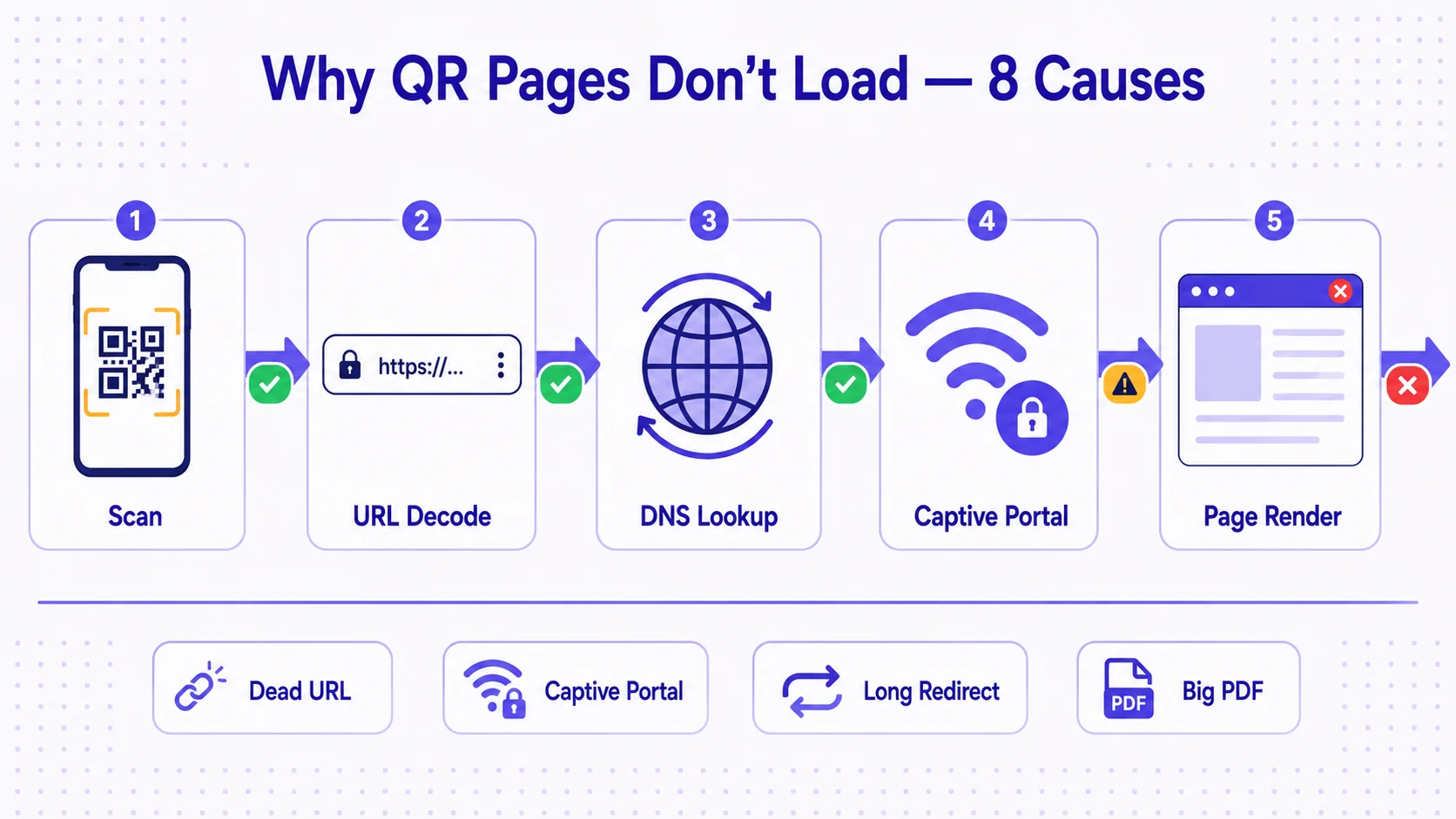
Your printed QR works. The customer points their camera, the corner-bracket viewfinder snaps onto the dots, the URL appears in the preview, the customer taps. And then nothing happens. A loading spinner that never resolves. A blank white page. A '404 not found' on a URL that you swear was right when you generated the QR. A 'no internet connection' error on a phone that is clearly online — they're on the venue's Wi-Fi, you can see the icon at the top of the screen. This is the post-scan failure mode, and it's the second-most-reported QR complaint after 'won't scan at all'. The reassuring part is the QR did its job; the diagnostic part is that the failure is downstream, somewhere between the URL the QR encodes and the page that's supposed to render.
This article catalogues the eight common causes of QR-scanned-but-page-won't-load, what's actually happening at each one, and how to fix each. The framing matters: a printed QR is a permanent, immutable object — once it's on the parking meter, the menu, the conference badge, the wedding invitation, you can no longer change the bytes that the QR encodes. So the fixes are not 'edit the QR'. The fixes are either 'edit the destination', 'edit what you encoded in the first place', or 'redesign the system so it can be edited next time' — and the third one, the dynamic-QR-redirect pattern, is what lets you turn an immutable printed object into a malleable digital one.
Cause 1 — Dead URL or 404 destination
The URL was valid when you generated the QR; by the time the customer scans, it isn't. The destination page was deleted, the file was moved, the campaign URL was taken down, the marketing team migrated to a new CMS and didn't redirect the old paths. The QR is fine. The URL on the other side is gone. The customer sees a 404 page or a blank 'this site can't be reached' error.
The fix on a static QR is brutal: you cannot fix it. The printed QR encodes the dead URL directly, so every copy in the field will keep pointing to nothing. The fix on a dynamic QR is one screen: edit the destination in the dashboard, and every printed copy now redirects to wherever you point it. This single failure mode is the single strongest argument for dynamic QRs over static ones. You don't have to anticipate WHICH URL will go dead — you have to anticipate that SOME URL will, eventually, go dead, and structure the system so that printed QRs don't die with it.
Cause 2 — Captive portal blocking the destination
The customer is on public Wi-Fi — a hotel lobby, an airport lounge, a coffee shop, a conference venue. The Wi-Fi requires the user to accept a terms-of-service page or enter a room number before the network allows real internet traffic through. That terms-of-service intercept is called a captive portal. When the customer scans a QR and the phone tries to open the destination URL, the captive portal intercepts the request and redirects the phone to its login page instead. The user sees the venue's Wi-Fi welcome screen, not your QR's destination. They get confused, often don't know to complete the captive-portal login first, and abandon.
This is enormously common in MENA hospitality contexts — STC, Etisalat, du, and Zain public Wi-Fi networks all run captive portals, as do most major hotel chains in Riyadh, Dubai, Doha, and Cairo. The fix: there is no fix you can implement on the QR side, because the captive portal is in the customer's network path, not your control. What you CAN do is print micro-copy next to the QR: 'On hotel Wi-Fi? Connect first before scanning.' Or design the destination so it gracefully degrades — if the user lands on a captive portal first, the page they finally reach should make sense even with that detour. For high-value scan surfaces (paid bookings, ticket activations) consider asking the user to use their cellular data instead of the venue Wi-Fi.
Cause 3 — Geo-blocked destination
The destination URL is hosted on infrastructure that blocks traffic from certain countries — often by accident, sometimes by design. A common pattern: your marketing page sits behind a CDN with a country-deny list configured years ago and forgotten. Or the destination is on a regional sub-CDN (us-east, eu-west) that doesn't accept requests from MENA IP ranges. Or the destination is a YouTube video, a TikTok page, or a streaming-service URL that's geo-blocked in the country where your customer is scanning. The phone receives the request, routes it to the destination, the destination's edge layer says 'no traffic from your country' and returns nothing — or a generic 'this content is not available in your region' page.
Fix: test your QR's destination from the country (and ideally the carrier) where the QR will be deployed. Don't test from your laptop in another city or another country on corporate VPN — the destination's geo-block rules will not apply to that test. For QRs deployed across multiple MENA countries, the test matrix should include at least Saudi Arabia, UAE, Egypt, and one Levant country, ideally using both cellular and Wi-Fi paths. If the destination is geo-blocked, either change the destination, move it behind a CDN that serves the affected regions, or use a dynamic QR pointing through a redirect on infrastructure you control.
Cause 4 — HTTP destination on a modern phone
Your QR encodes `http://example.com/page` (note: no S). Modern iOS and Android browsers increasingly block or warn on plain-HTTP destinations, especially for any form or sensitive content. The user scans, taps the URL, and the browser either silently refuses to load it or shows an 'unsafe site' warning that the user backs out of. The QR is fine; the encoded URL is using an obsolete unencrypted protocol.
Fix: always encode `https://` URLs in QRs. Always. The cost of HTTPS is zero (free TLS certificates from Let's Encrypt, automatic via almost every modern hosting platform), the benefit is the destination actually loads, and the side benefit is that browsers don't display security warnings. If you generated a QR with an HTTP URL and printed copies are already in the field, the fix on a static QR is to make the HTTPS version of the URL also resolve at the destination (the server can listen on both) and rely on the phone's automatic-upgrade behaviour — but this is fragile. The robust fix is dynamic QR with HTTPS-everywhere destinations.
Cause 5 — DNS not resolving (carrier-level interference)
The destination domain exists, the page is healthy, the URL is HTTPS — but the customer's mobile carrier's DNS resolver cannot find the domain. Possible causes: the carrier's DNS is using outdated cached records (the destination domain recently moved DNS providers and the propagation hasn't reached the carrier yet); the carrier is intentionally blocking the domain (some MENA carriers operate national-level filtering for compliance reasons); or the destination uses a brand-new domain that hasn't yet appeared in the carrier's resolver. The customer sees 'this site can't be reached' or 'DNS error', the phone reports the destination as unreachable, but other people on other carriers reach the same destination fine.
Fix: use established, well-propagated domains for QR destinations — not a brand-new domain registered yesterday. For dynamic QRs, the redirect-target domain (qra.cc, or your branded short domain) should be a stable, well-known DNS-resolvable host. Avoid wildcard-subdomain destinations on freshly registered domains. If the issue is a specific carrier blocking a specific domain (rare but real in some MENA contexts for adult-content or messaging-service URLs), the fix is either change the destination or use a redirect through a domain that's not blocked.
Cause 6 — Long redirect chain
The URL encoded in the QR is `redirector.example.com/x123` which redirects to `marketing.example.com/promo` which redirects to `cdn.example.com/landing/promo-final-v2` which redirects to the actual landing page. Four redirects in the chain. Most modern browsers tolerate up to 10-20 redirects before declaring a chain too long, but mobile carriers' transparent proxies often cap at 3-5 redirects and silently abort the request beyond that. The phone gets a 'too many redirects' error or a blank page partway through the chain.
This is especially common when teams stack several link-shorteners and analytics-routers in front of the actual destination — a Bitly that redirects to a UTM-decorating service that redirects to a CMS that redirects to the page. Each stage was added for a reason, but compounded they break on mobile networks.
Fix: collapse the redirect chain to one hop. A dynamic QR should redirect once — from the short URL to the final destination — not chain through three intermediate services. If you need UTM tagging, append it on the final destination URL, not as a separate redirect. If you need analytics, capture it at the redirect host itself rather than chaining through a separate analytics-router.
Cause 7 — Oversized PDF or media file on a slow connection
The QR's destination is a PDF, a video, or a large image. The customer is on 4G or even 3G in a remote area — a desert tourism site near AlUla, a Hajj tent block, a rural school in Upper Egypt — and the download is so large that the phone gives up or the user gives up before the download completes. The destination is technically working; the network can't deliver it fast enough for the user's patience.
Fix: keep QR destinations small. For PDFs, optimise — most marketing PDFs can be reduced from 5-10 MB to under 1 MB with no visible quality loss using tools like ILovePDF or Smallpdf. For videos, link to a streaming service (YouTube, the customer's CDN-backed player) rather than a direct .mp4. For images, serve responsive sizes and use modern formats (WebP, AVIF). The rule of thumb: a QR destination should fully load over a 3 Mbps connection in under 5 seconds, because some of your scans WILL be on 3 Mbps connections regardless of where the QR is deployed.
Cause 8 — Destination requires login or cookie state
Your QR points to a URL that requires the user to be logged in, or to have a specific cookie set, or to have come from a specific referring page. The destination renders fine when you test it from your own browser (where you're logged in) but renders as a redirect-to-login or a 'session expired' page for a fresh scanner. This is most common when marketing teams generate QRs from URLs they're already authenticated for, never test from incognito mode or a different device, and ship the QR.
Fix: always test QR destinations from incognito/private-browsing mode, on a different device, on a different network. If the QR's destination must be behind authentication (a private internal document, a member-only resource), make that explicit in the printed signage next to the QR: 'Scan to log in and view'. Better: use a public landing page as the QR destination, and put the authentication step on that page rather than on the QR's first-hop URL.
The pre-print test checklist
Before you commit a QR to a print run of 10,000 menus or 50 conference banners, run this checklist on the actual QR (not the URL it encodes — the QR, scanned by a real phone):
- Scan from incognito mode on iOS Safari. Does the page load fully in under 5 seconds?
- Scan from incognito mode on Android Chrome. Same question.
- Scan from a mid-range Android (Samsung A-series, Xiaomi Redmi, Huawei Nova) — not just a flagship.
- Scan over 4G cellular, not your home/office Wi-Fi.
- Scan over a public Wi-Fi network with a captive portal (a coffee shop, your office guest network). Does the destination still load after you complete the captive portal?
- If the QR will be deployed across MENA, scan from at least two countries — VPN to a UAE-egress and an Egypt-egress IP and re-test the destination.
- Scan the printed final design — not the screen mock-up. Print quality, ink absorption, paper finish all affect whether the QR scans cleanly.
- Wait 24 hours, scan again. DNS propagation, CDN warm-up, and short-term destination outages all surface in the first day after a deploy.
Eight checks, ten minutes of work. The cost of catching a problem before the print run is zero. The cost of catching it after is the cost of reprinting plus the customer experience damage in the interim.
Why dynamic QR is the structural fix
Read back through the eight causes. For five of them (dead URL, HTTP, DNS issues on a specific destination, long redirect chain, login-gated destination), the fix is 'change the destination URL after the QR is printed' — which is impossible on a static QR and one screen of work on a dynamic one. For two more (captive portal, large media), the dynamic QR doesn't directly fix the cause but lets you serve a graceful fallback page when the primary destination fails. Only one cause (geo-block on the redirect host itself) is harder to fix dynamically, and you sidestep it by choosing a redirect-host domain that's globally accessible from the start.
The takeaway is not that dynamic QR is a marketing-tier feature you upgrade to. It's that any QR which will be deployed for more than a few weeks, in any context where the destination might change, on any infrastructure not entirely under your control, should be dynamic by default. Static QR is acceptable for one-shot use cases (a single event's check-in QR with a 48-hour lifetime, a sticker for a private file you control end-to-end) and risky for everything else.
How QRA handles the eight causes
QRA QRs are dynamic by default — the destination is a short qra.cc redirect that you can edit from your dashboard in one screen. If a destination goes dead, gets migrated, runs into a CDN issue, or needs to be replaced, every printed copy of the QR is repointed in seconds, no reprint required. The redirect chain is exactly one hop — from the qra.cc short URL to your final destination, no intermediate services. The qra.cc domain is HTTPS-everywhere, hosted on globally distributed infrastructure with no geo-blocks. Scan analytics surface anomalies — a sudden drop in scan-to-load completion, scans coming from unexpected regions, repeated failures from a specific carrier — which is how most page-won't-load issues are caught before customers complain. For destinations that require authentication, the platform supports password-gated pages that explain the gate up front rather than landing the user on a login form they didn't expect.
The short answer
The QR did its job. The failure is downstream — at the URL, the DNS, the carrier, the captive portal, the redirect chain, the destination page itself. Eight common causes, eight fixes. Static QRs limit you to fixes you can plan in advance; dynamic QRs let you fix problems after the print run is in the wild. Test before you print: incognito mode, mid-range Android, real 4G, public Wi-Fi with a captive portal, the printed final, and a 24-hour wait. The technology is fine. The discipline of testing the destination, not just the QR, is what matters.
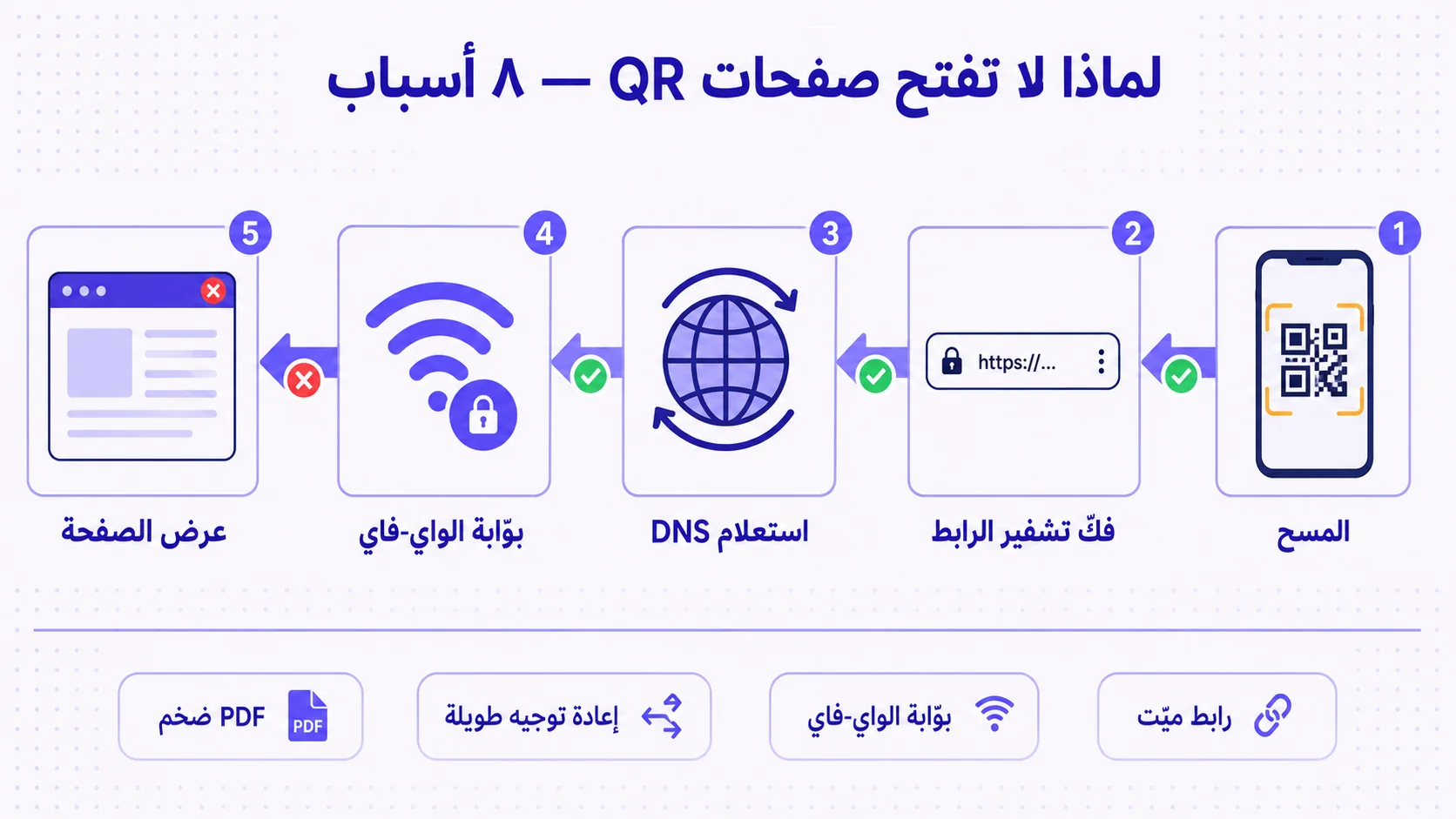
رمز QR المطبوع يعمل. العميل يوجّه كاميرته، إطار المسح يلتقط النقاط، الرابط يظهر في المعاينة، العميل ينقر. ثمّ لا يحدث شيء. مؤشّر تحميل لا يتوقّف، أو صفحة بيضاء، أو خطأ «٤٠٤ غير موجود» على رابط كنت متأكّداً أنّه كان صحيحاً يوم أنشأت الرمز، أو خطأ «لا يوجد اتّصال بالإنترنت» على هاتف واضح أنّه متّصل — العميل على واي-فاي الفندق، أيقونة الإشارة ظاهرة في الأعلى. هذا هو الفشل بعد المسح، وهو ثاني أكثر شكوى تُرفع عن رموز QR بعد «لا يقرأ أصلاً». الجزء المطمئن أنّ الرمز أدّى عمله؛ الجزء التشخيصي أنّ العطل بعده، في مكان ما بين الرابط الذي ضمّنه الرمز والصفحة التي يُفترض أن تظهر.
هذا المقال يضع كتالوجاً للأسباب الثمانية الشائعة لـ«الرمز يُقرأ لكن الصفحة لا تفتح»، ما الذي يحدث فعلاً في كلّ سبب، وكيف تُصلحه. الإطار مهمّ: الرمز المطبوع كائن دائم وغير قابل للتعديل — بمجرّد أن يصل إلى عدّاد الوقوف أو قائمة الطعام أو شارة المؤتمر أو دعوة العرس، لم تعد قادراً على تغيير البايتات التي يحملها. إذن الحلول ليست «عدّل الرمز». الحلول إمّا «عدّل الوجهة»، أو «عدّل ما ضمّنته في المرّة الأولى»، أو «أعِد تصميم النظام كي يكون قابلاً للتعديل في المرّة القادمة» — والثالث، نمط QR الديناميكي مع إعادة التوجيه، هو ما يحوّل الكائن المطبوع غير القابل للتغيير إلى كائن رقمي قابل للتعديل.
السبب الأوّل — رابط ميّت أو وجهة ٤٠٤
الرابط كان صالحاً يوم أنشأت الرمز؛ بحلول وقت مسح العميل، لم يعد كذلك. صفحة الوجهة حُذفت، الملفّ نُقل، رابط الحملة سُحب، فريق التسويق انتقل إلى نظام إدارة محتوى جديد ولم يعد توجيه المسارات القديمة. الرمز سليم. الرابط على الجهة الأخرى زال. العميل يرى صفحة ٤٠٤ أو خطأ فارغاً «لا يمكن الوصول إلى الموقع».
الحلّ على رمز ثابت قاسٍ: لا يمكنك إصلاحه. الرمز المطبوع يخزّن الرابط الميّت فعليّاً، فكلّ نسخة في الميدان ستستمرّ في الإشارة إلى لا شيء. الحلّ على رمز ديناميكي شاشة واحدة: عدّل الوجهة من لوحة التحكّم، وكلّ نسخة مطبوعة تُعيد التوجيه الآن إلى حيث تشير. هذا الفشل وحده هو أقوى حجّة لرمز ديناميكي مقابل ثابت. لست مضطرّاً لتوقّع أيّ رابط سيموت — أنت مضطرّ لتوقّع أنّ بعض الروابط، في النهاية، ستموت، وأن تصمّم النظام بحيث لا تموت معه نسخك المطبوعة.
السبب الثاني — بوّابة الواي-فاي تحجب الوجهة
العميل على واي-فاي عامّ — ردهة فندق، صالة مطار، مقهى، قاعة مؤتمرات. الشبكة تتطلّب من المستخدم قبول صفحة شروط الخدمة أو إدخال رقم غرفة قبل أن تسمح بمرور الإنترنت الحقيقي. هذا الاعتراض يُسمّى «بوّابة استحواذ» أو captive portal. حين يمسح العميل QR ويحاول الهاتف فتح الرابط، تعترض البوّابة الطلب وتعيد توجيه الهاتف إلى صفحة تسجيل الدخول الخاصّة بها بدلاً من ذلك. المستخدم يرى شاشة ترحيب الفندق، لا وجهة رمزك. يحتار، وغالباً لا يعلم أنّ عليه إكمال تسجيل الدخول للبوّابة أوّلاً، فيتخلّى.
هذا شائع جدّاً في سياقات الضيافة في الشرق الأوسط — شبكات STC وEtisalat وdu وZain العامّة جميعها تُشغّل بوّابات استحواذ، وكذلك معظم سلاسل الفنادق الكبرى في الرياض ودبي والدوحة والقاهرة. الحلّ: لا يوجد إصلاح يمكن تطبيقه على جانب الرمز، لأنّ البوّابة في مسار شبكة العميل، لا تحت سيطرتك. ما تستطيع فعله هو طباعة نصّ صغير بجانب الرمز: «على واي-فاي الفندق؟ اتّصل أوّلاً قبل المسح». أو صمّم الوجهة لتتعامل بلطف — إن وصل المستخدم إلى البوّابة أوّلاً، يجب أن تكون الصفحة التي يصلها لاحقاً مفهومةً مع هذا الالتفاف. لأسطح المسح عالية القيمة (الحجوزات المدفوعة، تفعيل التذاكر)، فكّر في طلب استخدام بيانات الجوّال بدلاً من واي-فاي المكان.
السبب الثالث — وجهة محجوبة جغرافيّاً
الرابط مُستضاف على بنية تحجب حركة المرور من بلدان معيّنة — أحياناً بالخطأ، أحياناً بتصميم. نمط شائع: صفحة التسويق خلف شبكة CDN بقائمة رفض بلدان مضبوطة قبل سنوات ومنسيّة. أو الوجهة على CDN إقليمي (us-east، eu-west) لا يقبل طلبات من نطاقات IP خاصّة بالشرق الأوسط. أو الوجهة هي فيديو يوتيوب أو صفحة تيك توك أو رابط خدمة بثّ محجوب في البلد الذي يمسح فيه عميلك. الهاتف يستلم الطلب، يوجّهه إلى الوجهة، طبقة الحافّة تقول «لا حركة من بلدك» وترجع لا شيء — أو صفحة عامّة «هذا المحتوى غير متاح في منطقتك».
الحلّ: اختبر وجهة رمزك من البلد (والمشغّل إن أمكن) الذي سيُنشَر فيه. لا تختبر من حاسوبك في مدينة أخرى أو بلد آخر عبر VPN الشركة — قواعد الحجب الجغرافي للوجهة لن تنطبق على ذلك الاختبار. لرموز ستُنشر عبر عدّة دول، يجب أن تشمل مصفوفة الاختبار على الأقلّ السعوديّة والإمارات ومصر وبلداً واحداً من المشرق، وأن يستخدم كلّاً من بيانات الجوّال والواي-فاي. إن كانت الوجهة محجوبة جغرافيّاً، إمّا غيّر الوجهة، أو انقلها خلف CDN يخدم المناطق المتأثّرة، أو استخدم رمزاً ديناميكيّاً يمرّ عبر إعادة توجيه على بنية تسيطر عليها.
السبب الرابع — وجهة HTTP على هاتف حديث
رمزك يخزّن `http://example.com/page` (لاحظ: بدون S). متصفّحات iOS وAndroid الحديثة تحجب أو تحذّر بشكل متزايد من وجهات HTTP غير المشفّرة، خاصّةً لأيّ نموذج أو محتوى حسّاس. المستخدم يمسح، ينقر الرابط، فيرفض المتصفّح تحميله بصمت أو يُظهر تحذير «موقع غير آمن» يتراجع المستخدم عنه. الرمز سليم؛ الرابط المُضمَّن يستخدم بروتوكولاً قديماً غير مشفّر.
الحلّ: ضمّن دائماً روابط `https://` في الرموز. دائماً. كلفة HTTPS صفر (شهادات TLS مجّانيّة من Let's Encrypt، تلقائيّة عبر تقريباً كلّ منصّة استضافة حديثة)، والفائدة أنّ الوجهة فعلاً تُحمَّل، والفائدة الجانبيّة أنّ المتصفّحات لا تعرض تحذيرات أمان. إن أنشأت رمزاً برابط HTTP ونسخ مطبوعة منه في الميدان، الحلّ على رمز ثابت هو أن تجعل نسخة HTTPS من الرابط تُحلّ أيضاً عند الوجهة (الخادم يستمع على الاثنين) والاعتماد على سلوك الترقية التلقائيّ في الهاتف — لكنّ هذا هشّ. الحلّ المتين هو رمز ديناميكي بوجهات HTTPS دائماً.
السبب الخامس — DNS لا يحلّ (تداخل على مستوى المشغّل)
نطاق الوجهة موجود، الصفحة سليمة، الرابط HTTPS — لكنّ خادم DNS لمشغّل العميل لا يستطيع إيجاد النطاق. الأسباب المحتملة: DNS المشغّل يستخدم سجلّات مخبّأة قديمة (الوجهة انتقلت مزوّد DNS مؤخّراً ولم يصل الانتشار بعد إلى المشغّل)؛ المشغّل يحجب النطاق عن قصد (بعض مشغّلي الشرق الأوسط يشغّلون فلترة على المستوى الوطني لأسباب امتثال)؛ أو الوجهة تستخدم نطاقاً جديداً جدّاً لم يظهر بعد في حلّال المشغّل. العميل يرى «لا يمكن الوصول إلى الموقع» أو «خطأ DNS»، الهاتف يبلّغ أنّ الوجهة غير قابلة للوصول، لكن أشخاصاً آخرين على مشغّلين آخرين يصلون إلى الوجهة نفسها بلا مشكلة.
الحلّ: استخدم نطاقات راسخة وذات انتشار جيّد لوجهات الرموز — لا نطاقاً جديداً سُجّل البارحة. للرموز الديناميكيّة، يجب أن يكون نطاق وجهة إعادة التوجيه (qra.cc، أو نطاقك القصير الموسوم) مضيفاً مستقرّاً ومعروفاً وقابلاً لحلّ DNS. تجنّب وجهات النطاقات الفرعيّة العشوائيّة على نطاقات حديثة. إن كانت المشكلة مشغّلاً معيّناً يحجب نطاقاً معيّناً (نادرة لكن واقعيّة في بعض السياقات للمحتوى المراقَب)، الحلّ إمّا تغيير الوجهة أو استخدام إعادة توجيه عبر نطاق غير محجوب.
السبب السادس — سلسلة إعادة توجيه طويلة
الرابط المُضمَّن في الرمز هو `redirector.example.com/x123` يعيد التوجيه إلى `marketing.example.com/promo` يعيد التوجيه إلى `cdn.example.com/landing/promo-final-v2` يعيد التوجيه إلى صفحة الهبوط الفعليّة. أربع إعادات توجيه في السلسلة. معظم المتصفّحات الحديثة تتحمّل حتّى ١٠-٢٠ إعادة قبل إعلان السلسلة طويلة جدّاً، لكنّ وكلاء الشفافيّة عند مشغّلي الجوّال غالباً ما يحدّون عند ٣-٥ إعادات ويُلغون الطلب بصمت بعد ذلك. الهاتف يحصل على «إعادات توجيه كثيرة» أو صفحة فارغة في منتصف السلسلة.
هذا شائع جدّاً حين تكدّس الفرق عدّة مختصرات روابط ومسارات تحليلات أمام الوجهة الفعليّة — Bitly يعيد التوجيه إلى خدمة UTM، تعيد التوجيه إلى نظام إدارة محتوى، يعيد التوجيه إلى الصفحة. كلّ مرحلة أُضيفت لسبب، لكنّها مجتمعةً تنكسر على شبكات الجوّال.
الحلّ: قلّص السلسلة إلى قفزة واحدة. الرمز الديناميكي يجب أن يعيد التوجيه مرّةً واحدة — من الرابط القصير إلى الوجهة النهائيّة — لا أن يتسلسل عبر ثلاث خدمات وسيطة. إن احتجت وسوم UTM، أضِفها على الرابط النهائي، لا كإعادة توجيه منفصلة. إن احتجت تحليلات، التقطها على مضيف إعادة التوجيه نفسه بدلاً من التسلسل عبر مسار تحليلات منفصل.
السبب السابع — PDF أو ملفّ وسائط ضخم على اتّصال بطيء
وجهة الرمز هي PDF أو فيديو أو صورة كبيرة. العميل على 4G أو حتّى 3G في منطقة نائية — موقع سياحة صحراوي قرب العُلا، كتلة خيام في الحجّ، مدرسة ريفيّة في صعيد مصر — والتنزيل كبير إلى درجة أنّ الهاتف يتخلّى أو المستخدم يتخلّى قبل اكتمال التنزيل. الوجهة تعمل تقنيّاً؛ لكنّ الشبكة لا تستطيع تسليمها بسرعة كافية لصبر المستخدم.
الحلّ: حافظ على صغر وجهات الرموز. للملفّات PDF، حسّن — معظم ملفّات التسويق يمكن تقليصها من ٥-١٠ ميغابايت إلى أقلّ من ميغابايت دون فقدان جودة ظاهر، باستخدام أدوات مثل ILovePDF أو Smallpdf. للفيديوهات، اربط بخدمة بثّ (يوتيوب، مشغّل CDN مدعوم) بدلاً من ملفّ .mp4 مباشر. للصور، قدّم أحجاماً تستجيب للجهاز واستخدم صيغاً حديثة (WebP، AVIF). القاعدة العمليّة: وجهة الرمز يجب أن تُحمَّل بالكامل على اتّصال ٣ ميغابت في الثانية خلال أقلّ من ٥ ثوان، لأنّ بعض المسحات ستكون على ٣ ميغابت في الثانية مهما كان مكان نشر الرمز.
السبب الثامن — الوجهة تتطلّب تسجيل دخول أو حالة كوكي
رمزك يشير إلى رابط يتطلّب أن يكون المستخدم مُسجَّل الدخول، أو أن يكون لديه كوكي محدّد، أو أن يأتي من صفحة إحالة محدّدة. الوجهة تظهر جيّداً حين تختبرها من متصفّحك (حيث أنت مُسجَّل الدخول) لكنّها تظهر كإعادة توجيه إلى تسجيل الدخول أو صفحة «انتهت الجلسة» للماسح الجديد. هذا شائع جدّاً حين تُنشئ فرق التسويق رموزاً من روابط هي مصادَقة عليها بالفعل، ولا تختبر أبداً من وضع التصفّح الخاصّ أو من جهاز مختلف، ثمّ تشحن الرمز.
الحلّ: اختبر دائماً وجهات الرموز من وضع التصفّح الخاصّ، على جهاز مختلف، على شبكة مختلفة. إن كان لا بدّ من أن تكون الوجهة خلف مصادقة (وثيقة داخليّة خاصّة، مورد للأعضاء فقط)، اجعل ذلك صريحاً في اللافتة المطبوعة بجانب الرمز: «امسح لتسجيل الدخول والعرض». الأفضل: استخدم صفحة هبوط عامّة كوجهة للرمز، وضع خطوة المصادقة على تلك الصفحة لا على الرابط الأوّل للرمز.
قائمة الاختبار قبل الطباعة
قبل أن تُرسل رمزاً إلى طباعة ١٠٠٠٠ قائمة طعام أو ٥٠ لافتة مؤتمر، نفّذ هذه القائمة على الرمز الفعلي (لا الرابط الذي يخزّنه — الرمز، مسحاً بهاتف حقيقي):
- امسح من وضع التصفّح الخاصّ على iOS Safari. هل تُحمَّل الصفحة بالكامل في أقلّ من ٥ ثوان؟
- امسح من وضع التصفّح الخاصّ على Android Chrome. السؤال نفسه.
- امسح من Android متوسّط (سامسونغ A، شياومي Redmi، هواوي Nova) — لا فقط من الرائد.
- امسح عبر بيانات الجوّال 4G، لا واي-فاي البيت/المكتب.
- امسح عبر شبكة واي-فاي عامّة ببوّابة استحواذ (مقهى، شبكة ضيوف المكتب). هل تُحمَّل الوجهة بعد إكمال البوّابة؟
- إن كان الرمز سيُنشر عبر الشرق الأوسط، امسح من بلدين على الأقلّ — VPN إلى IP خروج إماراتي وآخر مصري وأعد اختبار الوجهة.
- امسح من التصميم النهائي المطبوع — لا من نموذج الشاشة. جودة الطباعة، امتصاص الحبر، تشطيب الورق، كلّها تؤثّر على وضوح المسح.
- انتظر ٢٤ ساعة، امسح مجدّداً. انتشار DNS، تسخين CDN، وانقطاعات الوجهة قصيرة الأمد، جميعها تظهر في اليوم الأوّل بعد النشر.
ثمانية فحوصات، عشر دقائق عمل. كلفة اكتشاف المشكلة قبل الطباعة صفر. كلفة اكتشافها بعد الطباعة هي كلفة إعادة الطباعة بالإضافة إلى الضرر في تجربة العميل خلال الفترة الفاصلة.
لماذا الرمز الديناميكي هو الحلّ البنيوي
اقرأ مجدّداً الأسباب الثمانية. في خمسة منها (رابط ميّت، HTTP، مشاكل DNS على وجهة محدّدة، سلسلة إعادة توجيه طويلة، وجهة خلف تسجيل دخول)، الحلّ هو «غيّر الرابط بعد طباعة الرمز» — وهو مستحيل على رمز ثابت وشاشة واحدة من العمل على ديناميكي. في سببين إضافيّين (بوّابة استحواذ، وسائط كبيرة)، الرمز الديناميكي لا يصلح السبب مباشرةً لكنّه يتيح لك تقديم صفحة بديلة لطيفة حين تفشل الوجهة الأساسيّة. سبب واحد فقط (حجب جغرافي على مضيف إعادة التوجيه نفسه) أصعب في الإصلاح ديناميكيّاً، وتتفاداه باختيار نطاق لمضيف إعادة التوجيه يكون قابلاً للوصول عالميّاً من البداية.
الخلاصة ليست أنّ الرمز الديناميكي ميزة تسويقيّة تُرقّي إليها. بل أنّ أيّ رمز سيُنشر لأكثر من بضعة أسابيع، في أيّ سياق قد تتغيّر فيه الوجهة، على أيّ بنية ليست تحت سيطرتك كاملةً، يجب أن يكون ديناميكيّاً افتراضيّاً. الرمز الثابت مقبول لحالات استخدام لمرّة واحدة (رمز تسجيل دخول لحدث واحد بعمر ٤٨ ساعة، ملصق لملفّ خاصّ تتحكّم به من البداية إلى النهاية) وخطر لكلّ ما عداها.
كيف تعالج QRA الأسباب الثمانية
رموز QRA ديناميكيّة افتراضيّاً — الوجهة هي رابط qra.cc قصير قابل للتعديل من لوحة التحكّم في شاشة واحدة. إن ماتت وجهة، نُقلت، وقعت في مشكلة CDN، أو احتاجت استبدالاً، تُعاد توجيه كلّ نسخة مطبوعة في ثوان، دون إعادة طباعة. سلسلة إعادة التوجيه قفزة واحدة بالضبط — من qra.cc القصير إلى الوجهة النهائيّة، دون خدمات وسيطة. نطاق qra.cc يستخدم HTTPS دائماً، مُستضاف على بنية موزّعة عالميّاً بلا حجب جغرافي. تحليلات المسح تُظهر الشذوذ — هبوط مفاجئ في إكمال التحميل، مسحات من مناطق غير متوقّعة، فشل متكرّر من مشغّل معيّن — وهي الطريقة التي تُكتشف بها معظم مشاكل عدم تحميل الصفحة قبل أن يشتكي العملاء. لوجهات تتطلّب مصادقة، تدعم المنصّة صفحات محميّة بكلمة مرور تشرح الحاجز مسبقاً بدلاً من إيصال المستخدم إلى نموذج تسجيل لم يتوقّعه.
الإجابة المختصرة
الرمز أدّى عمله. الفشل بعده — في الرابط، أو DNS، أو المشغّل، أو بوّابة الواي-فاي، أو سلسلة إعادة التوجيه، أو صفحة الوجهة نفسها. ثمانية أسباب شائعة، ثمانية حلول. الرموز الثابتة تحصرك في الحلول التي تُخطّط لها مسبقاً؛ الرموز الديناميكيّة تتيح لك حلّ المشاكل بعد أن تكون نسخ الطباعة في الميدان. اختبر قبل أن تطبع: وضع التصفّح الخاصّ، Android متوسّط، 4G حقيقي، واي-فاي عامّ ببوّابة استحواذ، الطباعة النهائيّة، وانتظار ٢٤ ساعة. التقنيّة بخير. الانضباط في اختبار الوجهة، لا الرمز فقط، هو ما يهمّ.
Ready to make a smarter QR?جاهز لإنشاء رمز QR أذكى؟
Sign up free — no card needed. Track every scan, edit destinations anytime.سجّل مجاناً — بدون بطاقة. تتبّع كل عملية مسح وعدّل الوجهة في أي وقت.